
Finding the right portable label maker for your home, office, or school organization projects in Singapore requires looking past basic aesthetics. The Niimbot D101 has gained attention for its hybrid design, but whether it is the right choice for you depends on your specific workflow, label size requirements, and long-term budget. Instead of searching for a single universal winner, you should evaluate how each device handles app connectivity, print width limitations, and ongoing consumable costs.
Core Differences in Design and Portability
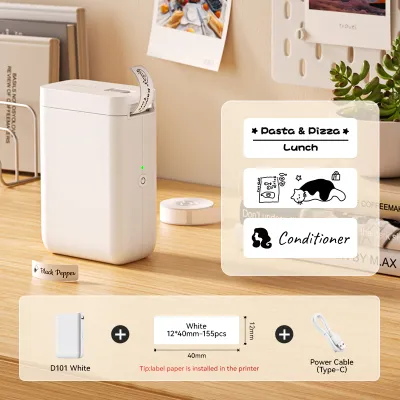
When comparing the physical footprint of the Niimbot D101 to other portable label makers, form factor and weight are primary considerations. The D101 features a sleek, minimalist vertical design that is highly pocketable, making it easy to carry around a classroom, pantry, or retail space. Other models on the market may adopt a more traditional horizontal layout with physical QWERTY keyboards, which increases their overall footprint and weight.
Power delivery is another critical differentiator. The Niimbot D101 utilizes a built-in rechargeable lithium-ion battery, typically charged via a modern USB-C interface. This eliminates the need to constantly purchase and replace disposable AA batteries, which is common in older or more budget-friendly competing models. When evaluating alternatives, check the manufacturer’s specification sheet to confirm the battery capacity and whether a charging cable is included in the box.
Products mentioned in this guide
Prices are valid at publication and may change. Please refer to the product page for the latest price.
Build quality and durability should also be verified before purchase. Most portable label makers, including the D101, are constructed from ABS plastic to keep the device lightweight. To assess drop resistance and overall durability, review the product labels or user manuals for official ratings. Some ruggedized competitors offer rubberized bumpers designed for industrial environments, whereas the D101 is tailored primarily for light household, school, and office organization.
Print Resolution and Label Compatibility
Print clarity is directly tied to the stated print resolution, measured in dots per inch (DPI). Most entry-level portable thermal label makers, including the Niimbot D101, operate at a standard 203 DPI. While this is perfectly adequate for clear text, simple icons, and barcodes, users requiring highly detailed graphics or tiny fonts may want to verify if a 300 DPI alternative is better suited for their needs.

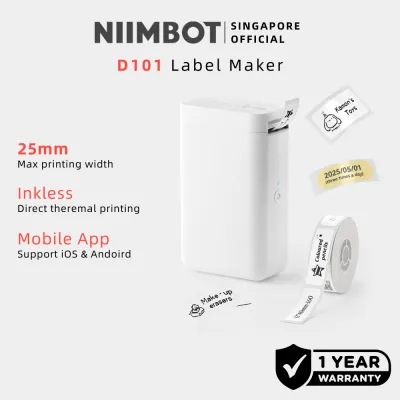
Label width compatibility is where the Niimbot D101 sets itself apart from many ultra-portable competitors. While standard pocket label makers are often restricted to a maximum label width of 15mm, the D101 supports wider labels up to 25mm, while remaining backward compatible with narrower sizes. This versatility allows you to print more detailed information, such as multi-line ingredient lists or larger asset tags.
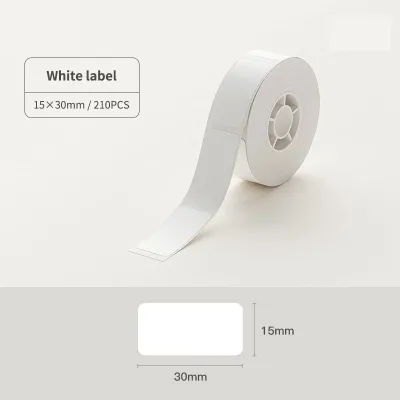
Before purchasing, it is essential to check for proprietary consumable restrictions. Many modern label makers, including the Niimbot D101, utilize RFID chips embedded in their official label rolls. This technology allows the companion app to automatically detect the label size and material, but it also restricts your ability to use third-party paper. Review the user manual to confirm if the device requires these proprietary rolls or if it supports open-format, non-RFID consumables.
It is important to note that properties like water, oil, and tear resistance depend entirely on the specific label material used, rather than the printer hardware itself. Direct thermal printing works by applying heat to specialized paper, so choosing high-quality laminated polyester labels is necessary if your labels will be exposed to moisture in the kitchen or friction in a school bag. Always verify the material specifications of the label rolls you intend to buy to ensure they match your environmental conditions.
App Ecosystem and Connectivity Experience
Because most ultra-portable label makers lack physical keyboards, your entire design and printing experience relies on the companion mobile application. The Niimbot app offers a wide array of pre-designed templates, custom fonts, and tools for importing images, Excel sheets, and generating QR codes. When comparing models, download the respective apps from the iOS App Store or Google Play Store beforehand to test the user interface and check for any hidden paywalls.
Connectivity stability is crucial for a smooth workflow. Most portable label makers connect to smartphones via Bluetooth, but the pairing process and offline capabilities can vary. Check the user manual to see if the device requires an active internet connection to print, or if it allows offline printing using locally saved templates. Some models also offer desktop compatibility via USB for Windows or macOS, which is highly beneficial for batch printing in an office setting.
Be aware of potential ongoing software costs. While some companion apps are entirely free, others may restrict certain premium fonts, icons, or cloud storage features behind a subscription model. Additionally, some apps require mandatory account registration before you can print a single label. Reading user reviews on app stores can help you identify these software limitations before committing to a specific hardware brand.
Evaluating the Price-to-Feature Ratio
To determine the true cost of ownership, you must look beyond the initial hardware purchase price. In Singapore, portable label makers generally range from S$30 to S$90 on major e-commerce platforms and official stationery stores. While a lower upfront price may seem appealing, the long-term cost is heavily influenced by the price and availability of replacement label rolls.
You can calculate the estimated cost per label using a simple formula: divide the retail price of a replacement roll by the total number of individual labels on that roll. Proprietary rolls with RFID chips often carry a premium price compared to generic thermal paper. If you plan to print in high volumes, a slightly more expensive printer that accepts open-format, third-party consumables may save you money over time.
Warranty terms and local after-sales support are also vital considerations for buyers in Singapore. Check whether the label maker comes with a local Singapore warranty or if you must rely on international seller warranties, which can make replacements difficult and costly. Official distributors often provide clearer warranty terms and easier access to replacement parts or troubleshooting assistance if the thermal print head malfunctions.
Decision Framework: Which Label Maker Should You Buy?
The Niimbot D101 is an excellent choice if you prioritize a highly compact, rechargeable design and require the flexibility to print both narrow (15mm) and medium-width (25mm) labels. Its app-driven ecosystem is ideal for users who enjoy customizing their labels with diverse fonts, icons, and templates, and who prefer the convenience of automatic label size detection via RFID.
Conversely, you should consider a competing model if your workflow demands open-format label compatibility to keep consumable costs as low as possible, or if you require a physical QWERTY keyboard for quick, phone-free labeling. Additionally, if your projects demand ultra-sharp graphics or very small text, look for a dedicated 300 DPI desktop-grade label printer instead.
Neither option will suffice if your operational environment requires industrial-grade durability, continuous heavy-duty printing, or specialized chemical-resistant asset tag materials. For heavy warehouse use or extreme outdoor exposure, you will need to invest in a ruggedized, industrial thermal transfer printer that uses ink ribbons rather than direct thermal paper.
Before making your final purchase, always verify that your specific label material, adhesive type, and planned operational environment are explicitly supported by the chosen model’s thermal head and official user manual. Taking the time to match the label specifications to your actual use case will ensure clean, long-lasting prints without damaging your device.
Frequently Asked Questions (FAQ)
Can I use third-party thermal labels with the Niimbot D101?
To determine if third-party thermal labels are compatible with the Niimbot D101, you must check the user manual or product specifications for RFID requirements. The D101 is designed to work with official rolls that contain an RFID chip, which automatically calibrates the printer to the correct label dimensions. Using non-official rolls without this chip may result in the printer failing to recognize the paper, leading to sensor calibration errors, misaligned prints, or a complete refusal to print. Furthermore, using unapproved consumables can sometimes affect your warranty coverage if the thermal print head is damaged by substandard paper.
Do portable thermal label makers require ink cartridges?
No, portable thermal label makers like the Niimbot D101 do not require ink cartridges, toner, or ribbons. They utilize direct thermal printing technology, which uses a heated print head to activate a chemical reaction on specially treated, heat-sensitive paper. While this eliminates the cost and hassle of buying ink, it means the labels themselves are sensitive to environmental factors. To prevent your printed labels from fading or turning black over time, you must store unused rolls in a cool, dry place away from direct sunlight, high temperatures, and organic solvents.

Community discussion
Share your experience or ask a question. Comments are reviewed before publication.