
Selecting the right label maker for your stickers labels in Singapore depends on where you plan to use the labels, how long you need them to last, and how you prefer to design them. The market is largely defined by three major brands: Brother, Niimbot, and Dymo. Each brand targets a distinct user profile, ranging from industrial professionals requiring highly durable laminated tapes to home organizers seeking quick, creative designs via mobile apps. Understanding the underlying print technologies and consumable ecosystems of these brands will help you make an informed purchase that fits your workflow and budget.
To find the ideal match, you must weigh the trade-offs between hardware durability, software usability, and the long-term cost of replacement tapes. While one brand may offer an inexpensive entry-level machine, the ongoing cost of proprietary label rolls can quickly exceed the initial hardware investment. By analyzing how each brand performs under local environmental conditions, such as Singapore’s high humidity, you can avoid premature label fading and adhesive failure.
How to Choose the Right Label Maker Brand
Before comparing specific brands, it is essential to understand the two primary printing technologies used in modern label makers: direct thermal and thermal transfer. Direct thermal printing uses heat-sensitive paper that darkens when exposed to the printer’s thermal printhead. This technology eliminates the need for ink, toner, or ribbons, making the machines compact and highly portable. However, because the paper remains chemically sensitive to heat and light, direct thermal labels are prone to fading, yellowing, or darkening over time when exposed to sunlight, friction, or high temperatures.
Products mentioned in this guide
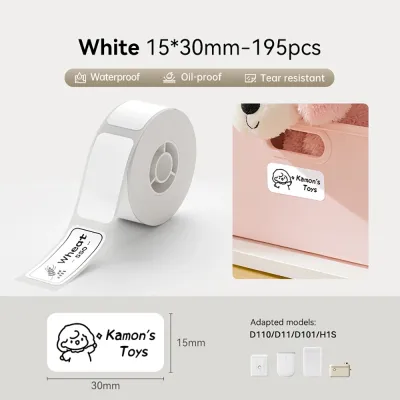
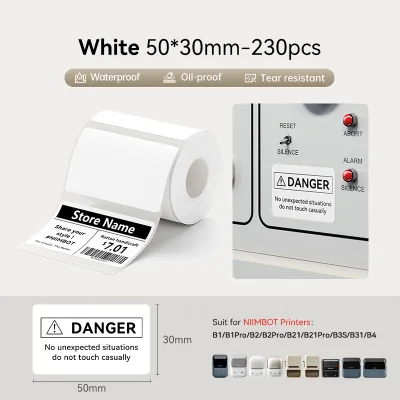
Prices are valid at publication and may change. Please refer to the product page for the latest price.
Thermal transfer printing, by contrast, uses a heated thermal printhead to melt a wax- or resin-based ink ribbon onto the label material. This process creates a highly durable, crisp print that resists fading, moisture, chemicals, and physical abrasion. While thermal transfer printers and their dual-component cartridges (containing both tape and ribbon) are typically bulkier and more expensive, they produce labels designed to last for years in challenging environments.
Another critical factor is the label tape ecosystem. Some brands utilize proprietary cartridges equipped with physical notches or electronic chips that prevent the use of third-party consumables. Other brands support open or widely cloned tape formats, which can significantly lower your ongoing operational costs. You should also consider whether you prefer continuous rolls, which allow you to cut labels to any custom length, or pre-cut die-cut rolls that offer uniform shapes like circles, squares, or cable wraps.
Finally, evaluate your preferred connectivity method. Standalone label makers feature physical keyboards (often in QWERTY or ABC layouts) and small built-in screens, allowing you to type and print labels instantly without connecting to an external device. App-driven models lack physical keys and rely entirely on a Bluetooth or Wi-Fi connection to a smartphone or tablet. While app-driven models offer immense creative freedom with custom fonts, icons, and borders, they require a compatible mobile operating system and ongoing software updates to remain functional.
Brother Label Makers: Best for Durable Office and Industrial Use
Brother has long been a benchmark in the labeling industry, primarily due to its proprietary P-touch laminated tape technology. P-touch TZe tapes consist of six layers of materials, resulting in a thin, extremely strong label. During printing, the text is thermal-transferred onto the underside of a protective laminate layer, sandwiching the ink between polyester film and the adhesive backing. This unique construction makes Brother laminated labels highly resistant to water, oil, harsh chemicals, extreme temperatures, and heavy abrasion.

For users in Singapore, this durability is particularly beneficial. Laminated Brother labels can withstand the high humidity of local tropical climates without peeling, and they are safe for use on kitchen containers that undergo frequent dishwashing or refrigeration. The adhesive backing is formulated to stick to a wide variety of surfaces, including textured plastics, powder-coated metals, and glass, making them highly suitable for office asset tagging, electrical panel labeling, and outdoor equipment marking.
Brother offers a diverse hardware lineup to suit different operational preferences. Their standalone handheld and desktop models feature robust physical keyboards and dedicated function keys for quick formatting, making them ideal for busy office environments where multiple users need to print simple text labels rapidly. For more complex design tasks, Brother also provides hybrid and app-connected models that pair with desktop software or mobile apps, allowing you to import spreadsheets, generate sequential barcodes, and print custom logos.
While Brother hardware is built to last, the primary trade-off is the cost of original consumables. Genuine TZe cartridges can be relatively expensive, especially for high-volume users. Fortunately, the physical design of Brother’s classic TZe cartridge slot has allowed a mature market of third-party compatible tapes to flourish. These aftermarket options are widely available on local online marketplaces at a fraction of the cost of original tapes, though users should verify print quality and adhesive strength on a trial basis before deploying them for critical applications.
Niimbot Label Makers: Best for App-Driven Crafting and Home Organization
Niimbot has gained rapid popularity by focusing on sleek, highly portable, and mobile-first label makers. These devices are designed primarily for home organization, pantry labeling, journaling, and small-scale crafting. Unlike traditional industrial machines, Niimbot printers rely entirely on Bluetooth connectivity and a companion mobile application, eliminating physical keyboards in favor of a clean, minimalist hardware aesthetic that fits easily into a drawer or bag.
The Niimbot mobile app is the central hub of the user experience, offering an extensive library of pre-designed templates, icons, borders, and fonts. Users can easily insert QR codes, barcodes, simple line drawings, and even imported images onto their stickers labels. This high level of customization makes Niimbot highly appealing to creative users who want to design visually pleasing labels for spice jars, storage bins, retail packaging, or school supplies.
However, Niimbot devices primarily utilize direct thermal printing technology. Because direct thermal paper is sensitive to environmental factors, these labels are not designed for long-term outdoor exposure or harsh industrial environments. In Singapore’s warm climate, storing direct thermal labels in areas prone to heat accumulation—such as near kitchen stoves, on sunny windowsills, or inside parked vehicles—can cause the paper to darken or the printed text to fade prematurely. For standard indoor home organization, however, the longevity of these labels is generally sufficient.
Niimbot’s consumable ecosystem is highly diverse in terms of aesthetics, offering a vast range of pre-cut die-cut labels in various colors, patterns, and shapes, alongside standard continuous white rolls. This variety allows users to match their labels to their home decor or product branding. It is important to note that many newer Niimbot models utilize RFID-enabled label rolls. The printer reads the RFID chip inside the roll to automatically detect the label size and template in the app, which simplifies setup but can restrict the use of cheaper, non-RFID third-party label rolls.
Dymo Label Makers: Best for Classic Shipping and Traditional Office Tasks
Dymo is a household name in office administration, particularly famous for its shipping and mailing solutions. The brand’s product lineup is divided into distinct ecosystems, each tailored to specific tasks. The LetraTag series consists of entry-level, user-friendly handheld printers designed for basic home and school labeling. These machines use simple paper, plastic, or metallic tapes that are easy to peel and apply, making them a practical choice for labeling files, folders, and storage boxes.
For professional office environments, Dymo’s LabelManager series utilizes D1 tapes, which offer greater durability and stronger adhesives than the LetraTag line. LabelManager devices are available in both standalone keyboard configurations and PC-connected models, providing a reliable solution for filing systems, shelving, and asset management. While D1 tapes are not as heavily laminated as Brother’s TZe tapes, they provide excellent clarity and longevity for indoor office applications.
Dymo’s true stronghold, however, lies in its desktop LabelWriter series. These high-volume direct thermal printers are designed specifically for printing shipping labels, visitor badges, and barcode stickers labels directly from a computer. Because they use direct thermal technology, there are no expensive ink ribbons to replace, which keeps operational costs low for local e-commerce sellers and logistics coordinators who need to print hundreds of address labels daily.
One key consideration when choosing Dymo is the hardware design. Many of their handheld and desktop models prioritize physical buttons, tactile navigation, and straightforward menu systems over modern mobile app integration. While this classic design ensures high reliability and ease of use for traditional office tasks, it may feel limiting to users who prefer the touch-screen design flexibility and graphic variety offered by modern mobile apps. Additionally, newer desktop models may require proprietary Dymo labels with built-in sensors, limiting the use of generic third-party shipping label rolls.
Brand Comparison: Tape Compatibility, App Features, and Value
To help you weigh the trade-offs between these three brands, the table below summarizes their key technical specifications, connectivity options, and typical consumable structures.
| Feature / Dimension | Brother (P-touch) | Niimbot | Dymo (LetraTag / LabelManager) |
|---|---|---|---|
| Primary Print Technology | Thermal Transfer (Laminated) | Direct Thermal | Direct Thermal |
| Connectivity Options | Standalone Keyboard, USB, Bluetooth | Bluetooth Only | Standalone Keyboard, USB |
| Label Material Types | Laminated Polyester, Fabric, Strong Adhesive | Paper, Synthetic, Patterned Die-Cut | Paper, Plastic, Metallic, Vinyl |
| App Dependency | Optional (Model Dependent) | Mandatory (All Models) | Optional (Model Dependent) |
| Third-Party Tape Support | High (Widely Available) | Low to Moderate (RFID Restricted) | Moderate (Model Dependent) |
| Typical Price Range | S$50 to S$250+ | S$20 to S$80 | S$30 to S$150+ |
When evaluating long-term value, Brother offers the most flexible third-party tape support for its classic TZe models. Because these cartridges do not rely on digital chips or RFID verification, you can easily source affordable aftermarket tapes on local online marketplaces, significantly lowering your cost per print. Dymo also has a reasonable selection of third-party D1 and shipping labels, though you must verify compatibility if you own a newer model that enforces proprietary roll detection.
Niimbot offers the lowest initial hardware entry barrier, with compact printers often priced under S$40. However, because you are generally locked into purchasing their proprietary, RFID-tagged label rolls to ensure full app functionality, your long-term cost per label may be higher if you print in large volumes. Therefore, Niimbot represents excellent value for occasional home organizing, while Brother or Dymo desktop models offer better cost efficiency for high-volume daily printing.
Where to Buy and What to Verify Before Purchasing in Singapore
When purchasing a label maker in Singapore, it is highly recommended to buy from authorized distributors or official brand stores on local e-commerce platforms. This ensures that you receive genuine hardware and are not accidentally purchasing parallel-imported models that may lack local warranty coverage. A local Singapore warranty is crucial for electronic devices, as it provides a straightforward path for repairs or replacements should the thermal printhead or Bluetooth module malfunction.
Before finalizing your purchase, always verify the exact tape width compatibility of the machine. Entry-level models often limit you to narrow tape widths, such as 12mm, which may not be sufficient if you need to print multi-line address labels or large warning signs. Ensure the model you select supports the specific tape widths (ranging from 6mm up to 24mm or 50mm) required for your intended projects.
For app-driven models, particularly from Niimbot or Bluetooth-enabled Brother units, download the companion app from your mobile device’s app store before buying the hardware. Check the app’s system requirements, user reviews, and required permissions. Some apps require location services and Bluetooth permissions to establish a connection with the printer. Confirming that the software runs smoothly on your specific smartphone model will prevent connectivity frustrations after unboxing your new device.
Frequently Asked Questions (FAQ)
Can I use third-party label tapes with Brother or Dymo machines?
Yes, third-party compatible tapes are widely available for many Brother P-touch and Dymo LabelManager models. However, you must carefully check your specific printer’s user manual and model number before purchasing. Some newer models feature optical sensors, physical alignment pins, or electronic chips designed to detect non-original cartridges. Using incompatible third-party tapes can lead to poor print alignment, adhesive residue buildup on the printhead, or the voiding of your manufacturer’s warranty. Always test a small batch of aftermarket tape to verify print quality and adhesive performance before purchasing them in bulk.
Do Niimbot thermal labels fade over time?
Because Niimbot label makers utilize direct thermal printing technology, the labels are inherently sensitive to environmental factors and will fade over time. Exposure to direct sunlight, high ambient temperatures, friction, and contact with oils or plasticizers will accelerate this fading process. In Singapore’s warm and humid climate, a direct thermal label placed on an item stored outdoors or in a hot kitchen pantry may begin to fade or yellow within several months. To maximize the lifespan of these labels, keep them indoors, away from direct sunlight, and avoid placing them on surfaces that experience frequent handling or heat exposure.
Which brand is best for printing waterproof stickers labels?
For truly waterproof stickers labels, Brother’s laminated P-touch (TZe) series is highly recommended. The thermal transfer printing process, combined with the protective top laminate layer, ensures that the printed text remains completely sealed against water, steam, dishwashing liquid, and physical scrubbing. If you choose Niimbot or Dymo, you must look closely at the specific material specifications of the label rolls. Standard paper thermal labels will absorb moisture and degrade quickly, so you must select synthetic, plastic, or vinyl label rolls that explicitly state water-resistant or waterproof properties, and verify that the adhesive backing is rated for wet environments.
Community discussion
Share your experience or ask a question. Comments are reviewed before publication.