
Choosing the correct label size for your child’s school supplies depends on the physical dimensions of the items, the amount of information you need to print, and the student’s grade level. While the Niimbot D101 is a highly versatile portable thermal label maker, selecting the right roll width and cut length ensures that names, class numbers, and subject titles remain legible and securely attached. This guide breaks down how to match label sizing strategies to different school stages, from preschool bulk items to secondary school electronics, helping you organize effectively without wasting your label rolls.
By tailoring your label choices to the specific physical demands of each grade level, you can prevent the common frustration of peeling corners and unreadable text. Younger children require larger, highly visual labels that help them identify their belongings in a busy classroom, while older students benefit from compact, minimalist designs that fit small electronic devices. Understanding the physical capabilities of your printer is the first step toward creating a durable, organized system for the entire school year.
Understanding Niimbot D101 Label Compatibility and Sizing
Before purchasing label rolls, it is essential to understand the physical specifications and compatibility limits of the Niimbot D101. Unlike smaller models that only support narrow tapes, the D101 is a dual-width thermal printer capable of handling label widths ranging from 10mm to 25mm. To accommodate narrower rolls, the printer utilizes a physical limit slot or internal baffle adapter that keeps the roll centered. Always check your printer’s packaging or user manual to verify the maximum roll diameter and supported width configurations before buying new consumables.
Products mentioned in this guide
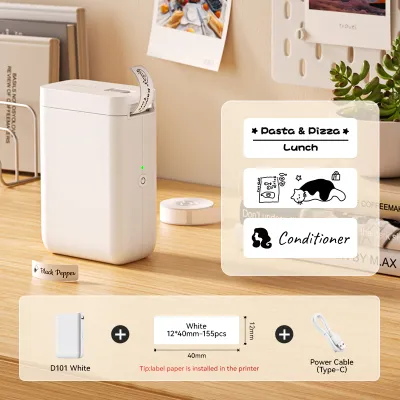
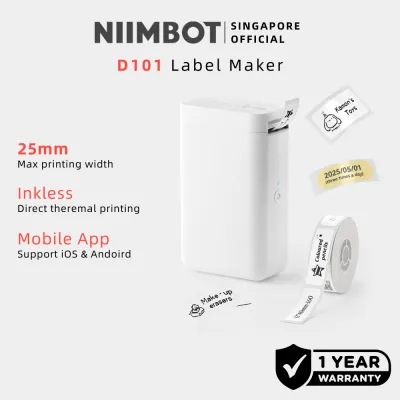
Prices are valid at publication and may change. Please refer to the product page for the latest price.
The printer supports both continuous label rolls and pre-cut gap (die-cut) labels, each requiring different settings in the companion mobile application. Continuous rolls allow you to customize the cut length dynamically based on the length of the text, which is ideal for long names or detailed subject descriptions. Pre-cut gap labels have fixed physical boundaries and require you to select the exact template size within the app so the printer’s optical sensors can align the text perfectly within each label.
Because thermal printing relies on heat-sensitive paper rather than ink, the durability of your print depends entirely on the material composition of the label roll. When editing your designs in the companion app, pay close attention to the printable area margins displayed on the screen. Placing text too close to the edge on narrow 10mm or 12mm rolls can result in cut-off characters, so always leave a small safety margin around your text and icons to ensure a clean, professional print.
Preschool and Kindergarten: Large Items and Visual Labels
In preschool and kindergarten, school supplies are typically bulky, frequently shared, or stored in communal cubbies. Common items requiring labels include large water bottles, lunchboxes, sleeping mats, outdoor shoes, and plastic storage bins. For these larger items, prioritizing the widest compatible label rolls—specifically the 20mm to 25mm options—provides the surface area needed for maximum visibility.

At this early educational stage, children are often still learning to read their own names, making visual cues incredibly important. The wider 25mm format allows you to print large, bold fonts alongside simple graphic icons, such as animals, stars, or vehicles, which young children can easily recognize as their own. High contrast between the print color and the label background is essential for quick identification by both teachers and young children in a busy classroom environment.
When labeling cylindrical items like large thermoses or water bottles, consider using a longer continuous label cut that wraps slightly around the curve. This wrapping technique ensures the child’s name and icon are visible from multiple angles, reducing the chances of the item being misplaced. Because these items are handled frequently and subjected to spills, choosing a wide, durable label material is key to keeping the identification intact.
Lower Primary: Medium Items and Essential Information
As children transition into lower primary school, the volume of individual stationery items increases dramatically. Students are now responsible for managing their own pencils, rulers, glue sticks, erasers, plastic folders, and textbooks. For these standard school supplies, medium-width label rolls—typically around 15mm—offer the ideal balance between information capacity and physical fit.
This medium width provides sufficient vertical space to print two lines of text clearly, allowing you to include both the student’s full name and their classroom or section number. Having the class name clearly printed is incredibly helpful for returning lost items to the correct classroom during recess or after-school activities. The 15mm width fits neatly onto the spine of exercise books and the flat surfaces of plastic folders without overlapping the edges.
However, applying labels to very small or highly curved stationery items requires careful planning. A label that is too long will wrap awkwardly around slim items like glue sticks or markers, creating tension that causes the edges to lift over time. For these items, keep the label length short and ensure the surface is completely clean before application to maintain a secure adhesive bond.
Upper Primary and Secondary: Small Items and Discreet Labeling
In upper primary and secondary school, the nature of school supplies shifts toward smaller, high-value personal items and electronics. Students frequently carry scientific calculators, USB flash drives, charging cables, wireless earbud cases, and specialized subject folders. To label these compact items without looking bulky or unprofessional, opt for the narrowest compatible label rolls, such as 10mm or 12mm widths.
Older students generally prefer a more mature, minimalist aesthetic and may resist bright, cartoonish labels. Using narrow, transparent (clear) or solid white labels with clean, sans-serif fonts allows the identification to blend seamlessly with the design of their devices. A simple, discreet label is often highly appreciated by teenagers who want to protect their gear without drawing unnecessary attention to it.
When dealing with extremely limited surface areas, such as the slim barrel of a fine-liner pen or a thin charging cable, adapt your text layout accordingly. Use initials or a shortened version of the student’s name rather than attempting to squeeze a full name and class title onto a tiny label. This approach keeps the text legible while ensuring the label fits perfectly within the flat boundaries of the device.
Quick Reference: Matching Label Dimensions to Common School Supplies
To help you quickly select the right label roll for your organizing tasks, the following table matches common school supply categories with recommended Niimbot D101 label dimensions and layout strategies.
| Supply Category | Recommended Label Width | Information Capacity | Typical Grade Level |
|---|---|---|---|
| Bulky Gear (Lunchboxes, water bottles, cubby bins) | 20mm – 25mm | Large name, class, and visual icon | Preschool to Lower Primary |
| Standard Stationery (Pencils, rulers, glue sticks) | 12mm – 15mm | Two lines: Name and class/subject | Lower to Upper Primary |
| Textbooks & Folders (Subject files, exercise books) | 15mm – 25mm | Multi-line: Name, subject, and class | All Grade Levels |
| Small Electronics (USBs, calculators, chargers) | 10mm – 12mm | Single line: Initials or short name | Upper Primary to Secondary |
Using this matrix as a starting point allows you to batch-print your labels efficiently, swapping out the rolls in your D101 as you move from labeling large gear to small stationery items.
Practical Tips for Printing and Applying School Labels
To ensure your printed labels survive the daily wear and tear of the school year, proper surface preparation and application techniques are essential. Before applying any label, thoroughly clean and dry the item’s surface using a lint-free cloth. For plastic and metal items, wiping the surface with a small amount of isopropyl alcohol helps remove oils, dust, and fingerprint residue, which significantly improves the adhesive’s ability to bond.
Before committing to printing a large batch of labels, always utilize the print preview function within the companion mobile application. This step allows you to verify that the text alignment, margins, and icons are correctly positioned and will not be cut off during printing. Taking a moment to preview your design prevents the unnecessary waste of label rolls and ensures a consistent look across all your labeled items.
When applying the label, press down firmly starting from the center and smoothing outward toward the edges to push out any trapped air bubbles. Avoid stretching the label material during application, as the elastic memory of the synthetic paper can cause the edges to shrink back and lift over time, especially on curved surfaces. For very young children’s items, periodically check that the labels remain securely adhered to prevent peeling edges from becoming a distraction.
Because water resistance and smudge resistance depend on the exact combination of label material and adhesive, it is wise to perform a simple test. Print a sample label, apply it to a test surface, and expose it to water or firm rubbing to verify its durability before labeling your child’s entire school kit. For items that require frequent washing, such as drinkware, gentle hand-washing is highly recommended over high-temperature dishwasher cycles to preserve both the adhesive backing and the thermal print quality.
Frequently Asked Questions (FAQ)
Can I use third-party label rolls with the Niimbot D101?
The Niimbot D101 is designed to work best with official Niimbot label rolls, which often contain built-in RFID chips or specific sensor markings that the printer detects automatically to configure the app settings. While some third-party rolls may physically fit into the paper cabin if they match the core size and width requirements, the printer may not recognize them, or the companion app may restrict printing functions. Always check your printer’s user manual and warranty terms, as using non-OEM consumables can sometimes affect print alignment or void your manufacturer warranty.
How do I prevent labels from peeling off water bottles?
Preventing labels from peeling off water bottles requires meticulous surface preparation and smart placement. Clean the bottle thoroughly to remove any oily residue from hands or dish soap, and ensure it is completely dry before applying the label. When wrapping a label around a cylindrical bottle, avoid letting the ends overlap unless the label is specifically designed for wrapping, as the tension can cause the overlapping edge to lift. Additionally, check the label roll’s specifications to verify its water resistance, and opt for gentle hand-washing rather than harsh dishwasher cycles to extend the life of the adhesive.
Does the companion app offer school-specific label templates?
Yes, the companion mobile application features a dedicated template library that includes various categories for school, office, and home organization. You can browse these templates to find pre-designed layouts featuring school-themed borders, subject icons, and name tag formats. These templates are fully customizable, allowing you to adjust the fonts, sizes, and decorative elements to suit different grade levels. Once you create a layout you like, you can save it as a custom template within the app, making it easy to batch-print matching labels for textbook sets or seasonal supply refreshes.

Community discussion
Share your experience or ask a question. Comments are reviewed before publication.