
Navigating Singapore’s highly efficient public transportation network is incredibly straightforward once you have the right payment tool in hand. While the city-state offers various digital and contactless payment methods, the physical EZ-Link card remains a staple for residents, daily commuters, and collectors alike. Whether you are seeking a standard transit card for your daily commute or looking to purchase a collectible singapore note ezlink design as a functional souvenir, understanding how to acquire, top up, and manage this card will ensure a seamless travel experience across the island.
This guide provides a comprehensive overview of the physical specifications of the card, where to purchase different designs, step-by-step instructions for reloading and usage, and essential tips for managing your card balance and validity.
Understanding the EZ-Link Card and Its Uses
An EZ-Link card is a contactless, stored-value smartcard that operates on the Contactless e-Purse Application System (CEPAS) standard in Singapore. Physically, the card conforms to the standard CR80 dimensions (85.60 mm × 53.98 mm with a thickness of 0.76 mm), which is the universal size for credit cards and ID cards, making it easy to slip into any standard wallet, cardholder, or lanyard. Inside the plastic exterior lies a passive radio-frequency identification (RFID) chip and an antenna coil. When you place the card near a reader, the electromagnetic field from the reader powers the internal chip, allowing data to transfer instantly without physical contact.
Products mentioned in this guide
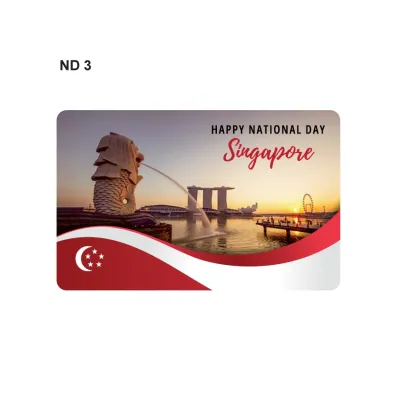
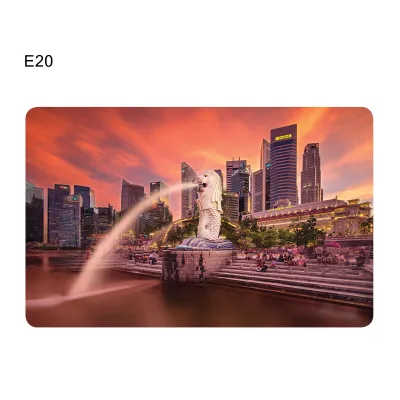
Prices are valid at publication and may change. Please refer to the product page for the latest price.
The primary use case for the EZ-Link card is paying fares on public transit, including the Mass Rapid Transit (MRT) subway lines, the Light Rail Transit (LRT) systems, and public buses. Beyond transit, the card is widely accepted for micro-payments at selected retail outlets, convenience stores, vending machines, and public parking lots equipped with the Electronic Parking System (EPS). It is also used to pay road tolls via the Electronic Road Pricing (ERP) system when inserted into a vehicle’s dual-mode in-vehicle unit.
While Singapore has introduced the SimplyGo system—which allows commuters to tap in and out using contactless bank cards, mobile wallets, or smartwatches—the physical EZ-Link card remains highly relevant. Many users prefer a dedicated physical card to manage their transit budgets separately, avoid potential foreign transaction fees on overseas-issued bank cards, or provide a reliable payment method for children and elderly family members who do not carry smartphones or credit cards. Furthermore, the physical card serves as a popular canvas for unique local designs, making it a collectible item.
Where to Buy an EZ-Link Card in Singapore
When purchasing an EZ-Link card, you will typically pay an initial cost that is split into two components: a non-refundable card fee (which covers the cost of manufacturing the physical card and its internal RFID components) and an initial stored value that is ready for immediate use. Depending on where you purchase the card, you may need to prepare cash or a local debit card, as payment acceptance policies vary across retail outlets and ticketing offices.

Standard EZ-Link Cards
Standard, everyday EZ-Link cards are highly accessible and can be purchased immediately upon arrival in Singapore. The most common locations to buy a standard card include:
- SimplyGo Ticket Offices: Located at major MRT stations and bus interchanges, including Changi Airport, Orchard, Chinatown, and City Hall. A standard card purchased here typically costs S$10, which includes a S$5 non-refundable card fee and S$5 in usable stored value.
- Passenger Service Centres: Situated inside most MRT stations near the fare gates. Staff members can sell you standard cards over the counter, subject to stock availability.
- Authorized Convenience Stores: Retailers such as 7-Eleven and Cheers stock standard EZ-Link cards at their checkout counters. Cards purchased at convenience stores typically cost S$10 or S$12, with a portion allocated as stored value and the remainder as the non-refundable card fee.
These standard cards are pre-activated and ready for immediate use at any transit gantry or retail terminal right after purchase.
Special Edition and Bank Note Design Cards
For those interested in unique designs, EZ-Link frequently releases special edition cards featuring popular culture characters, local heritage themes, and commemorative illustrations. Among the most popular collectibles is the singapore note ezlink card series, which features high-quality prints resembling Singapore’s historical and current paper currency notes. These cards are highly sought after by tourists and local collectors who appreciate the detailed representation of local currency design on a functional transit card.
Special edition and bank note design cards can be found through several dedicated channels:
- Official Online Stores: EZ-Link operates official stores on major local e-commerce platforms where collectors can purchase newly released designs directly.
- Specialized Vending Machines: Located at selected MRT stations (such as Bugis, Orchard, and Tanjong Pagar), these automated machines display and dispense various limited-edition card designs.
- Authorized Retail Partners: Select gift shops, convenience stores, and specialty stationery outlets occasionally carry these collector series.
Note that special edition cards often carry a higher non-refundable card cost (sometimes ranging from S$10 to S$15 for the card alone, containing zero stored value) due to their collectible status and licensing fees. You will need to top up these cards before using them for transit.
How to Top Up Your EZ-Link Card
To ensure uninterrupted travel and payments, you must maintain a sufficient balance on your card. The system requires a minimum balance (typically S$3.00) to enter MRT stations or board buses. The maximum amount of stored value an EZ-Link card can hold is S$500. Monitoring your balance is simple, and several convenient reloading methods are available across the island.
Topping Up at Transit Locations
You can easily add value to your card at any MRT station or bus interchange using automated ticketing machines. The physical steps are straightforward:
- Locate a SimplyGo Kiosk, Top-Up Kiosk, or Assisted Service Kiosk near the station entrance.
- Place your EZ-Link card flat onto the designated card reader slot. Do not remove the card during the transaction to prevent data corruption or failed loads.
- Select the "Top-Up" option on the touch screen.
- Choose your preferred payment method. Most machines accept NETS (local debit cards), credit cards, or digital payment modes. Selected machines also accept physical cash notes (such as S$2, S$5, S$10, or S$50 notes).
- Select or enter the top-up amount (usually in increments of S$2 or S$5, with a minimum top-up of S$2 at kiosks).
- Complete the payment process and wait for the screen to display a confirmation message showing your new balance before retrieving your card.
Topping Up via Retailers and Apps
If you prefer to top up while running errands or on the go, you can utilize retail networks or your smartphone:
- Over-the-Counter Retailers: You can top up your card at convenience stores (7-Eleven, Cheers), Watson's personal care stores, and selected supermarket service counters. Simply hand your card to the cashier and specify the top-up amount. Note that some third-party retailers may charge a nominal convenience fee (typically S$0.50) per transaction.
- The EZ-Link Mobile App: If your smartphone is equipped with Near Field Communication (NFC) capabilities, you can top up your card directly using the official EZ-Link app. Open the app, select the top-up option, enter your credit or debit card details, and firmly hold your physical card against the NFC antenna area on the back of your phone. Keep the card completely still until the app confirms that the write process is 100% complete.
Step-by-Step Guide to Using the Card for Transit and Retail
Using your card is a simple matter of tapping it against a compatible reader. To ensure a smooth transaction and prevent errors, keep in mind the “one card per person” rule on public transit. Additionally, practice proper card care: avoid bending, twisting, or exposing the card to extreme heat, as this can damage the internal RFID antenna and render the card unusable.
To prevent “card clash”—where a reader detects multiple contactless cards simultaneously and charges the wrong card or fails to register—always remove your EZ-Link card from your wallet or cardholder if it contains other contactless credit cards, office access cards, or travel passes.
Riding the MRT and Public Buses
Public transit fares in Singapore are calculated based on the precise distance traveled between your entry and exit points. Therefore, you must tap your card both at the start and the end of your journey.
- On the MRT/LRT: As you approach the fare gates, hold your card flat against the yellow reader panel. Wait for the green light to illuminate and a single beep to sound, which indicates a successful entry. The gate barrier will open. At your destination station, tap your card on the exit gate reader. The screen will display the exact fare deducted for the trip alongside your remaining card balance.
- On Public Buses: Board the bus through the front door and tap your card firmly on the reader mounted next to the entrance. When you reach your stop, exit through the middle or rear doors, ensuring you tap your card on the exit reader before stepping off.
Crucial Warning: If you fail to tap out when exiting an MRT station or alighting from a bus, the system will automatically charge you the maximum possible fare for that entire route. Always tap out to ensure you are only billed for the distance you actually traveled.
Paying at Retail Stores and Vending Machines
Using your stored value for retail purchases is highly convenient for small transactions. To pay at a participating merchant:
- Look for the EZ-Link or CEPAS logo at the cashier counter, self-checkout kiosk, or vending machine.
- Inform the cashier that you wish to pay using your EZ-Link card, or select the "CEPAS/EZ-Link" payment option on the self-service screen.
- Place your card flat on the payment terminal's reader surface.
- Hold the card in place for a couple of seconds until the terminal beeps, prints a receipt, or displays a green checkmark indicating successful payment.
Managing Your Card: Balance Checks, Expiry, and Refunds
Proper card management ensures you are never caught stranded at a transit gate with an inactive or empty card.
Balance Checks
You can easily verify your remaining balance at any time using several methods:
- Transit Gate Screens: Every time you tap in or out at an MRT gantry or bus reader, the small screen displays your current balance.
- Ticketing Kiosks: Placing your card on any SimplyGo Kiosk or Top-Up Kiosk will display your current balance and transaction history on the screen.
- The EZ-Link App: By registering your card's unique 16-digit identification number in the mobile app, you can view your balance and track your spending history directly from your smartphone.
Expiry Dates
Standard physical EZ-Link cards have a validity period of 5 years from the date of manufacture. You can check your card’s exact expiry date by placing it on a SimplyGo Kiosk or by registering it on the EZ-Link mobile app. Once a card expires, it can no longer be used for transit or retail payments. If your card is nearing its expiry date, you can visit any SimplyGo Ticket Office to transfer the remaining stored value to a new card. Depending on active promotional campaigns, you may be able to purchase a discounted replacement card during this process.
Refunds
If you are leaving Singapore or no longer require your physical card, you can obtain a refund of any remaining stored value. To do this, present your card at any SimplyGo Ticket Office located at MRT stations. The customer service staff will process the refund immediately, and you will receive the remaining cash balance on the spot. Please note that the physical card itself will be returned to you, but the initial S$5 card purchase fee is strictly non-refundable. Once a refund is processed, the card is permanently deactivated and cannot be reloaded or used again.
Frequently Asked Questions (FAQ)
This section addresses common troubleshooting scenarios and alternative payment options to help you navigate Singapore’s transit system with confidence.
What should I do if my EZ-Link card stops working at the gantry?
If your card fails to register when you tap it at a transit gantry, step aside immediately to avoid blocking the flow of other commuters behind you. First, check if your card is physically damaged, bent, or cracked, which can sever the internal copper antenna. Try tapping your card on an adjacent gantry reader, as individual readers can occasionally experience temporary glitches.
If the card still fails to read, proceed to the nearest Passenger Service Centre or SimplyGo Ticket Office inside the station. The customer service officer can scan your card to diagnose the issue. They will determine if the failure is due to an insufficient balance, card expiry, or internal chip damage, and assist you in resolving the issue or transferring your funds to a functional card.
Can I use my overseas contactless bank card instead of an EZ-Link card?
Yes, Singapore’s public transit system supports SimplyGo, which allows you to pay fares using contactless Mastercard, Visa, and NETS bank cards, as well as mobile wallets linked to Apple Pay, Google Pay, or Samsung Pay. This includes many overseas-issued credit and debit cards, meaning you do not strictly need to purchase a physical EZ-Link card to travel around Singapore.
However, using an overseas contactless card may incur administrative fees and foreign currency conversion fees charged by your card issuer, which can accumulate over multiple trips. Additionally, using a dedicated physical card like a singapore note ezlink edition is often preferred by travelers who want to avoid these extra banking fees, manage a strict travel budget, or keep a unique, functional souvenir of their time in Singapore.

Community discussion
Share your experience or ask a question. Comments are reviewed before publication.