
Navigating Singapore’s public transport network is highly efficient when using a contactless smart card. The EZ-Link card is the primary reloadable transit card used across the island’s Mass Rapid Transit (MRT), Light Rail Transit (LRT), and public buses. Whether you are a resident commuting daily or a visitor exploring the city’s sights, understanding how to acquire, manage, and utilize this card is essential for seamless travel. This guide provides a comprehensive walkthrough of the entire process, from your initial purchase to troubleshooting common issues. By integrating your transit card into your daily routine, you gain access to a convenient payment method that extends beyond trains and buses to various retail outlets, dining establishments, and vending machines across Singapore.
Where and How to Buy an EZ-Link Card
To begin using an EZ-Link card, you must first locate an authorized sales channel. Physical cards are readily available at several convenient locations throughout Singapore. You can purchase them at SimplyGo Ticket Offices located within major MRT stations, Passenger Service Centres at most transit hubs, and participating convenience stores such as 7-Eleven. If you are arriving by air, ticket counters at Changi Airport offer these cards, allowing you to secure your transport payment method immediately upon arrival.
When purchasing a card, it is important to understand the difference between standard transit cards and customized or specialty options. Standard cards are designed for everyday commuting and are sold with a specific structure: a portion of the purchase price covers the non-refundable cost of the physical card itself, while the remaining balance is pre-loaded as stored value that you can use immediately. On the other hand, customized cards, limited-edition designs, or charity cards may have a higher initial cost, and some may not include any pre-loaded stored value. Always clarify the breakdown of the purchase price with the sales representative before completing your transaction.
Products mentioned in this guide
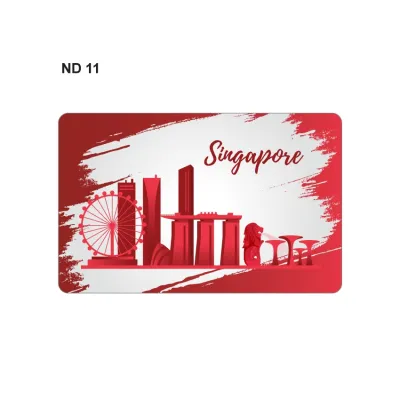
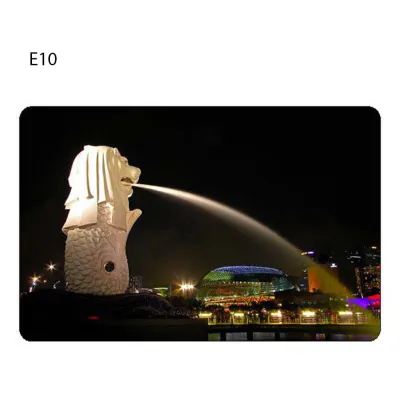
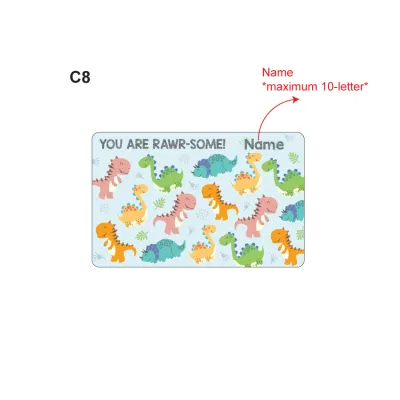
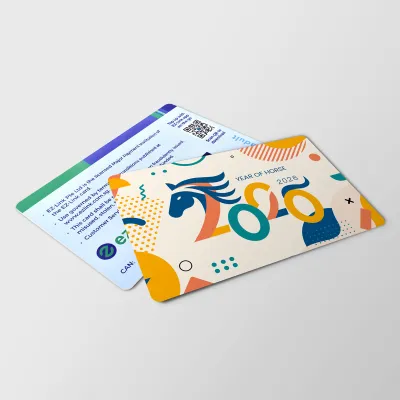
Prices are valid at publication and may change. Please refer to the product page for the latest price.
Before leaving the purchase counter, take a moment to inspect the physical card. Ensure there are no visible cracks, deep scratches, or bent edges that could interfere with the internal antenna. It is also wise to verify the initial stored value by checking the printed receipt or asking the cashier to confirm the balance on their terminal screen. This simple check prevents discrepancies and ensures your card is ready for immediate use.
Registering Your Card for Security and Perks
While you can use an EZ-Link card anonymously, registering the card to an official account offers significant security benefits and convenient features. The primary advantage of registration is balance protection. If your card is lost or stolen, a registered card can be blocked immediately to prevent unauthorized usage, and the remaining balance can be recovered. Additionally, registered users gain access to detailed journey logs, transaction histories, and automated services such as automatic top-ups.

The registration process is straightforward and can be completed digitally. You will need to download the official transit mobile application, SimplyGo, or visit the official website. Create a personal account using your contact details and identification. Once logged in, navigate to the card management section and enter your card’s unique 16-digit serial number, known as the Card Access Number (CAN), which is printed on the back of the physical card. Follow the on-screen prompts to link the card to your profile.
In the event that your registered card is lost, stolen, or physically damaged, you can initiate a balance transfer. Log into your account via the app or website to report the card lost. You will need to provide verification details, such as the identification number used during registration. Once the loss is reported, the system will freeze the card’s balance, typically within a specified processing window. You can then request to transfer the remaining funds to another active registered card or directly to a local bank account, ensuring your money is not lost.
How to Top Up Your EZ-Link Card
Keeping your card funded is essential for uninterrupted travel. Singapore offers a variety of physical and digital top-up methods to suit different preferences. Physical top-up options are widely distributed across the transit network. You can use General Ticketing Machines (GTMs) and SimplyGo Kiosks located inside all MRT and LRT stations. These machines accept various payment methods, including local debit cards, credit cards, and mobile payment platforms. Additionally, you can top up your card with cash or electronic payments at the cashiers of participating convenience stores and select retail outlets.
For greater convenience, digital and automated top-up methods allow you to add funds without visiting a physical machine. The most seamless option is setting up an auto-top-up service, which automatically reloads your card with a pre-selected amount whenever the balance falls below a certain threshold. This service can be linked directly to a credit card, debit card, or bank account through the official mobile app. Alternatively, if your smartphone is equipped with Near Field Communication (NFC) capabilities, you can use the official app to top up your card instantly. Simply select the top-up amount in the app, authorize the payment, and tap the physical card against the back of your phone to transfer the value.
Before confirming any top-up transaction, it is important to be aware of limits and potential fees. The maximum stored value limit for a standard card is S$500. While top-ups at transit station kiosks and through the official app are generally free of transaction fees, some third-party retail counters or convenience stores may charge a small service fee per transaction. Always check the terminal screen or the app interface for any displayed fees before finalizing your payment.
Using Your Card for Transit and Retail Payments
Using your card is a simple matter of tapping it against a contactless reader, but following the correct procedure is crucial to avoid payment errors. When entering an MRT or LRT station, locate the transit gantry and hold your card flat against the designated reader. Wait for the green light to flash and the barrier to open. The screen on the gantry will display your remaining balance. When exiting the station, tap the card again at the exit gantry. The system will calculate the distance-based fare, deduct it from your card, and display both the fare charged and your remaining balance.
On public buses, the tap-in and tap-out process is equally important. Tap your card on the reader located near the front entrance when boarding the bus. When preparing to alight, tap your card on the reader located near the exit doors before stepping off. Failing to tap out when alighting from a bus results in the system charging you the maximum possible fare for that bus route, as it cannot verify where your journey ended. To ensure a smooth tap, avoid “card clash” by removing your transit card from your wallet if you carry other contactless payment cards, as multiple cards can interfere with the reader’s signal.
Beyond public transport, your card is a versatile payment tool for retail transactions. Many convenience stores, supermarkets, fast-food outlets, hawker stalls, and vending machines accept the card. To identify these merchants, look for the official contactless payment logo or the EZ-Link acceptance decal near the cash register. When making a purchase, inform the cashier that you wish to pay using your transit card, then tap the card on the payment terminal when prompted. Always check your remaining balance before tapping to ensure you have sufficient funds to cover the transaction.
Troubleshooting and Card Replacement
Even with regular use, you may occasionally encounter issues with your card. Understanding how to interpret reader errors can help you resolve problems quickly. Common errors displayed on transit gantries include “Insufficient Balance,” which simply means your card’s value has fallen below the minimum required travel fare and needs an immediate top-up. An “Expired Card” message indicates that your card has reached the end of its validity period, which is typically several years from the date of manufacture. An “Invalid Card” or “Read Error” message usually points to physical damage to the internal antenna or a temporary system glitch. If your card fails to read, approach the nearest Passenger Service Centre for assistance, or use an alternative payment method to avoid blocking the gantry.
If your card is defective, damaged, or expired, you can obtain a replacement by visiting a SimplyGo Ticket Office. When seeking a replacement, bring the physical card in question along with a valid photo identification document, such as an NRIC, FIN, or passport. The customer service officer will assess the card’s condition and assist you with transferring any remaining stored value to a new card.
The cost of replacement depends on the nature of the issue. If the card is found to have a manufacturing defect and is still within its validity period, you are generally eligible for a free replacement, and the remaining balance will be transferred to the new card at no extra cost. However, if the card is physically damaged due to wear and tear—such as being bent, cracked, or punctured—or if the card has simply expired, a standard replacement fee will apply to cover the cost of the new physical card.
Frequently Asked Questions (FAQ)
Can I use one card for multiple people traveling together?
No, you cannot use a single card for multiple commuters traveling together on public transport. The transit system in Singapore calculates fares based on the distance traveled by each individual, which requires tracking the exact entry and exit points of each commuter. Tapping the same card multiple times at a transit gantry or bus reader during the same journey will result in an error or incorrect fare deductions. Every passenger, including children who exceed the height threshold for free travel, must possess their own individual transit card or alternative contactless payment method.
What happens to the stored value if the card expires?
When your card reaches its expiry date, the stored value remains secure but cannot be used for transit or retail payments until the card is replaced or refunded. You can easily check your card’s expiry date on the back of the card, at General Ticketing Machines, or by registering the card on the official mobile app. If your card has expired, you can request a full refund of the remaining stored value. To do this, visit any SimplyGo Ticket Office or submit a refund request through the official app. It is advisable to initiate this process within the permitted refund claim period after expiration to ensure a smooth transfer of your funds.
Is this card the best option for short-term tourists?
For short-term tourists, the choice between a dedicated transit card and other payment methods depends on your travel plans and preferences. A standard reloadable transit card is highly beneficial if you plan to travel extensively on public transport, as it helps you manage a dedicated travel budget and avoids foreign transaction fees. However, if you prefer not to manage a physical transit card or deal with top-ups, you can simply tap your foreign-issued contactless credit card, debit card, or mobile wallet at transit gantries and bus readers. If you choose to use a foreign-issued card, check with your financial institution beforehand regarding any administrative fees or daily charges that may apply to overseas transit transactions.

Community discussion
Share your experience or ask a question. Comments are reviewed before publication.