
Selecting the right office stationery requires a clear understanding of technical specifications, particularly when matching paper to your specific printing equipment and document goals. When browsing fujifilm a4 paper options, the term “GSM” is the most critical specification you will encounter. This measurement directly dictates how the paper feels in the hand, how it absorbs ink or toner, and how smoothly it feeds through your printer. Choosing the correct weight ensures your printed materials look professional while preventing costly hardware issues.
Understanding GSM: What the Weight Specification Means for Your Paper
GSM stands for Grams per Square Meter, which is the global metric standard for measuring paper density and weight. If you were to take a single sheet of paper measuring exactly one meter by one meter, its weight in grams would equal its GSM rating. This standard allows manufacturers, retailers, and consumers to compare paper products across different brands and categories with absolute consistency.
A common misconception is that GSM is a direct measurement of physical thickness, often referred to in the industry as caliper. While a higher GSM paper is generally thicker than a lower GSM paper, the measurement primarily indicates the mass and pulp density of the sheet. Two different paper brands with the identical GSM rating can have slightly different physical thicknesses depending on the wood pulp composition, fiber length, and manufacturing compression techniques used during production.
Products mentioned in this guide

![[SG] Fujifilm A4 70gsm Everyday Copier Paper 1 Carton | MAX 2 CARTONS/ORDER [Evergreen Stationery]](https://img.lazcdn.com/g/p/6c0da9aef6095ba243aedb3b797bb59d.png_400x400q80.png_.webp)
![PaperOne A3 A4 A5 Printing Paper | Double A A4 Printing Paper | Fujifilm A4 Printing Paper [70gsm | 80gsm | 100gsm]](https://img.lazcdn.com/g/p/e6656a7d0c70606a115a8596caf6a15d.png_400x400q80.png_.webp)
Prices are valid at publication and may change. Please refer to the product page for the latest price.
Understanding this distinction is vital because pulp density directly influences how light passes through the sheet and how liquids are absorbed. A higher GSM rating means there is more physical fiber packed into the same space, resulting in a heavier, more opaque, and structurally durable sheet. This density determines how well the paper resists bending, tearing, and the moisture associated with liquid inks.
Typical Fujifilm A4 Paper GSM Options and Their Best Uses
Fujifilm, a brand highly regarded in Singapore for its imaging and document solutions, offers A4 copy paper in several distinct weight variants to suit different office and home environments. Understanding these specific options allows you to match the paper to the exact requirements of your document and budget.

70 GSM (Lightweight/Economy)
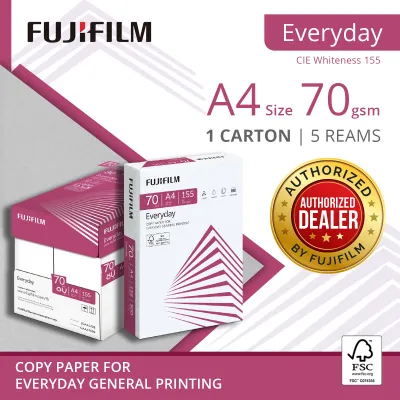
The 70 GSM variant represents the lightweight, economy tier of the fujifilm a4 paper lineup. This paper is thinner and more flexible, making it highly cost-effective for high-volume, everyday printing tasks where premium presentation is not a priority. It is best utilized for internal drafts, single-sided reference prints, email hard copies, and student note-taking. Because it uses less wood pulp per sheet, it is typically sold at a lower price point, allowing offices to manage operational expenses during bulk print runs.
80 GSM (Standard Office Weight)
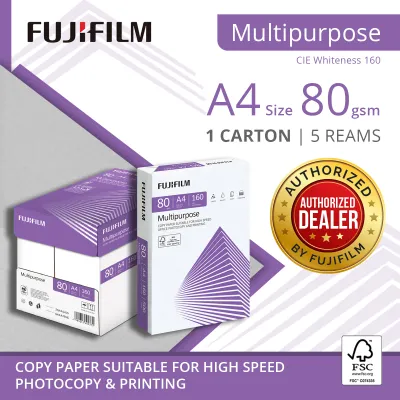
The 80 GSM variant is the industry benchmark for standard office and copy paper. It strikes an ideal balance between physical substance, opacity, and cost-efficiency. This weight is highly versatile and is the default choice for external correspondence, formal business reports, legal contracts, and standard double-sided printing. It provides a clean, professional tactile feel that conveys quality without the bulk or expense of premium specialty papers.
100 GSM and Above (Heavyweight/Premium)
For specialized printing tasks that require a premium finish, Fujifilm offers heavier paper options, often reaching 100 GSM or higher in their premium ranges. These heavyweight sheets feel substantial and luxurious to the touch, making them perfect for client-facing presentation handouts, certificates, official proposals, and color-heavy marketing flyers. The increased density allows the paper to handle heavy ink saturation without warping or losing its structural integrity.
Verification Advice
When purchasing fujifilm a4 paper in Singapore, always verify the exact GSM rating printed on the outer packaging or carton. Retailers and commercial distributors may stock different regional variants, and specific weight availability can fluctuate based on supply chains. Checking the packaging ensures you do not accidentally mix different weights in your printer trays, which can lead to feeding issues.
How Paper Weight Impacts Print Quality and Hardware Performance
The weight of your paper does not merely change how a document feels; it actively determines the visual quality of the print and the mechanical reliability of your office hardware. Matching the paper weight to your printing technology is essential for achieving optimal results.
Ink Bleed and Show-Through
One of the most noticeable differences between paper weights is opacity, which directly affects ink bleed and show-through. Thinner 70 GSM paper has lower opacity, meaning that when you print on one side, the text or images are often visible from the reverse side. This show-through makes double-sided (duplex) printing highly impractical as it reduces readability. In contrast, 80 GSM and heavier papers offer significantly higher opacity, preventing ink or toner from showing through and ensuring clean, legible double-sided documents.
Color Vibrancy and Image Sharpness
The density of the paper fibers also determines how ink behaves when it hits the surface. When using inkjet printers, liquid ink can saturate lightweight paper, causing the fibers to swell, warp, or “cockle.” This warping distorts the image and causes colors to look dull and muddy. Heavier papers, such as 100 GSM, possess the fiber density required to hold high volumes of ink on the surface without warping, resulting in sharper text, crisper lines, and more vibrant color reproduction for charts and graphics.
Printer Feed and Jamming Risks
From a mechanical perspective, your printer’s feed rollers and separation pads are calibrated to handle specific ranges of paper thickness and stiffness. If you attempt to feed paper that is too heavy for your machine’s specifications, the rollers may fail to grab the sheet, or the paper may get stuck as it attempts to navigate the tight curves of the internal paper path. Conversely, paper that is too light can crumple easily under the pressure of the feed mechanism, leading to frequent paper jams and increased wear on internal components.
Multi-Sheet Feeding
Singapore’s tropical, high-humidity climate introduces unique challenges for paper handling and storage. Paper fibers are naturally hygroscopic, meaning they readily absorb moisture from the surrounding air. Lightweight paper (70 GSM) that has absorbed moisture loses its stiffness and becomes limp, which often causes the printer’s feed rollers to pull multiple sheets at once, resulting in double-feeding and immediate jams. Keeping your paper stored in a cool, dry place and using 80 GSM paper, which has greater physical resistance to humidity-induced limpness, can significantly improve feed reliability. Always consult your printer’s user manual to verify the supported GSM range before loading non-standard paper weights.
How to Choose the Right GSM for Your Printing Needs
Selecting the ideal paper weight requires balancing the visual and tactile demands of your document against your operational budget and hardware capabilities. By categorizing your printing tasks, you can optimize your paper usage effectively.
Everyday Drafts & Student Notes
For high-volume, low-priority tasks, 70 GSM fujifilm a4 paper is the most practical choice. It allows you to maximize the number of sheets printed per dollar, making it ideal for university lecture notes, proofreading drafts, and temporary internal checklists. The lighter weight also makes large stacks of documents easier to carry and store, reducing physical clutter and shipping weights.
Client Proposals & Official Records
When the document is intended for external stakeholders, clients, or permanent archiving, 80 GSM is the recommended standard. This weight ensures that contracts, invoices, and business letters look professional and can be handled repeatedly without tearing easily. It also facilitates flawless double-sided printing, which saves total paper volume while maintaining high readability and a premium corporate image.
Marketing Flyers & Photo-Heavy Documents
For marketing collateral, detailed design portfolios, or documents containing high-resolution color graphics, you should opt for 100 GSM or higher premium papers. The superior thickness and surface coating of these papers prevent ink saturation issues and provide the tactile weight that consumers associate with high-value brands.
Cost vs. Quality Trade-off
Ultimately, managing your paper supply involves a strategic trade-off. While 100 GSM paper offers the best visual and tactile experience, using it for everyday emails would be highly uneconomical. Conversely, using 70 GSM paper for an important client pitch could undermine your company’s professional presentation. Maintaining a dual-inventory system—using 70 GSM or 80 GSM for standard daily operations and reserving heavier, premium papers for client-facing materials—is the most cost-effective approach for Singapore businesses and home offices alike.
Frequently Asked Questions (FAQ)
Can I use 80 GSM Fujifilm paper in a standard home inkjet printer?
Yes, standard home inkjet and laser printers are designed to handle 80 GSM paper as their primary media type. This weight falls comfortably within the standard operational limits of almost all consumer-grade printers. However, if you are printing high-density color photos, ensure the ink has sufficient time to dry to prevent smudging on the surface.
Does a higher GSM always mean the paper is physically thicker?
While a higher GSM generally correlates with a thicker sheet of paper, it is not an absolute rule. GSM measures the weight of the paper per square meter, not its physical height or caliper. The physical thickness can vary slightly depending on how tightly the paper fibers are compressed during the manufacturing process, meaning two different paper brands of the same GSM might have minor differences in tactile thickness.

Community discussion
Share your experience or ask a question. Comments are reviewed before publication.