
Selecting the right A4 laminator for certificates and important documents requires balancing heat sensitivity, paper thickness, and the frequency of your laminating tasks. For standard paper certificates, a multi-roller thermal laminator that provides consistent heat distribution is highly effective, while delicate, heat-sensitive documents demand a machine with a cold lamination setting to prevent permanent heat damage. By matching the machine’s roller system, temperature controls, and pouch compatibility to your specific document types, you can achieve bubble-free, professional-grade preservation that lasts for years.
Key Specifications for Certificate Lamination
When preserving important documents, understanding the mechanical differences between thermal and cold lamination is the first step. Thermal laminators use heated rollers to melt the adhesive on the plastic pouch, creating a permanent, rigid bond. This method is highly effective for standard paper certificates, diplomas, and training awards. However, some official documents use heat-sensitive inks, thermal paper, or delicate watermarks that can blacken or degrade under high temperatures. For these heat-sensitive items, cold lamination is necessary. Cold laminators use pressure-sensitive adhesive pouches and do not apply heat, making them safe for delicate historical documents, photographs, and thermal prints.
The thickness of the laminating pouch, measured in microns, directly affects the rigidity and protection of the finished document. Standard pouches range from 75 to 250 microns per flap. A 75 or 80-micron pouch is flexible and suitable for everyday notices, but for certificates that require a premium, rigid feel, a 125-micron or 150-micron pouch is preferred. Thicker pouches offer superior protection against bending and tearing, but they require a laminator capable of generating and maintaining higher temperatures to melt the thicker adhesive layer completely. Before purchasing, verify that your chosen machine can handle the specific micron thickness you intend to use.
Products mentioned in this guide
![[SG] GBC Inspire Plus A4/A3 Laminator + FREE 100pcs A4 Laminating Pouch | WHILE STOCKS LAST [Evergreen Stationery]](https://img.lazcdn.com/g/p/2a4715d31debd35f8897e5c972d306d7.jpg_400x400q80.jpg_.webp)
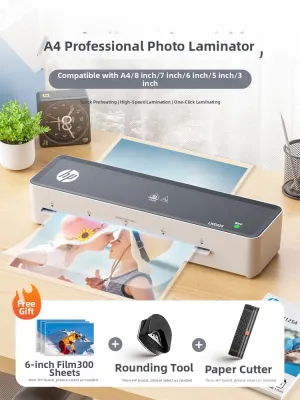
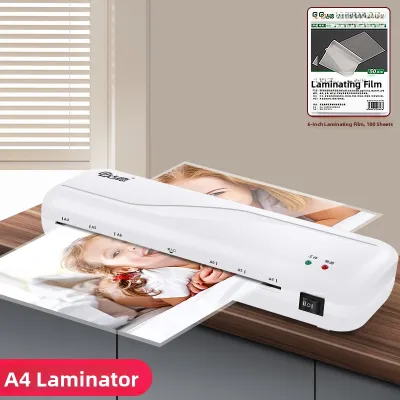
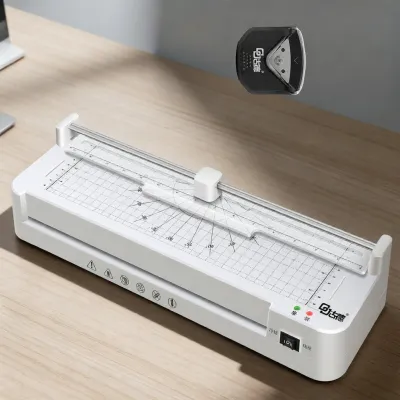
Prices are valid at publication and may change. Please refer to the product page for the latest price.
Warm-up time and temperature consistency are critical indicators of a laminator’s performance. The time a laminator takes to reach its operating temperature can vary from one minute to over five minutes. More importantly, temperature consistency across the rollers is vital. Basic two-roller machines may experience temperature drops during continuous feeding, leading to cloudy patches or incomplete sealing. Professional-grade four-roller or six-roller systems distribute heat much more evenly, ensuring that the entire surface of the A4 certificate receives uniform pressure and heat, resulting in a crystal-clear finish.
Evaluating Pouch Compatibility and Finish
Choosing the right pouch finish is essential for the readability and presentation of your certificates. Glossy pouches are the most common, offering a high-shine finish that makes colors vibrant and text sharp. However, they reflect a significant amount of light, which can make certificates difficult to read when displayed under bright office lights or near windows. Matte pouches provide a non-reflective, satin-like finish that eliminates glare, resists fingerprints, and allows for easier scanning or photocopying. For certificates that will be framed or hung on walls, a matte finish often provides a more sophisticated and readable appearance.

Verifying pouch dimensions is another crucial step to ensure a completely waterproof and airtight seal. Standard A4 paper measures 210 by 297 millimeters. To ensure a proper seal, the laminating pouch must be slightly larger than the document, typically measuring around 216 by 303 millimeters. This leaves a 3 to 5-millimeter border around the entire edge of the paper. Feeding a document that is too close to the edge of the pouch can cause the adhesive to leak onto the rollers or result in an incomplete seal that allows moisture to seep in over time.
When preserving irreplaceable certificates, it is crucial to check the packaging labels for archival-safe or acid-free pouch certifications. Over time, standard plastics and adhesives can release acids that cause paper to turn yellow, brittle, or fade. Archival-safe pouches are manufactured without harmful chemical compounds, ensuring that the document’s ink and paper fibers remain chemically stable and visually pristine for decades. Always look for these specifications on the pouch packaging to guarantee long-term preservation.
Operational Features for Professional Results
Even with careful feeding, misalignments can occur, leading to devastating jams that can ruin a one-of-a-kind certificate. An anti-jam release lever, often labeled as an ABS button, allows you to manually disengage the rollers, releasing the tension so you can gently pull the misfed pouch backward out of the machine. Having this feature is an essential safeguard when handling documents that cannot be easily replaced.
Adjustable temperature controls are vital because different paper weights and pouch thicknesses require different levels of heat. A machine with fixed temperature settings might overheat thin 80-micron pouches, causing them to warp or ripple, while underheating thick 150-micron pouches, leaving them cloudy and poorly sealed. Adjustable temperature controls, either via a digital screen or a manual dial, allow you to calibrate the heat precisely to match the specific combination of your certificate paper and pouch thickness.
A reverse function actively drives the rollers backward to back out a misfed document, offering a more controlled recovery than a manual release lever. Additionally, an auto-shutoff feature is a valuable safety and energy-saving function. If the laminator is left on accidentally in a busy office or home environment, the machine will automatically power down after a set period of inactivity, preventing overheating, reducing fire hazards, and extending the lifespan of the internal heating elements.
Condition-Based Selection Matrix
If you only need to laminate a few birth certificates, marriage licenses, or school awards a year, a compact and budget-friendly A4 thermal laminator is highly suitable. These entry-level machines typically feature a small footprint, a simple two-roller system, and a fixed temperature setting optimized for standard 80-micron to 125-micron pouches. While they may take slightly longer to warm up and require a cool-down period between uses, they offer a cost-effective solution for basic preservation needs.
For environments where certificates, teaching aids, and signs are laminated weekly, a mid-range laminator is more appropriate. Look for machines with faster warm-up times, a higher continuous run time, and a robust four-roller system. These models often feature adjustable temperature settings, allowing you to switch between different pouch thicknesses easily, and are built to handle consecutive laminating runs without overheating or losing temperature consistency.
In professional print shops, corporate offices, or archival institutions where large volumes of documents are processed daily, a heavy-duty professional laminator is essential. These high-end machines feature precise digital temperature dials, variable speed controls, and advanced multi-roller systems that ensure flawless, high-speed sealing. They also offer robust cold lamination modes for delicate, heat-sensitive historical documents and are built with heavy-duty motors designed for continuous, all-day operation.
Maintenance and Safety Checks
As pouches pass through the heated rollers, tiny amounts of adhesive can squeeze out and accumulate on the roller surfaces. Over time, this buildup can cause subsequent pouches to wrap around the rollers, leading to severe jams and sticky residue on your documents. To prevent this, run a clean, uncoated piece of cardboard or a manufacturer-approved cleaning sheet through the machine while it is still warm. This simple step helps lift off excess adhesive and keeps the rollers smooth.
Before feeding an irreplaceable certificate into the machine, perform a quick visual check. Ensure the power cord is free of frays or damage, and verify that the machine is heating up evenly without emitting unusual chemical smells or smoke. If you notice any uneven heating or strange noises, do not risk inserting your document; instead, have the machine serviced or replaced.
Both the laminating machine and the unused pouches should be stored in a cool, dry environment. In humid climates, high humidity can cause paper certificates to absorb moisture before lamination, which can lead to steam bubbles forming inside the sealed pouch. Keep your laminating pouches sealed in their original packaging or a resealable plastic bag with a silica gel packet to maintain adhesive integrity and prevent the sheets from curling or sticking together before use.
Frequently Asked Questions (FAQ)
Can I laminate a document with a raised seal or embossed stamp?
Laminating a document with a raised seal or embossed stamp is generally not recommended. The high pressure and heat of a thermal laminator can flatten the textured embossing, permanently altering the document’s official appearance. Furthermore, the air pockets created around the raised edges of the seal can prevent the laminating pouch from adhering properly, leaving unsightly silver bubbles or unsealed gaps where moisture can enter. If you must protect an embossed document, consider using a cold lamination pouch with light manual pressure, or keep the document in an archival-safe, unlaminated protective sleeve.
What should I do if a certificate gets jammed inside the laminator?
If a jam occurs, immediately press the anti-jam release lever or activate the reverse function to back the document out of the machine. If the machine does not have these features, turn off the power switch and unplug the cord from the wall outlet immediately to prevent the heating elements from melting the plastic further. Allow the machine to cool down completely before attempting to gently pull the document out. If the certificate is tightly wrapped around the internal rollers, do not force it or use sharp metal tools like scissors or knives, as this can slice the document and damage the rollers; instead, consult a professional repair service.
Is it possible to remove a laminated pouch from an important document without damaging it?
Removing a laminated pouch from a document is extremely difficult and carries a very high risk of permanently destroying the paper. Thermal lamination creates a strong physical and chemical bond between the melted adhesive and the paper fibers. Attempting to peel the plastic off, even with heat from a hair dryer or iron, usually results in tearing the paper, lifting the ink, or stripping the surface layer of the certificate. Because lamination is virtually permanent, you should always create a high-resolution digital scan or take a clear photograph of the certificate before laminating it, ensuring you have a secure backup copy.

Community discussion
Share your experience or ask a question. Comments are reviewed before publication.