
GSM stands for “Grams per Square Meter,” which measures the weight and density of a sheet of paper. Choosing the right weight for your A4 paper depends entirely on your specific printing task: 70 GSM is ideal for high-volume draft printing, 80 GSM is the versatile standard for everyday office documents, and 100 GSM or higher is reserved for premium presentations and certificates. Selecting the wrong weight can lead to frustrating paper jams, ink smudging, or excessive show-through on double-sided prints.
What Does GSM Actually Mean for A4 Paper?
To understand paper weight, it helps to look at the metric system. GSM represents the physical mass of a single square meter of paper. Because a standard A4 sheet is exactly one-sixteenth of a square meter, its actual weight is a fraction of its GSM rating, but the industry uses this measurement to define thickness, stiffness, and opacity.
A common misconception is that a higher GSM automatically translates to better overall paper quality. In reality, GSM only dictates the physical substance and structural properties of the sheet. It does not guarantee a smoother texture, better ink absorption, or higher optical brightness. A premium, well-calendered 80 GSM sheet can offer a much smoother writing or printing surface than a rough, uncoated 100 GSM sheet.
Products mentioned in this guide
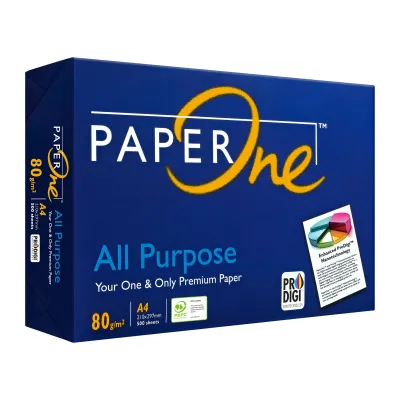
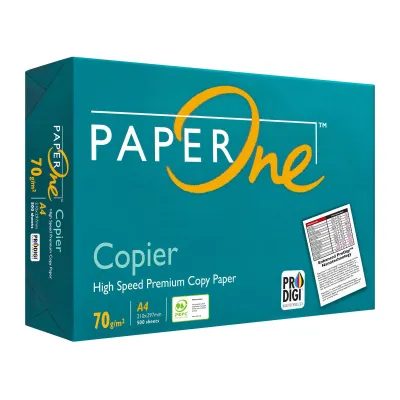
Prices are valid at publication and may change. Please refer to the product page for the latest price.
How Paper Weight Affects Print Quality and Printer Safety
The weight of your A4 paper directly impacts how your printer handles the media and how the final print looks. Using the wrong GSM can cause mechanical issues or ruin your document’s presentation.

Printer Compatibility and Jamming Heavier papers are significantly stiffer than standard office sheets. Standard home and office printers rely on a series of rubber rollers to pull and bend paper through the printing path. If the paper is too thick, it cannot bend around these rollers, leading to immediate paper jams or potential hardware damage. Always check your printer’s user manual to verify its maximum supported media weight before loading heavy sheets.
Opacity and Show-Through Thinner papers, such as 70 GSM, have lower opacity, meaning they are more translucent. If you attempt double-sided printing on thin paper, the ink or toner from the front side will show through on the back. This show-through makes text difficult to read and looks unprofessional. For double-sided documents, a higher GSM is essential to provide the necessary opacity.
Ink Absorption and Drying Heavier papers often feature denser fiber structures or specialized surface coatings. When printing with an inkjet printer, the liquid ink must absorb and dry quickly to prevent smudging. In humid climates like Singapore, high ambient humidity can slow down drying times, especially on dense, high-GSM papers. To avoid smudged prints, perform an observable trial by printing a single test sheet and checking the dry time before running a large batch.
Which A4 Paper Weight Should You Choose?
Selecting the right A4 paper weight is a balancing act between cost, document purpose, and your printer’s capabilities. Understanding the standard weight tiers helps you make an efficient choice without overpaying.
70 GSM: Everyday Drafts and High-Volume Printing
This is the lightest standard weight widely available for office use. It is highly economical, with a ream of 70 GSM paper typically costing slightly less than standard weights, making it perfect for high-volume, single-sided print jobs.
Use 70 GSM paper for internal memos, rough drafts, and temporary reading materials where minimizing cost and physical storage bulk is your main priority. However, avoid using this weight for double-sided prints or documents with heavy color graphics. The thin paper is highly prone to show-through and can warp or buckle under heavy ink coverage.
80 GSM: Standard Office Documents and Double-Sided Printing
This is the universal standard for professional and home printing. If you purchase standard copy paper without checking the label, it is highly likely to be 80 GSM.
This weight offers the ideal balance of tactile stiffness, sufficient opacity to prevent show-through, and reliable compatibility with almost all standard printers. It is the perfect choice for external correspondence, formal reports, invoices, and everyday double-sided printing. It feeds smoothly through high-speed office copiers with minimal risk of misfeeds or jams.
100 GSM and Above: Premium Presentations and Certificates
This category includes heavy, premium papers and cardstocks. These sheets feel thick, luxurious, and highly professional in the hand.
Choose 100 GSM or higher for important documents such as corporate proposals, resumes, certificates, and marketing brochures. This weight handles heavy ink coverage and high-resolution color graphics beautifully without warping. However, because of its thickness, standard bottom paper cassettes may struggle to feed it. To protect your printer and prevent jams, feed these heavier sheets through the manual bypass tray or rear feed slot.
GSM vs. Brightness: Which Spec Matters More?
When shopping for A4 paper, you will often see both a GSM rating and a brightness (or whiteness) rating on the packaging. These are entirely separate metrics that serve different purposes.
While GSM measures the physical weight and thickness of the paper, brightness measures the percentage of light the paper reflects. A higher brightness rating means the paper looks whiter and provides better contrast with dark ink. It is entirely possible for a high-quality 70 GSM paper to have a higher brightness rating—and therefore look cleaner and crisper—than a dull, off-white 80 GSM paper.
To simplify your purchasing decision, prioritize GSM first to ensure physical compatibility, double-sided usability, and printer safety. Once you have selected the correct weight, look at the brightness rating to ensure your colors pop and your text remains highly legible.
Frequently Asked Questions (FAQ)
Can I use 100 GSM paper in a standard home printer?
Yes, most modern home inkjet and laser printers can handle 100 GSM paper, but it is not universally guaranteed. Budget home printers often have tight paper paths that struggle with the stiffness of thicker sheets. Always consult your specific printer’s user manual to check its maximum paper weight limit. If you experience frequent jams, try feeding the paper one sheet at a time through the manual feed tray or rear slot to reduce the bending angle.
Does a higher GSM mean the paper is more durable?
Not necessarily. While a higher GSM paper feels sturdier, resists creasing, and is harder to tear by hand, true long-term durability depends on the paper’s material composition and manufacturing process. Acid-free paper prevents yellowing over time, while synthetic or cotton-fiber papers offer superior water and tear resistance. A standard wood-pulp paper will still degrade over time regardless of whether it is 70 GSM or 120 GSM.

Community discussion
Share your experience or ask a question. Comments are reviewed before publication.