
Quick Answer: Which Notebook Fits Your Note-Taking Style?
The choice between a Rocketbook and a traditional notebook represents a fundamental shift in how we capture, store, and interact with written information. On one side stands a modern, synthetic, reusable medium designed to bridge the physical-digital divide; on the other lies the centuries-old tradition of wood-pulp paper, celebrated for its sensory feedback and archival permanence. Deciding between them requires evaluating your daily workflow, your sensory preferences, and how you plan to access your notes in the future.
Choose a Rocketbook if your primary goal is to digitize your handwritten notes quickly, reduce physical clutter, and reuse a single notebook indefinitely. This smart notebook system is engineered for those who want to scan pages directly to cloud storage services, search their handwritten notes digitally via optical character recognition (OCR), and wipe pages clean with a damp cloth once the information is safely backed up. It is a highly efficient tool for temporary brainstorming, structured daily planning, and lecture notes that do not require physical archiving.
Choose a traditional paper notebook if you prioritize the tactile feedback of real paper, use a diverse range of writing instruments (including fountain pens, brush pens, and standard ballpoints), and want a permanent physical record of your thoughts. Traditional paper offers a level of friction and absorption that synthetic pages cannot replicate. It is the ideal medium for journaling, sketching, and deep-focus writing where the physical presence of the notebook serves as a lasting archive.
Products mentioned in this guide
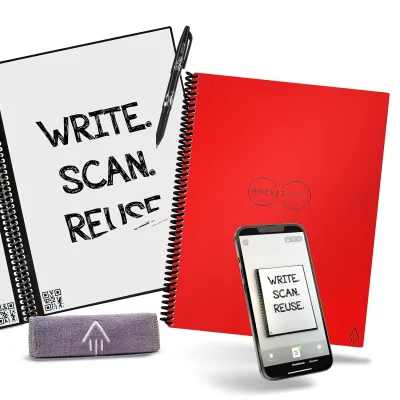
Prices are valid at publication and may change. Please refer to the product page for the latest price.
Before making a choice, verify your specific requirements regarding ink types, document permanence, and environmental conditions. For instance, if you rely on specialized inks or write in environments exposed to high temperatures, the heat-sensitive nature of smart notebook inks may pose a risk. Conversely, if you work in highly humid environments, traditional paper may suffer from moisture absorption, whereas synthetic pages remain completely unaffected.
Paper Feel and Surface Texture: Synthetic Pages vs. Wood Pulp
The physical sensation of writing is determined almost entirely by the interface between the pen tip and the page surface. Rocketbook utilizes a proprietary synthetic paper technology constructed from a polyester-based composite. This material is completely non-porous, waterproof, and designed to withstand repeated wiping without tearing. When you run your fingers across a Rocketbook page, it feels exceptionally smooth, almost plastic-like, and lacks the organic grain found in traditional paper.

Traditional notebooks, by contrast, are made from cellulose fibers derived from wood pulp or cotton. These fibers are woven together to create a porous, absorbent matrix. Depending on the manufacturing process, traditional paper can range from ultra-smooth, coated surfaces (often found in premium Japanese notebooks) to toothy, textured sheets (common in sketchbooks and sketch-heavy journals). The weight of the paper, measured in grams per square meter (GSM), also influences its physical properties, with higher GSM papers offering a more substantial, rigid feel under the pen.
This structural difference directly translates into tactile feedback, often referred to by stationery enthusiasts as the “tooth” of the paper. When writing on traditional paper, the microscopic texture of the cellulose fibers creates a controlled resistance against the pen tip. This friction provides sensory feedback to your hand, allowing for precise control over stroke width, curves, and stopping points. On Rocketbook’s synthetic pages, this friction is significantly reduced. The pen tip glides across the surface with minimal resistance, creating a sensation that some users describe as writing on glass or a whiteboard.
While a low-friction surface can increase writing speed, it also requires different muscle control. Without the natural grip of paper fibers, your hand must work harder to stabilize the pen, which can lead to slipping or slightly looser handwriting if you are accustomed to high-friction paper. To determine which surface suits your writing style, check the product specifications of any notebook you consider. If you prefer a tactile, controlled writing experience, look for traditional papers with a higher GSM and a matte, uncoated finish. If you prefer a fast, effortless glide, synthetic options will align with your preferences.
Ink Compatibility and Drying Times: What Works and What Smudges
Ink compatibility is perhaps the most critical operational difference between these two notebook formats. Rocketbook’s synthetic pages are designed to work exclusively with specific friction-erasable gel pens, most notably the Pilot FriXion line. These pens use a specialized thermochromic ink that becomes transparent when exposed to heat, which is typically generated by the friction of a rubber eraser. On a Rocketbook, however, erasing is achieved by applying water, which dissolves the binders in the ink and allows it to be wiped away from the non-porous synthetic surface.
Using standard writing instruments on a Rocketbook can permanently damage the notebook. Traditional ballpoints, standard gel pens, rollerballs, and fountain pens use permanent, pigment-based, or water-based inks designed to sink deep into porous paper fibers. If applied to a synthetic Rocketbook page, these inks will either bead up and fail to dry, or they will permanently stain the plastic coating, rendering that section of the page unusable. Therefore, choosing a smart notebook commits you to a closed ecosystem of compatible erasable pens and refills.
Drying time is another major consideration when writing on synthetic surfaces. Because Rocketbook pages are completely non-porous, the ink cannot sink into the page; instead, it must dry entirely through the evaporation of its liquid carriers. This process takes significantly longer than it does on traditional paper. Depending on ambient humidity and temperature, FriXion ink can take anywhere from 10 to 15 seconds to dry completely on a synthetic page. During this window, the wet ink is highly susceptible to smudging.
Traditional paper notebooks offer near-universal ink compatibility because their porous fibers immediately draw liquid away from the surface. When you write with a standard gel pen or fountain pen on high-quality wood-pulp paper, the ink is absorbed into the paper matrix, drying almost instantly. This rapid absorption minimizes the risk of smudging, feathering (where ink spreads along the fibers), and bleed-through (where ink penetrates to the back of the page), provided the paper has adequate sizing and density.
For left-handed writers, this drying time disparity is a crucial factor. Left-handed individuals who write with an “overwriter” or “hook” grip naturally drag their hand across the text they have just written. On a Rocketbook, this motion almost guarantees smudging unless the writer adopts a specialized hand position or waits patiently for each line to dry. On traditional paper paired with a fast-drying gel or ballpoint pen, left-handed writers can write continuously without fear of ruining their work. Always verify pen and ink compatibility by checking the manufacturer’s guidelines, and perform a quick dry-time test in an inconspicuous corner of a page before writing extensive notes.
Overall Writing Experience: Pen Control, Feedback, and Hand Fatigue
The overall writing experience is a holistic combination of physical comfort, pen control, and the psychological impact of the medium. Pen control on a synthetic page requires a conscious adjustment. Because the surface is slick, fine-tip pens (such as 0.5mm or 0.7mm gel pens) may feel slightly unstable, requiring a firmer grip to maintain consistent letterforms. Users who naturally write with heavy pressure may find their pen slipping forward, while those with a light touch may enjoy the effortless, rapid flow of the pen across the smooth page.
This difference in friction directly influences hand fatigue during long writing sessions. The natural “tooth” of traditional wood-pulp paper acts as a stabilizer, allowing your hand muscles to relax slightly between strokes. When writing on a synthetic surface, the lack of resistance means your hand must actively decelerate and guide the pen tip at the end of every stroke. Over hours of continuous note-taking, this active stabilization can lead to increased muscle tension in the hand, wrist, and forearm. If you frequently write long-form essays or extensive meeting minutes, the physical comfort of traditional paper may be superior.
Beyond the physical mechanics, the psychological aspect of note-taking plays a significant role in how we process information. Traditional notebooks possess an inherent sense of permanence. Because ink cannot be easily erased without leaving a mark, writers tend to be more deliberate with their words, organizing their thoughts before committing them to the page. This permanence makes traditional notebooks highly suited for personal journaling, reflective writing, and creative drafting, where mistakes are preserved as part of the creative process.
Conversely, the erasable nature of a smart notebook fosters a low-pressure environment. Knowing that any mistake can be instantly wiped away with a damp cloth encourages rapid brainstorming, messy mind-mapping, and uninhibited sketching. It removes the anxiety of the “blank page” and allows for a dynamic, iterative writing process where pages can be drafted, scanned, and cleared without wasting physical resources.
Environmental factors also shape the writing experience, particularly in tropical climates like Singapore. High relative humidity can cause traditional wood-pulp paper to absorb moisture from the air over time. This moisture absorption can make the paper feel soft, increase the drying time of fountain pen inks, and cause standard inks to feather or bleed more easily. Rocketbook’s synthetic pages are entirely impervious to humidity, maintaining their structural integrity and smooth surface regardless of the weather. However, because the erasable ink used in smart notebooks is heat-sensitive, leaving your notebook in a hot environment—such as a parked car in the sun or near a window receiving direct sunlight—can cause the ink to reach its clearing temperature, making your notes temporarily disappear.
Beyond the Pen: Digitization, Reusability, and Long-Term Value
To fully evaluate these two notebook types, one must look beyond the physical act of writing to the broader workflow, reusability, and long-term value they offer. The integration of digital workflows is where smart notebooks excel. Rocketbook features a highly optimized app ecosystem that utilizes QR codes printed on the corners of each page, along with a row of customizable symbols at the bottom. By marking a specific symbol and scanning the page with your smartphone camera, the app automatically crops, enhances, and routes the document to your designated cloud service, such as Google Drive, Dropbox, or OneDrive. The app’s built-in optical character recognition (OCR) can also transcribe your handwriting into searchable digital text.
Traditional notebooks do not offer native digital integration. To digitize notes written on standard paper, you must rely on third-party scanning applications or take manual photos. This process lacks the automated routing, page alignment, and seamless cloud syncing that smart notebooks provide. For professionals and students who require a clean, organized digital archive of their physical notes, the smart notebook workflow saves significant administrative time and effort.
The trade-off for this digital efficiency is the loss of physical permanence. Rocketbook is designed around a “write, scan, erase, repeat” cycle. Once a page is scanned and wiped clean, the physical artifact is gone forever, leaving only the digital file. For some, this is a liberating way to reduce paper clutter and maintain a minimalist workspace. For others, particularly those who find value in flipping through old physical notebooks, the loss of the physical page is a significant drawback. Traditional notebooks serve as a physical archive, preserving the exact texture, ink color, and physical presence of your notes for decades.
From a financial perspective, calculating the long-term value of each option requires looking at your usage habits rather than upfront costs alone. A high-quality traditional notebook can cost anywhere from S$10 to S$40 depending on the brand, paper quality, and binding. If you write extensively, you may find yourself purchasing several of these notebooks each year. A Rocketbook has a higher initial purchase price, typically ranging from S$30 to S$60, and requires ongoing purchases of compatible erasable pens or refills. However, because a single smart notebook can be reused hundreds of times, it can replace dozens of traditional notebooks over its lifespan, making it highly cost-effective for high-volume writers who do not need to keep physical copies.
The physical durability of the materials also differs. Synthetic pages are highly resistant to tearing, water spills, and general wear, making them exceptionally durable for daily travel. However, the specialized coating on synthetic pages can degrade over time if subjected to aggressive erasing, abrasive cloths, or natural skin oils. Traditional paper notebooks are susceptible to water damage, tearing, and corner bending, but high-quality, acid-free archival paper will not degrade or yellow for generations if stored in a dry, cool environment.
Final Verdict: How to Choose Based on Your Note-Taking Habits
Ultimately, the decision between a Rocketbook and a traditional notebook comes down to how you balance the convenience of digital organization against the sensory satisfaction of physical writing. Your choice should align with your daily habits, your preferred tools, and how you interact with your notes over time.
Profile 1: The Digital Organizer (Choose Smart Notebooks) If you are a student, busy professional, or agile planner who values a clutter-free desk, seamless cloud integration, and the ability to search your handwritten notes digitally, a smart notebook is an excellent investment. It streamlines the transition from physical brainstorming to digital archiving, making it perfect for temporary notes, meeting agendas, and lecture outlines that are best stored in the cloud.
Profile 2: The Tactile Purist (Choose Traditional Notebooks) If you find creative inspiration in the friction of a pen against real paper, enjoy using fountain pens or specialized inks, and value the physical presence of a journal or archive, traditional notebooks remain unmatched. They offer a superior sensory experience, zero reliance on technology, and a permanent physical record of your thoughts that will never vanish due to a software update or high temperatures.
Final Tip If you are undecided, consider starting with a smaller, pocket-sized version of a smart notebook or a high-quality pocket notebook. This allows you to test the unique glide of synthetic paper and the performance of erasable inks in your daily environment without committing to a full-sized journal.
Frequently Asked Questions (FAQ)
Can I use regular gel pens or fountain pens in a reusable smart notebook?
No, you cannot use standard gel pens, ballpoints, or fountain pens on a reusable smart notebook. These notebooks require specific friction-erasable inks, such as those found in Pilot FriXion pens, to function correctly. Standard inks contain permanent pigments and solvents that will sink into or permanently bond with the synthetic page coating, staining the pages and making them impossible to erase without damaging the notebook. Always check the pen packaging for friction-erasable compatibility before writing.
Does the ink on a smart notebook fade over time or in hot weather?
Yes, the specialized ink used in smart notebooks is heat-sensitive and can fade or disappear entirely when exposed to high temperatures, typically around 60°C or higher. In hot climates like Singapore, leaving your smart notebook in a parked car, near a sunny window, or close to a heat-emitting electronic device can trigger this thermal reaction. If your notes disappear due to heat, placing the notebook in a freezer for a short period can sometimes restore the faded ink, though this is not guaranteed. For permanent, temperature-stable records, traditional paper and standard inks are far more reliable.
How do I clean and erase a reusable notebook without damaging the pages?
To clean your reusable notebook safely, use a clean microfiber cloth slightly dampened with room-temperature water. Gently wipe the pages in a circular motion to lift the erasable ink, then use a dry portion of the cloth to remove any remaining moisture. Avoid using harsh chemical cleaners, alcohol, abrasive sponges, or excessive water, as these can strip away the specialized synthetic coating that allows the pages to be erased. Always ensure the pages are completely dry before writing on them again, as writing on damp pages can cause the ink to bead and smudge.
Community discussion
Share your experience or ask a question. Comments are reviewed before publication.