
Choosing between the Niimbot D11 and alternative mini label makers comes down to balancing portability, app usability, and long-term consumable costs. While the Niimbot D11 is highly popular for its sleek, pocket-sized design and user-friendly mobile application, competing models on the market often offer distinct advantages, such as wider print areas or compatibility with open-format, non-proprietary label rolls. Understanding these trade-offs is essential for selecting a device that fits your specific organizational workflow.
To make an informed decision, you must look beyond the outer casing and evaluate how each device handles daily tasks. Key factors like print resolution, connection stability, and the ongoing cost of thermal paper rolls will ultimately determine whether a label maker remains a helpful tool or becomes an expensive drawer ornament. This comprehensive comparison breaks down these critical elements to help you identify the right model for your home, school, or office projects.
By analyzing the physical hardware, software ecosystems, and real-world operating costs, you can easily determine which device offers the best value for your budget. Whether you are labeling spice jars in a humid kitchen, organizing cables behind a desk, or managing inventory for a small business, matching the printer’s capabilities to your environment ensures a seamless and satisfying labeling experience.
Products mentioned in this guide
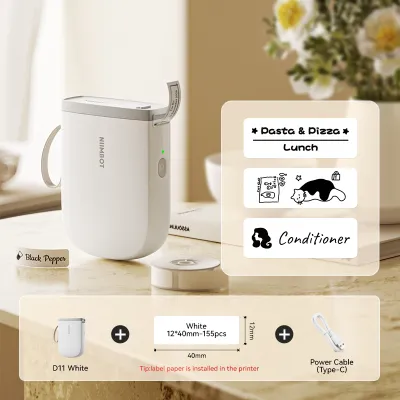
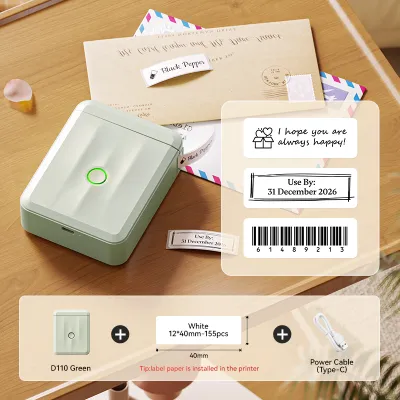
Prices are valid at publication and may change. Please refer to the product page for the latest price.
Core Specifications and Hardware Design
Mini label makers are designed primarily for on-the-go convenience, meaning their physical footprint and weight are major factors in their overall usability. The Niimbot D11 features a highly compact, cylindrical-edged design that closely resembles a minimalist power bank, making it exceptionally easy to slip into a pocket, pencil case, or desk drawer. In contrast, many competing mini label makers opt for a boxier, square-shaped aesthetic; while slightly bulkier to transport, these wider designs often sit more securely on flat surfaces during high-volume printing sessions.
Print width limitations represent one of the most significant hardware differences among portable thermal printers. The Niimbot D11 is engineered for narrow labeling tasks, typically supporting a maximum print width of 12mm to 15mm, which is ideal for file folders, cable wraps, and small storage containers. If your projects require wider layouts—such as shipping labels, detailed ingredient lists, or large price tags—you will need to look at alternative mini label makers that support wider formats, such as 24mm or even 50mm media rolls.
Battery capacity and charging efficiency also dictate how practical a device is for large-scale organizing projects. Most modern mini label makers, including the D11, feature built-in rechargeable lithium-ion batteries that charge via standard USB-C or Micro-USB ports. When comparing models, check the manufacturer’s specifications for the battery capacity (measured in mAh) and the estimated continuous printing time. A larger battery capacity ensures you can complete extensive labeling tasks, such as organizing an entire pantry or school classroom, without needing to stop and recharge.
Print Quality and Label Compatibility
Print resolution directly affects the clarity and professional appearance of your labels, especially when printing small text or detailed graphics. Most entry-level mini label makers, including the Niimbot D11, print at a standard resolution of 203 DPI (dots per inch). This resolution is perfectly adequate for clear, legible text and simple icons. However, if you plan to print intricate logos, high-density barcodes, or very small font sizes, you should check if alternative models offer a higher resolution, such as 300 DPI, which provides noticeably sharper edges.

Label compatibility is another crucial area where mini printers diverge, particularly regarding the choice between die-cut and continuous rolls. The Niimbot D11 primarily utilizes pre-cut, die-cut labels that come in fixed sizes with rounded corners, ensuring a uniform and neat look for every label you print. Some competing models, however, support continuous label tape and feature a manual or automatic built-in cutter. This continuous format allows you to print custom-length labels, which is highly advantageous for long text strings or variable-sized items.
Environmental durability depends entirely on the quality of the label material rather than the printer itself. Because direct thermal printing does not use ink, the longevity of the print relies on how the thermal paper reacts to heat, light, and moisture. In humid climates like Singapore, labels used in kitchens, bathrooms, or outdoor areas face challenging conditions. To ensure your labels do not fade, smudge, or peel, always check the specific label roll packaging to verify if the material is water-resistant, oil-proof, and scratch-resistant before purchasing.
App Functionality and User Experience
The companion mobile application is the primary interface for designing your labels, making software usability just as important as hardware performance. The Niimbot app is widely recognized for its highly visual, beginner-friendly interface, offering a vast library of pre-designed templates, creative fonts, and playful icons. This makes it an excellent choice for home organization and creative crafts. Competitor apps, on the other hand, may offer a more utilitarian design, focusing on clean, professional layouts that are better suited for retail or office environments.
Bluetooth connectivity and pairing stability are essential for a frustration-free design workflow. Most modern mini label makers utilize Bluetooth 4.0 or higher to establish a quick, wireless connection with iOS and Android devices. When evaluating different brands, look for apps that allow you to design labels offline and save templates locally on your phone. This feature is incredibly useful when working in areas with poor internet connectivity, such as deep storage closets, basements, or outdoor events.
Advanced workflow features can save significant time if you frequently print labels in bulk. Check the companion app’s specifications to see if it supports batch printing, which allows you to print a sequence of different labels in a single command. Other valuable software features include automatic barcode and QR code generation, Excel data import for inventory management, and voice-to-text input. Be aware that some manufacturers restrict certain premium fonts or advanced design features behind an in-app subscription, so it is wise to review the app’s terms before committing to a specific brand.
Pricing, Consumables, and Long-Term Value
When calculating the true cost of ownership, you must look beyond the initial retail price of the hardware. In the local market, mini label makers generally range from around S$25 to S$60, depending on the brand, model, and any bundled label rolls included in the box. While a lower upfront price is appealing, the ongoing cost of replacement label rolls will quickly become the primary expense of your labeling system.
Consumable costs vary widely depending on whether a label maker uses proprietary or open-format rolls. The Niimbot D11 utilizes proprietary rolls that feature built-in RFID chips, which allow the companion app to automatically detect the label size and material for perfect alignment. While this RFID technology offers unmatched convenience and eliminates alignment errors, it generally locks you into buying official Niimbot consumables, which can be more expensive per label than generic alternatives.
If you prefer to minimize ongoing costs, look for competing mini label makers that accept standard, non-proprietary thermal paper rolls. These open-system devices allow you to source budget-friendly generic rolls from various online marketplaces and ecommerce platforms. However, using third-party consumables often requires you to manually input label dimensions in the app and adjust alignment settings, which can lead to occasional printing errors or wasted labels during setup.
Decision Framework: Which Mini Label Maker Fits Your Workflow?
Choose the Niimbot D11 if your primary goal is quick, convenient, and highly portable labeling for home organization, school supplies, or personal crafts. Its compact design makes it incredibly easy to carry around, and the companion app’s extensive library of creative templates, fonts, and icons simplifies the design process. The automated RFID roll detection is perfect for users who want a seamless, plug-and-play experience without worrying about manual alignment settings.
Opt for an alternative mini label maker if your projects require wider print formats, custom-length continuous labels, or the lowest possible ongoing operating costs. If you run a small business, manage a complex office filing system, or need to print industrial-grade labels, a device that supports open-format, non-proprietary consumables will offer better long-term value and greater flexibility in material selection.
Before making your final purchase, verify whether your primary use case requires specialized features that standard mini thermal printers cannot provide. If you need heavy-duty outdoor durability, high-volume continuous printing, or integration with smart home systems, a standard portable mini printer may not suffice. In those scenarios, investing in a ruggedized industrial label maker or a dedicated desktop thermal printer would be a more reliable and practical choice.
Frequently Asked Questions (FAQ)
Do mini thermal label makers require ink cartridges?
No, mini thermal label makers do not require ink cartridges, toner, or ribbons. They utilize direct thermal printing technology, which uses a heated printhead to chemically activate heat-sensitive dyes embedded within the thermal paper itself. While this eliminates the mess and ongoing cost of traditional ink, it means the printed labels are sensitive to extreme heat, direct sunlight, and heavy friction, which can cause the text to fade or the paper to turn black over time.
Can I use third-party label rolls in the Niimbot D11?
Compatibility with third-party label rolls depends on the specific generation of the Niimbot D11 you are using. Many newer models feature built-in RFID readers that scan the official label roll to automatically configure the print settings in the companion app. If you attempt to use a non-RFID or third-party roll, the printer may not recognize the media, or the app may restrict printing capabilities. Always check the product specifications and user reviews to verify if a device supports generic consumables before purchasing bulk third-party rolls.

Community discussion
Share your experience or ask a question. Comments are reviewed before publication.