
Choosing between the Niimbot B21 and other label makers comes down to how you prefer to design your labels and where you plan to use the device. If you want a highly visual, app-driven experience with creative fonts, icons, and pre-designed templates for home organization or journaling, a smart portable printer like the Niimbot B21 is an excellent fit. However, if you need to print simple, durable utility labels quickly without connecting to a smartphone, a traditional standalone label maker with a physical keyboard remains the more practical choice.
Core Differences: Niimbot B21 vs. Traditional and Smart Label Makers
To make an informed decision, it is essential to understand how modern smart label makers differ from traditional models. Smart label makers like the Niimbot B21 rely entirely on a wireless Bluetooth connection to a smartphone or tablet. You design your labels within a dedicated mobile application, which offers extensive creative freedom, including custom fonts, graphics, and imported images. This setup eliminates the need for a physical keyboard on the device itself, allowing for a much sleeker, more compact hardware design.
In contrast, traditional standalone label makers feature a built-in physical keyboard, often using a QWERTY or ABC layout, alongside a small monochrome screen. These devices operate independently of any external phone or computer, making them highly reliable for quick, on-the-spot labeling in workshops, offices, or outdoor environments. While they lack the advanced graphic design capabilities of app-based systems, they excel at producing simple, highly legible text labels in seconds.
Products mentioned in this guide
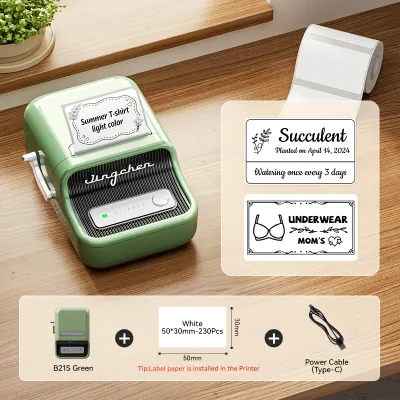
Prices are valid at publication and may change. Please refer to the product page for the latest price.
The printing technology also differs significantly across these categories. Portable smart printers typically use direct thermal printing, which utilizes heat-sensitive paper to create images without requiring ink, toner, or ribbons. This keeps ongoing maintenance simple, as you only need to purchase compatible thermal label rolls. On the other hand, heavy-duty desktop label makers or industrial systems often use thermal transfer technology, which melts a ribbon onto the label material to create highly durable, chemical-resistant prints suitable for harsh environments.
Key Comparison Dimensions to Check Before Buying
When comparing the Niimbot B21 to alternative options, relying solely on marketing descriptions can be misleading. It is crucial to evaluate specific technical specifications, software requirements, and physical design elements against your actual daily workflow. By checking the manufacturer’s official manuals, product labels, and user guides, you can verify whether a particular model supports the exact label sizes, materials, and software features you need before making a purchase.

Print Quality and Media Compatibility
Print clarity is a vital factor, especially if you plan to print small text, intricate icons, or barcodes. Most portable smart label makers offer print resolutions measured in dots per inch (DPI), typically ranging from 203 DPI to 300 DPI. While 203 DPI is generally sufficient for standard text and simple icons, a higher resolution is preferable if you require crisp, high-density barcodes or highly detailed graphics. You should verify the stated resolution in the product specifications and, if possible, inspect sample prints to ensure legibility.
Media compatibility is another critical area to investigate. Some label makers only support continuous tape rolls, which you cut to your desired length using a built-in blade. Others, like the Niimbot B21, are designed to handle die-cut gap labels, which come pre-cut into specific shapes and sizes, such as circles, squares, or cable wraps. You should also check the available material finishes, including matte, glossy, transparent, or patterned designs, to ensure they match your aesthetic preferences.
Finally, consider the environmental durability of the labels. Direct thermal labels are sensitive to heat and prolonged exposure to direct sunlight, which can cause the print to fade or the paper to darken over time. If you need labels for kitchen containers that will be washed frequently, or for items stored in hot outdoor environments, check the manufacturer’s guidelines regarding water resistance, oil resistance, and thermal limits to ensure the labels will remain intact and readable.
App Functionality and Design Templates
For any smart label maker, the companion mobile application is the heart of the user experience. Before purchasing, download the app from your mobile device’s app store to explore its interface and usability. Check the text formatting options, font selections, and the ease of importing custom images or logos. A well-designed app should allow you to position elements precisely and preview the final layout before sending the print job to the device.
Look closely at the built-in template library and icon selection. Many users choose smart printers specifically for their creative templates, which simplify the process of designing labels for spice jars, storage bins, or retail products. Additionally, if you need to print multiple labels with sequential numbers or varying text, verify whether the app supports batch printing or data import features, which can save significant time compared to designing each label individually.
Operating system compatibility and software policies are also important to verify. Ensure the app is fully compatible with your smartphone’s operating system version. You should also check whether the app requires a mandatory account registration or an internet connection to function, and whether certain premium fonts, templates, or features are locked behind a paid subscription model, as these factors can impact the long-term cost and convenience of using the device.
Hardware Design and Portability
The physical design of a label maker directly influences how easily you can integrate it into your daily routine. Battery configuration is a primary consideration for portable models. Devices with built-in rechargeable lithium-ion batteries offer the convenience of USB charging, making them easy to power up using a standard phone charger or power bank. Standalone models, however, often rely on multiple AA batteries, which can be useful if you work in locations without easy access to electricity, though they require ongoing replacement costs.
The mechanism for loading labels and cutting them also varies. Look for a user-friendly, drop-in loading design that allows you to swap label rolls quickly without complex threading. For cutting, some compact printers feature a manual tear bar with a serrated edge, requiring you to pull the label against the teeth to cut it. Other models include a manual push-button cutter or an automatic electronic cutter, which provides a cleaner, more precise edge but may add to the device’s overall size and weight.
Consider the physical footprint and weight of the device, especially if you plan to carry it in a bag or store it in a shallow desk drawer. The Niimbot B21 features a distinct retro typewriter-inspired aesthetic that many users find appealing enough to display openly on a desk. If aesthetics are important to you, compare the materials and finish of different models, but balance these visual preferences against practical factors like grip comfort and overall durability.
Decision Framework: Which Label Maker Should You Choose?
To determine the best label maker for your specific needs, you can use a conditional decision framework based on your primary use cases and operating preferences.
You should choose the Niimbot B21 or a similar smart portable printer if your primary goal is creative organization, journaling, or small-business packaging. These devices are ideal if you enjoy designing labels visually on a high-resolution smartphone screen, require a wide variety of pre-cut label shapes and decorative patterns, and appreciate a compact, stylish hardware design that fits easily into a home or office environment.
You should choose a traditional standalone keyboard label maker if you prioritize speed, simplicity, and independent operation. This option is best if you need to print straightforward text labels for filing folders, storage boxes, or cables without the hassle of pairing Bluetooth, managing app updates, or relying on a smartphone battery. It is a highly practical tool for quick, functional labeling in utility closets, garages, or shared office spaces.
You should choose a desktop thermal transfer printer if you require industrial-grade durability and high-volume printing. This category is necessary if you need to print permanent asset tags, shipping labels, or chemical-resistant labels that must withstand harsh outdoor conditions, heavy handling, or exposure to solvents. These printers are typically larger and require a continuous power connection, but they offer unmatched durability and lower per-label costs for high-volume operations.
Before making your final choice, always verify the ongoing cost and availability of compatible label rolls. Some manufacturers use proprietary roll sizes or built-in sensors that limit you to their official media, while others allow the use of generic third-party rolls. Calculate the average cost per label based on your expected printing volume to ensure the system remains affordable over its lifespan.
Purchasing Channels and Post-Delivery Verification
When you are ready to purchase your chosen label maker in Singapore, sourcing it from reliable channels is essential to ensure you receive an authentic product with valid warranty support. Look for the brand’s official online store, authorized local retail outlets, or verified flagship storefronts on major ecommerce platforms. Purchasing from these channels helps protect you against counterfeit devices and ensures access to customer support if you encounter technical issues.
Upon receiving your new label maker, perform a quick post-delivery verification to ensure everything is in working order. Begin by unboxing the device and checking that all included accessories, such as the charging cable, user manual, and starter label roll, are present. Charge the device fully before its first use to calibrate the battery, and download the official companion app to your smartphone.
Run a quick test print to verify both the hardware functionality and the print quality. Load the starter roll according to the manufacturer’s instructions, pair the device via Bluetooth, and print a simple test label containing both text and a small graphic. Check for any alignment issues, faint printing, or feeding errors. Finally, review the seller’s return and exchange policies immediately so you can address any connectivity or hardware defects within the allowed return window.
Frequently Asked Questions (FAQ)
Can I use third-party label rolls in smart label makers?
Whether you can use third-party label rolls depends entirely on the specific model’s design and manufacturer policies. Many modern smart label makers, including certain Niimbot models, utilize radio-frequency identification (RFID) chips or optical sensors inside the printer to detect the exact label type, size, and remaining quantity. If the printer does not detect an official chip, it may refuse to print or limit certain app features. Always check the product specifications and warranty terms, as using non-original consumables can sometimes void your warranty. If third-party rolls are supported, it is wise to test a small batch first to verify proper alignment and print quality.
Do smart label makers require an internet connection to print?
An active internet connection is generally not required for the actual printing process, as the communication between your smartphone and the label maker is handled directly via a local Bluetooth connection. However, you will need an internet connection initially to download the companion app from your device’s app store and to complete any mandatory account registration. Additionally, some apps require internet access to load cloud-based design templates, download new fonts, or access customer support features. For basic offline printing using saved local templates, a Bluetooth connection alone is typically sufficient.

Community discussion
Share your experience or ask a question. Comments are reviewed before publication.