
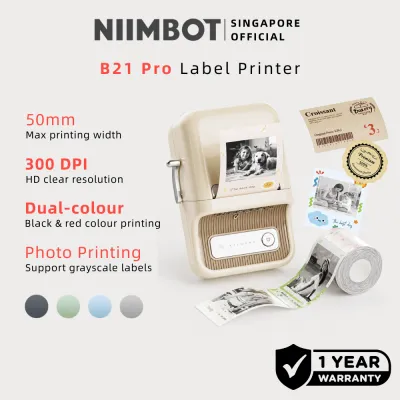
Choosing the right label maker depends heavily on where your labels will live and how you want them to look. The Niimbot B21 Pro stands out in the mid-range portable printer market, offering a compelling blend of retro aesthetics, seamless mobile app integration, and a wide variety of creative template options. It is highly suitable for home organization, creative journaling, and light boutique retail applications where visual appeal is a high priority.
However, if your labeling tasks require extreme durability, chemical resistance, or long-term outdoor exposure, traditional label makers utilizing laminated tape systems remain the superior choice. This comparison focuses on mid-range, portable, Bluetooth-enabled label makers available in the current market, evaluating how the Niimbot B21 Pro holds up against its primary competitors in terms of features, usability, and overall long-term value.
By examining print technology, companion software, and the ongoing cost of consumables, you can determine whether this stylish thermal printer aligns with your specific organizational or business needs.
Products mentioned in this guide
Prices are valid at publication and may change. Please refer to the product page for the latest price.
Core Evaluation Criteria for Mid-Range Label Makers
When evaluating portable label printers in the S$60 to S$120 price range, several performance factors dictate whether a device is a helpful organizational tool or a source of frustration. Understanding these criteria helps clarify the functional differences between competitive models.
Print Quality and Clarity
Print resolution is measured in dots per inch (dpi). Most mid-range portable label makers offer a standard resolution of 203 dpi, which is sufficient for clear text, simple icons, and scannable QR codes or barcodes. Higher-end or specialized models may offer up to 300 dpi for ultra-fine text. The performance of the print head also determines how evenly heat is applied across the thermal medium, directly affecting the sharpness of edges and the density of solid black areas.
App Ecosystem and Usability
Because modern portable label makers lack physical keyboards, they rely entirely on companion mobile applications connected via Bluetooth. A well-designed app should offer an intuitive user interface, a stable wireless connection, a diverse library of pre-designed templates, and a wide selection of fonts and icons. It must also support essential functions like batch printing, serial number generation, and database importing for small business operations.
Consumable Versatility
Label makers generally split into two camps: direct thermal printers and thermal transfer printers. Direct thermal models use heat-sensitive paper or film that darkens when exposed to the print head, eliminating the need for ink or toner but limiting the label’s environmental resistance. Thermal transfer models use a heated ribbon to fuse ink onto laminated tapes, creating highly durable labels that resist water, chemicals, and UV exposure. The physical width of the supported labels—ranging from narrow 12mm tapes to wider 50mm address labels—also dictates the printer’s versatility.
Hardware and Portability
Physical build quality, battery capacity, and charging standards are critical for on-the-go labeling. Modern devices should ideally feature rechargeable lithium-ion batteries and standard USB-C charging ports, removing the need to constantly purchase disposable alkaline batteries. The physical footprint, weight, and ease of loading label rolls also contribute directly to daily usability.
Niimbot B21 Pro vs. Brother Bluetooth Label Makers
Comparing the Niimbot B21 Pro to Brother’s popular entry-to-mid-level Bluetooth models, such as the Brother PT-P300BT (Cube) or the PT-P710BT (Cube Plus), highlights a clear division between creative, aesthetic thermal printing and highly durable, industrial-grade labeling.

App Experience and Design Versatility
- Niimbot App Interface: The Niimbot Design companion app is highly visual and tailored for creative users. It offers a vast library of pre-made templates, playful icons, decorative borders, and diverse fonts. Designing a label feels similar to using a basic graphic design tool, making it incredibly easy to create custom spice jar labels, price tags, or journal stickers. The app's drag-and-drop interface is highly responsive, though some advanced templates or premium fonts may require a VIP subscription.
- Brother App Interface: In contrast, Brother’s Design&Print 2 and iPrint&Label apps are more utilitarian and office-oriented. While they offer clean, professional templates, the creative assets are more reserved and structured. The interface is optimized for speed, precision, and standardized formats rather than artistic customization.
Label Durability and Material Comparison
- Niimbot Direct Thermal Labels: The B21 Pro utilizes direct thermal printing on specialized paper or synthetic film rolls. While Niimbot offers water-resistant and scratch-resistant thermal labels, they remain vulnerable to environmental extremes. Over time, exposure to high temperatures, direct sunlight, or friction can cause the thermal paper to fade or turn entirely black.
- Brother Laminated TZe Tapes: Brother’s patented TZe laminated tapes feature a protective top layer that shields the printed text from water, harsh chemicals, extreme temperatures, and intense UV light. Under Singapore's high relative humidity and tropical climate, laminated tapes are virtually impervious to peeling, fading, or degrading, making them the industry standard for long-term reliability.
Practical Use Case Alignment
- When to Choose Niimbot: The Niimbot B21 Pro is the ideal companion for indoor home organization, such as labeling pantry containers, storage boxes, files, and clothing drawers. It is also highly effective for small retail businesses, cafes, and florists needing elegant price tags, product packaging labels, or temporary food prep dates.
- When to Choose Brother: Brother label makers are indispensable for demanding environments. If you are labeling electrical distribution boards, outdoor gardening pots, network cables in server racks, or items that undergo frequent dishwashing, the durability of laminated TZe tape is absolutely necessary to ensure the labels remain readable for years.
Niimbot B21 Pro vs. Dymo and Other Portable Thermal Brands
When compared to other direct thermal competitors like the Dymo LetraTag 200B or portable Phomemo models (such as the M110 or M220), the Niimbot B21 Pro carves out its niche through distinctive industrial design and specific media support.
Design, Form Factor, and Build Quality
- Niimbot B21 Pro: The B21 Pro features a striking retro typewriter aesthetic, complete with a glossy finish, chrome-accented details, and a satisfying physical lever that opens the paper compartment. It serves as an attractive desktop piece rather than a utilitarian plastic tool. The build feels solid, and the tactile power button adds to the premium experience.
- Dymo and Phomemo: The Dymo LetraTag 200B features a highly compact, minimalist, disc-like plastic design that easily slides into a drawer or backpack. Phomemo’s portable printers, such as the M110, lean toward a rugged, industrial, or simple rounded plastic look. They prioritize functional utility and pocket-sized portability over visual flair.
Print Speed and Smudge Resistance
Direct thermal print clarity depends heavily on the quality of the thermal coating on the paper or film roll. The B21 Pro delivers consistent, smudge-resistant printing when paired with official Niimbot label rolls. Because the thermal reaction occurs instantly as the paper passes the print head, there is no wet ink to dry, meaning labels can be applied immediately after printing. While print speeds are comparable across these brands, the print density on the B21 Pro remains highly uniform, preventing the faint or streaky text often observed on lower-end generic thermal printers.
Connectivity and Offline Functionality
- Bluetooth Stability: The Niimbot B21 Pro utilizes a reliable Bluetooth connection that pairs quickly through the app rather than your phone's system settings. Connection dropouts are rare during standard operation.
- Offline Use Constraints: A key consideration for the Niimbot app is that many creative templates and cloud-saved designs require an active internet connection to load. If you are working in an area with poor mobile reception, you may be restricted to basic text input and locally saved layouts. Competitors like Dymo offer simpler apps that run entirely offline without requiring user accounts or cloud communication, providing a more reliable option for basic, distraction-free labeling.
Specification and Feature Matrix
To help you verify the hardware capabilities and technical specifications of these popular mid-range options, the table below compares the Niimbot B21 Pro with its direct competitors.
| Feature | Niimbot B21 Pro | Brother PT-P300BT (Cube) | Phomemo M110 |
|---|---|---|---|
| Print Technology | Direct Thermal (No Ink) | Thermal Transfer (Laminated) | Direct Thermal (No Ink) |
| Max Print Width | 50 mm | 12 mm | 57 mm |
| Resolution (dpi) | 203 dpi | 180 dpi | 203 dpi |
| Connectivity | Bluetooth, USB-C | Bluetooth | Bluetooth, USB-C |
| Battery Type | Rechargeable Lithium-ion | 6 x AAA Batteries or AC Adapter | Rechargeable Lithium-ion |
| App OS Support | iOS, Android, Windows | iOS, Android | iOS, Android, Windows, macOS |
| Primary Material | Thermal Paper & Film Rolls | Laminated TZe Tape Cassettes | Thermal Paper & Film Rolls |
Note: Specifications are based on current manufacturer documentation. Please verify exact battery inclusions and regional adapter compatibility with local retailers before purchasing.
Long-Term Value: Consumable Costs and Ecosystem
The initial purchase price of a label maker is only part of the financial equation. The ongoing cost of consumables heavily influences the overall value of the device over its lifespan.
Cost-Per-Label Analysis
- Direct Thermal Rolls: Direct thermal consumables, such as those used by the Niimbot B21 Pro and Phomemo M110, are generally inexpensive. Because they do not require a separate ink ribbon or a multi-layered protective laminate, a single roll containing dozens of labels can be purchased for a relatively low price. This makes direct thermal printing highly cost-effective for high-volume labeling tasks, such as printing shipping addresses, retail price tags, or temporary storage labels.
- Laminated Tape Cassettes: Brother’s laminated TZe cassettes are significantly more expensive per meter of label material. The complex manufacturing process of the six-layer laminated tape, combined with the integrated ink ribbon cartridge, results in a higher cost per label. If you print hundreds of labels monthly, the consumable costs for a laminated system will accumulate much faster than those of a direct thermal system.
Ecosystem Lock-in and RFID Technology
Many modern thermal printer manufacturers employ hardware-level ecosystem restrictions. The Niimbot B21 Pro utilizes RFID chips embedded in the core of official Niimbot label rolls. When you insert a roll into the printer, the companion app reads the RFID chip to automatically identify the exact label size, color, and material type, adjusting the on-screen canvas accordingly.
While this RFID integration provides exceptional convenience and eliminates manual setup errors, it also serves as a form of digital rights management (DRM). If you attempt to use cheaper, third-party generic thermal rolls that lack the official RFID chip, the printer may refuse to print, or the app may restrict advanced design features. Before committing to the Niimbot ecosystem, verify the current availability and pricing of official Niimbot rolls in your local market to ensure the ongoing costs align with your budget.
Environmental Limitations of Thermal Paper
Direct thermal labels have inherent physical limitations that you must consider before application:
- Heat Sensitivity: Because the paper relies on a heat-activated chemical reaction to display text, exposing a thermal label to high heat—such as placing it on a microwave-safe container, near a kitchen stove, or inside a car parked in the sun—can cause the entire label to turn black and become unreadable.
- UV and Light Exposure: Prolonged exposure to direct sunlight or strong UV light will gradually fade the printed image, eventually erasing the text entirely.
- Chemical and Friction Vulnerability: Hand sanitizers, rubbing alcohol, cooking oils, and constant abrasive friction can dissolve or degrade the thermal coating, causing the print to smudge or disappear.
Always check the care instructions and material specifications on your label packaging. If your labeled items will undergo frequent washing, exposure to oils, or heavy handling, consider upgrading to synthetic thermal film labels or opting for a laminated tape system.
Final Decision Framework: Which Label Maker Fits Your Needs?
To make an informed purchase, match your specific organizational habits, business requirements, and environmental conditions to the strengths of each system.
Choose the Niimbot B21 Pro if:
- You prioritize visual design: You want to create beautiful, customized labels with unique fonts, icons, and decorative borders for home styling, organizing pantries, or scrapbooking.
- You run a boutique business: You need a stylish, desktop-friendly device to print elegant price tags, product labels, or packaging seals for a physical store or online shop.
- You want maximum convenience: You appreciate a smart app that automatically detects the loaded label size via RFID, saving you from manual layout adjustments.
Choose a Brother Bluetooth Model if:
- You require industrial durability: Your labels must withstand harsh environments, extreme temperatures, direct sunlight, heavy moisture, or chemical exposure.
- You need long-term permanence: You are labeling cables, electrical panels, outdoor equipment, or assets that must remain clearly identifiable for several years.
- You prefer a standardized, utilitarian system: You do not need artistic templates and prefer a straightforward, reliable office labeling tool.
- You want to avoid subscription models: You prefer an app that operates entirely locally without cloud dependencies or premium feature paywalls.
Choose Dymo or Alternative Thermal Brands if:
- You need a highly portable tool: You prefer a compact, pocket-sized device like the Dymo LetraTag 200B that can be easily carried around in a toolkit or bag.
- You want to avoid proprietary roll restrictions: You prefer a thermal printer that allows the use of affordable, non-RFID third-party label rolls to minimize ongoing operating costs.
- You require specific desktop operating system compatibility: You need a printer that integrates seamlessly with macOS or Windows for batch printing from local databases.
Verify First if:
If you plan to use labels for specialized safety warnings, industrial compliance, medical tracking, or permanent outdoor signage, do not rely solely on general marketing descriptions. Always consult the technical data sheets provided by the consumable manufacturer to verify temperature limits, moisture ratings, and chemical compatibility before deploying labels in critical environments.
Frequently Asked Questions (FAQ)
Do Niimbot thermal labels fade over time?
Yes, Niimbot labels utilize direct thermal printing technology, which naturally fades over time due to the chemical composition of the heat-sensitive coating. Under typical indoor conditions away from direct sunlight, high humidity, and friction, high-quality synthetic thermal labels can remain legible for several years. However, if they are exposed to direct sunlight, high heat, or rubbed frequently, they will fade or darken much faster. For permanent or outdoor applications, laminated thermal transfer tapes are highly recommended.
Can I use third-party label rolls with the Niimbot B21 Pro?
The Niimbot B21 Pro is designed to work with official Niimbot label rolls, which contain an embedded RFID chip. This chip allows the companion app to automatically detect the label size and material type. While some physical third-party rolls of the correct dimensions may physically fit inside the printer compartment, the device’s firmware and app may restrict printing or disable customization features if a valid official RFID chip is not detected. To ensure consistent print quality and avoid voiding your manufacturer warranty, it is highly recommended to use official Niimbot consumables.

Community discussion
Share your experience or ask a question. Comments are reviewed before publication.