
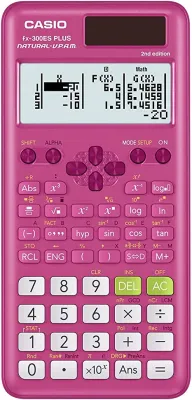
The Casio FX-300ESPLUS2 is generally not allowed for use in the Singapore GCE O-Level and N-Level national examinations. The Singapore Examinations and Assessment Board (SEAB) maintains a strict, exhaustive list of approved calculator models that candidates can bring into the examination hall. Because the Casio FX-300ESPLUS2 is a regional model primarily manufactured and distributed for the North American market, it is not registered on the official SEAB approved list.
Using an unapproved calculator during a national exam can lead to severe consequences, including the immediate confiscation of the device by exam invigilators, leaving the student to complete the paper without any mathematical aid. To avoid unnecessary stress and potential academic penalties, parents and students must ensure they purchase a model that is explicitly approved and stickered for exam use in Singapore.
SEAB Calculator Rules for GCE O-Level and N-Level Exams
The Singapore Examinations and Assessment Board (SEAB) establishes rigorous standards for all equipment brought into national examination halls, particularly scientific and graphing calculators. These rules are designed to ensure a level playing field for all candidates, preventing any unfair advantage that advanced technology might provide. The primary objective of these regulations is to test a student’s mathematical understanding and problem-solving abilities rather than their ability to program a device to solve equations automatically.
Products mentioned in this guide
Prices are valid at publication and may change. Please refer to the product page for the latest price.
Under the official SEAB guidelines, several types of calculator features are strictly prohibited in GCE O-Level and N-Level examinations. Calculators must not possess Computer Algebra Systems (CAS), which can perform symbolic manipulation of algebraic expressions. Additionally, any device capable of plotting graphs, storing user-defined programs, or communicating wirelessly via Wi-Fi, Bluetooth, or infrared is entirely banned. The vast majority of permitted devices are standard scientific calculators that display calculations across one or two lines without advanced programming capabilities.
Compliance is verified through a multi-stage process before and during the examinations. In the weeks leading up to the GCE O-Level and N-Level papers, secondary schools conduct official calculator registration exercises. Mathematics teachers inspect each student’s calculator to confirm the model matches the SEAB approved list. Once verified, a tamper-proof school or SEAB approval sticker is affixed to the back of the device. On the day of the exam, invigilators perform physical checks of every calculator on the desks, ensuring the model number is visible and the official sticker is intact.
How to Verify if the Casio FX-300ESPLUS2 is SEAB-Approved
To confirm whether a specific calculator like the Casio FX-300ESPLUS2 can be used in national exams, you must follow a systematic verification process. The most reliable method is to consult the official SEAB website directly. SEAB regularly updates its “List of Approved Calculators” document, which is accessible to the public. You should download the latest version of this PDF and search specifically for the brand “Casio” to view all permitted models.

When cross-referencing the Casio FX-300ESPLUS2, pay close attention to the exact model name and its suffixes. Manufacturers often produce regional variants of calculators that share similar physical designs but have different internal software or model designations. The FX-300ESPLUS2 (often written as fx-300ES PLUS 2nd Edition) is tailored for curricula outside of Singapore, such as those in North America. Consequently, you will find that this specific model is absent from the SEAB registry. Instead, the list features models specifically localized for Singapore, such as the Casio fx-96SG PLUS or fx-97SG X, which contain the “SG” suffix indicating local curriculum alignment.
You can also perform a physical inspection of the device to verify its status. The model number is permanently printed on the faceplate of the calculator, usually just above the screen or near the brand logo. If the printed text reads “fx-300ES PLUS” or “fx-300ES PLUS 2”, it does not match any entry on the SEAB approved list. Even if the calculator functions similarly to approved models, invigilators rely strictly on the exact alphanumeric model string during their checks.
Finally, check for the presence of an official school approval sticker. If you attempt to present the Casio FX-300ESPLUS2 during your school’s registration exercise, the mathematics department will identify it as an unlisted model and decline to sticker it. Without this sticker, the calculator will be flagged immediately by invigilators when placed on the exam desk.
What to Do If Your Calculator Is Not on the Approved List
If you discover that your current calculator, such as the Casio FX-300ESPLUS2, is not on the SEAB approved list, you must take immediate action to secure a compliant alternative. The first step is to consult your school’s mathematics department. Teachers can recommend the exact model that is integrated into the school’s daily lessons. Using the same model as your peers ensures you can easily follow classroom demonstrations and learn the specific keystroke shortcuts required for complex calculations.
If you recently purchased the unapproved calculator from a local retailer or an online marketplace, check the seller’s return or exchange policy. Many reputable stationery shops and ecommerce sellers in Singapore understand the strict exam requirements and may allow you to exchange an unapproved model for an approved one, provided the packaging is undamaged and you have the original receipt. If an exchange is not possible, consider purchasing a standard approved scientific calculator, which is widely available and relatively inexpensive.
Do not attempt to bring an unverified or unapproved calculator into the exam hall under any circumstances. Some students believe they can bypass the rules if their calculator looks similar to an approved model, but invigilators are trained to spot discrepancies. If you are caught using an unapproved device, the consequences are severe. The calculator will be confiscated, and you may face disciplinary action, including a zero mark for the practical or written paper. The anxiety of losing your calculator right before a high-stakes exam can also severely disrupt your focus and performance.
Tips for Buying Exam-Compliant Calculators in Singapore
When shopping for a new calculator for the GCE O-Level or N-Level exams, look for clear compliance indicators on the product packaging. Local distributors and retail outlets in Singapore often place prominent stickers or labels on the box stating “Approved by SEAB” or “Suitable for Ministry of Education (MOE) Exams.” These labels provide immediate peace of mind that the model has been vetted for the local school system.
To ensure authenticity and compliance, always purchase your stationery and calculators from authorized retailers. School bookshops, established local stationery chains, and official brand stores on major ecommerce platforms are the safest options. Avoid purchasing calculators from unauthorized parallel importers or overseas sellers on online marketplaces. These sellers often list regional variants, such as the Casio FX-300ESPLUS2, which may look identical to local models but lack the necessary firmware modifications and official SEAB registration.
Always retain your purchase receipt and the original packaging until the calculator has been successfully registered and stickered by your school. Having the receipt allows you to quickly return or exchange the device if you accidentally purchased the wrong model. Additionally, verify the power source of the calculator before buying. Some models rely solely on solar power, while others use a combination of solar cells and backup batteries (such as AAA or button cells). Opting for a dual-power model ensures the calculator remains functional even in dimly lit examination halls.
Frequently Asked Questions (FAQ)
Can I use a calculator with a protective cover during the exam?
No, you cannot keep a protective cover on your calculator during the examination. SEAB rules require all candidates to remove hard plastic slide-on covers, leather cases, or soft slipcovers from their calculators before the paper begins. These covers must be placed on the floor underneath your desk along with your other personal belongings. This rule prevents candidates from concealing notes, formulas, or unauthorized materials inside the cover or casing.
What happens if my approved calculator runs out of battery during the paper?
If your approved calculator fails or runs out of battery during the exam, you should raise your hand immediately to alert the invigilator. The exam staff may be able to provide a temporary replacement calculator from the school’s spare inventory, though this is subject to availability. You will not be granted any extra time to make up for the disruption. To prevent this scenario, it is highly recommended to replace the batteries a few days before the examination period begins and to test the screen contrast to ensure the power levels are optimal.
Community discussion
Share your experience or ask a question. Comments are reviewed before publication.