
Physical Ntuc FairPrice vouchers are a highly convenient way to pay for your daily essentials, groceries, and household goods across Singapore. To use your physical voucher, you can present it directly to a cashier at a manned checkout counter or scan its barcode at a self-checkout kiosk in any participating store. If your physical voucher features a scratch-off panel with a digital PIN, you can also link its value directly to your FairPrice online account to pay for deliveries via the mobile app or website.
Understanding the exact steps for both in-store and online redemption ensures a seamless transaction without any delays at checkout. By verifying your voucher type, checking the printed terms, and knowing how to handle split payments, you can maximize the value of your shopping vouchers on your next grocery run.
Understanding Your Physical NTUC FairPrice Voucher
Before heading to the checkout counter, it is important to identify the specific type of physical Ntuc voucher you hold. FairPrice issues vouchers in several formats, including traditional paper vouchers, scratch cards, and physical gift cards. Traditional paper vouchers are typically issued in fixed denominations such as S$5, S$10, or S$50 and are designed primarily for physical store transactions. Physical gift cards, on the other hand, are durable plastic cards that may hold a pre-loaded balance or be reloadable depending on the specific terms of issue.
Products mentioned in this guide
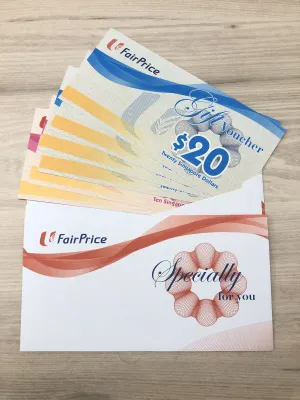
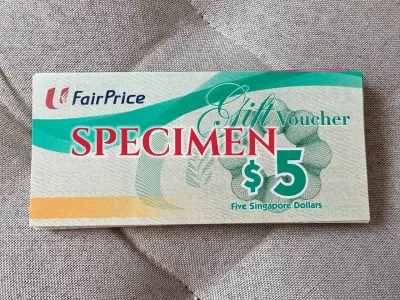

Prices are valid at publication and may change. Please refer to the product page for the latest price.
Always turn the voucher over to read the printed terms and conditions on the back before you begin shopping. These terms detail critical information, including the voucher’s expiry date, face value, and any specific store format restrictions. While most standard vouchers are accepted across all major formats—including FairPrice Supermarkets, FairPrice Finest, FairPrice Xtra, and Warehouse Club—some promotional or corporate vouchers may be restricted to specific locations or outlets.
Checking for a scratch-off panel or a covered PIN code on your physical voucher is essential if you plan to shop online. If your voucher has a silver scratch-off panel, it is designed for dual-use, meaning you can choose to either spend it in-store or redeem it digitally. If there is no scratch-off panel or PIN printed anywhere on the paper voucher, it is strictly restricted to in-store use and cannot be processed through the website or mobile app.
How to Redeem Your Voucher In-Store
Using your physical voucher at a brick-and-mortar store is straightforward, whether you prefer interacting with a cashier or using automated checkout machines. Both methods require you to have the physical voucher intact and ready for verification.

Using a Manned Cashier
When paying at a manned checkout lane, start by placing your items on the conveyor belt as usual. Before the cashier begins scanning your items or finalizing the bill, explicitly inform them that you intend to pay using an NTUC FairPrice voucher. This allows the staff member to configure the point-of-sale terminal to accept voucher payments before completing the transaction.
Hand the physical voucher directly to the cashier, who will scan the printed barcode or manually key in the serial number for verification. If you are using paper vouchers, the cashier will retain them after scanning. For physical gift cards, the cashier will swipe or tap the card to deduct the transaction amount from the card’s balance.
If your total grocery bill exceeds the face value of your physical vouchers, you must pay the remaining balance using a secondary payment method. Cashiers accept cash, credit cards, debit cards, NETS, or mobile payment apps to cover any outstanding amount. Once the transaction is complete, check your printed receipt to verify that the voucher values were correctly deducted from your final bill.
Using Self-Checkout Kiosks
If you prefer using the self-checkout kiosks, begin by scanning all your grocery items at the station. Once you have finished scanning and are ready to pay, look at the kiosk screen and select “Voucher” or “Gift Card” as your primary payment method. Choosing the correct payment category on the screen activates the kiosk’s optical scanner to read voucher barcodes.
Hold the physical voucher underneath the red laser scanner, aligning the barcode horizontally. Keep the voucher flat and steady until the machine emits a confirmation beep, indicating that the barcode has been successfully read and applied. If the kiosk screen displays the updated balance, you can proceed to scan additional vouchers if you have more than one.
In cases where a voucher barcode is slightly creased or fails to scan, do not attempt to force it. Look for an on-screen prompt to manually enter the voucher’s serial number, or tap the “Call Staff” button to alert the store assistant monitoring the self-checkout area. The assistant will quickly verify the voucher and input the code manually to ensure your discount is applied.
After applying your physical vouchers, the kiosk will prompt you to pay any remaining balance. Select your preferred secondary payment option, such as a contactless credit card or mobile payment, to settle the final amount. The kiosk will print a receipt detailing the voucher redemption and any remaining balance if you used a physical gift card.
How to Use Your Voucher on the FairPrice App and Website
Bridging your physical voucher to your digital account allows you to enjoy the convenience of home delivery while utilizing your physical gift balances. However, this process requires specific voucher types and a registered online account.
Adding the Voucher to Your Digital Account
To use a physical voucher online, you must first verify that it is eligible for digital redemption. The physical voucher must explicitly state that it can be used online and must feature a silver scratch-off panel covering a secure PIN. Traditional paper vouchers that lack this scratch-off PIN cannot be uploaded to your digital wallet and must be spent in-store.
To begin the digital link, open the FairPrice mobile app or log in to the official website. Navigate to your account profile and locate the section labeled “Vouchers,” “Wallet,” or “Payment Methods.” This is the centralized hub where you can manage your digital payment options and store credits.
Gently scratch off the silver protective panel on your physical voucher using a coin or your fingernail to reveal the secure PIN. Avoid using sharp objects like scissors or knives, which can tear the paper and render the code unreadable. Carefully type the voucher’s serial number and the revealed PIN into the designated fields in the app, then click “Add” or “Redeem” to credit the value to your digital account.
Once the voucher is successfully added to your digital wallet, keep the physical voucher in a safe place until you have fully placed and received your online order. In the rare event of an account sync issue, transaction dispute, or order cancellation, having the physical voucher on hand is necessary for customer service representatives to verify your claim.
Applying the Balance at Online Checkout
With your voucher balance credited to your digital account, you can shop for groceries online as you normally would. Add your desired items to your virtual cart and proceed to the checkout screen when you are ready to finalize your order. Review your delivery address and preferred delivery slot before moving to the payment section.
On the payment selection screen, look for the option to apply your saved vouchers or digital wallet balance. Check the box next to your redeemed voucher balance to apply it to your current order. The system will automatically calculate the deduction and display the updated total on the order summary page.
If your online order total is greater than your digital voucher balance, the system will prompt you to select a secondary payment method, such as a saved credit card, to cover the difference. This ensures that the transaction can be processed smoothly without any interruption to your delivery schedule.
Be aware that certain promotional vouchers or digital balances may have restrictions regarding delivery charges or service fees. Some vouchers can only be applied to the cost of physical products, meaning you will need to pay for delivery and service fees using a credit or debit card. Always review the final price breakdown on the checkout screen before clicking the final confirmation button.
Important Terms, Restrictions, and Troubleshooting
To avoid complications at the checkout counter or online, familiarize yourself with common exclusions and troubleshooting steps. Being prepared prevents awkward situations and helps protect your voucher’s financial value.
Physical vouchers typically carry specific product exclusions printed in the fine print on the back. In most cases, you cannot use these vouchers to purchase tobacco products, alcohol, stage 1 infant formula, statutory items like lottery tickets, or other gift cards. If your cart contains any of these restricted items, the value of those items will be excluded from the voucher calculation, and you must pay for them using an alternative payment method.
If you find yourself with a damaged physical voucher—such as a torn barcode, a faded serial number, or an accidentally ruined scratch-off PIN—do not discard it. Take the damaged voucher to the customer service counter of a major FairPrice outlet. The staff can often verify the authenticity of the voucher using the remaining visible serial numbers and assist you with a manual redemption or replacement, subject to verification.
To check the remaining balance on a physical gift card, you can ask a cashier at any manned counter to perform a balance check, or look at the bottom of your latest transaction receipt. For digital voucher balances, simply log in to your FairPrice app and check your digital wallet history. Keeping track of these balances prevents surprises during checkout.
Finally, always pay close attention to the printed expiry date on your physical vouchers. FairPrice vouchers generally cannot be extended, renewed, or replaced once they have expired. To prevent losing the monetary value, plan your grocery trips well ahead of the expiry date and use older vouchers first.
Frequently Asked Questions (FAQ)
Can I use multiple NTUC FairPrice vouchers in a single transaction?
Yes, the point-of-sale system at physical stores allows you to stack and use multiple physical vouchers in a single transaction. If you are paying at a manned cashier lane, inform the staff member upfront that you plan to use multiple vouchers so they can scan them sequentially. At self-checkout kiosks, you can scan your physical vouchers one after another, and the machine will continuously update the remaining balance until all vouchers are applied.
What happens if my purchase total is less than the voucher's face value?
For traditional paper vouchers, cashiers do not provide cash change if your purchase total is lower than the voucher’s face value. Any remaining unused value on a paper voucher is forfeited, so it is highly recommended to plan your purchases so that the total bill meets or exceeds the voucher’s value. However, if you are using a physical gift card or a digital voucher balance on the app, the remaining balance is retained on the card or in your digital account for future use.
Community discussion
Share your experience or ask a question. Comments are reviewed before publication.