
Using a physical Sheng Siong voucher to pay for your groceries is a straightforward process that can help you manage your household budget at one of Singapore’s most popular supermarket chains. You can redeem these physical vouchers at any manned checkout counter in-store, and select voucher types featuring digital alphanumeric codes can also be applied to your online grocery orders on the official e-commerce platform. Understanding the specific terms, physical handling requirements, and step-by-step redemption processes ensures a seamless transaction whether you are shopping in person or ordering from home.
Preparing Your Physical Voucher: Validity and Restrictions
Before heading to the supermarket or loading your digital cart, taking a few moments to inspect the physical condition and terms of your voucher can prevent unexpected delays at the checkout counter.
- Verify the Expiry Date: Locate the printed expiry date, which is typically found on the front or back of the physical paper voucher. Sheng Siong vouchers have a strict validity period, and expired vouchers cannot be extended, revalidated, or exchanged for cash. It is best to organize your vouchers by expiry date so you use the oldest ones first.
- Understand the Denomination: Identify the monetary value printed clearly on the face of the voucher, usually in standard Singapore Dollar (S$) denominations such as S$5, S$10, S$20, or S$50. Ensure the voucher is an official Sheng Siong issued voucher, which is specifically designated for purchases at their physical supermarkets or their official online grocery platform.
- Inspect the Paper and Print Quality: Physical vouchers are typically printed on specialized cardstock or thermal-coated paper. Protect the voucher from moisture, grease, and direct heat, which can cause the thermal ink to fade or the paper to tear. Before heading to checkout, perform a quick visual check: ensure the barcode is sharp, the serial number is fully legible, and the paper has no severe tears or water damage that could prevent optical scanners from reading the printed ink.
- Check for Restricted Items: Read the fine print on the back of the voucher to understand any product exclusions. Most supermarket vouchers in Singapore exclude specific regulated categories from voucher payments. These commonly include tobacco products, alcohol, lottery tickets, and the purchase of other gift cards or vouchers. If your cart contains these items, you must pay for them using an alternative payment method.
- Change and Balance Policies: Physical supermarket vouchers operate on a "no change" policy. If your total grocery bill is lower than the face value of the voucher, the cashier cannot provide cash change, and any remaining balance on that voucher is permanently forfeited. To maximize the value of your voucher, plan your shopping cart total so that it meets or slightly exceeds the voucher's denomination.
Step-by-Step Guide to Redeeming Vouchers at Physical Supermarkets
Redeeming your physical voucher in-store requires navigating the checkout process correctly, as physical paper vouchers involve manual handling and validation by supermarket staff.
Products mentioned in this guide
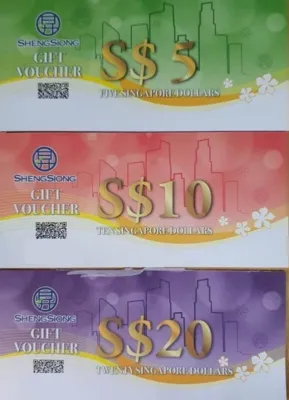
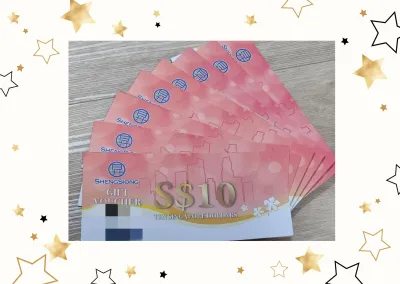

Prices are valid at publication and may change. Please refer to the product page for the latest price.

- Step 1: Shop and Proceed to a Manned Cashier: Complete your grocery shopping and locate a manned checkout lane. It is important to note that physical paper vouchers generally cannot be processed at self-checkout kiosks. These automated machines lack the physical slots, scanning mechanisms, or collection bins required to securely accept, verify, and retain physical paper vouchers.
- Step 2: Declare Your Payment Method Early: As you place your groceries on the conveyor belt, inform the cashier immediately that you will be paying with a physical Sheng Siong voucher. Declaring your payment method before the cashier begins scanning or finalizes the bill allows the system to process the voucher smoothly without needing to void, adjust, or re-ring the transaction.
- Step 3: Hand Over the Voucher for Verification: Pass the physical voucher to the cashier. The cashier will inspect the voucher's security features, check the expiry date, and scan the printed barcode using the point-of-sale optical scanner. If the scanner cannot read the barcode due to minor smudging or printing variations, the cashier will manually input the alphanumeric serial number and PIN into the cash register system.
- Step 4: Settle Any Remaining Balance: If your total grocery bill exceeds the cumulative value of the vouchers you have presented, you must pay the difference. Sheng Siong stores accept a wide range of payment methods for the remaining balance, including cash, NETS, major credit cards, and local mobile payment options such as PayNow or contactless mobile wallets.
- Step 5: Verify the Receipt and Surrender the Voucher: Once the transaction is processed, the cashier will retain the physical voucher, as it must be collected and reconciled by the store. In some cases, the cashier may stamp or mark the voucher as "voided" before keeping it. Before leaving the counter, check your printed receipt to confirm that the voucher denomination was correctly deducted from your final bill.
How to Apply Physical Voucher Codes to Online Grocery Orders
Transitioning a physical paper voucher to a digital shopping platform is highly convenient, but it depends on the specific type of voucher you hold.
- Confirm Online Eligibility: Check the front and back of your physical voucher for a digital redemption code, promo code, or scratch-off PIN. While modern physical vouchers often come equipped with these digital credentials for online use, older batches or specific corporate gift vouchers may be strictly restricted to in-store redemption. If your voucher does not feature an online code or PIN, it can only be used at physical supermarket outlets.
- Step 1: Build Your Cart on the Official Platform: Log in to your account on the official Sheng Siong online grocery website or mobile application. Browse the digital aisles, add your desired groceries to the virtual shopping cart, and ensure your delivery address falls within the active service zones across Singapore.
- Step 2: Locate the Voucher Input Field: Once you have finished shopping, proceed to the checkout or payment summary screen. Look for the dedicated input field labeled "Voucher Code," "Promo Code," or "Gift Voucher." This field is typically located near the order total summary before you select your final payment method.
- Step 3: Enter the Code Accurately: Gently scratch off any protective coating on the back of the physical voucher to reveal the PIN, if applicable. Carefully type the alphanumeric serial number and PIN into the online input field. Avoid common transcription errors, such as confusing the capital letter "O" with the number "0", or the letter "I" with the number "1". Ensure there are no accidental spaces at the beginning or end of the code.
- Step 4: Apply and Verify the Discount: Click the "Apply" or "Redeem" button next to the input field. The online system will validate the code against its database. Once accepted, verify that the voucher value has been successfully subtracted from your order subtotal. You can then proceed to select your preferred delivery slot and pay any remaining balance using your credit card or other online payment methods.
- Retain the Physical Voucher: Do not discard the physical paper voucher immediately after completing your online transaction. Keep it in a safe, dry place until your groceries have been successfully delivered and you have verified your order. In the rare event of a delivery cancellation, system glitch, or refund request, customer support may require you to provide photos of the physical voucher and its serial number to reinstate the credit.
Troubleshooting Rejected or Damaged Vouchers
If you encounter issues when trying to redeem your voucher, knowing how to troubleshoot the problem can save time and reduce stress.
- Handling Damaged or Faded Barcodes: If the barcode on your voucher is torn, faded, or smudged, the cashier's optical scanner may fail to read it. In this scenario, politely ask the cashier to manually type the printed serial number into the point-of-sale system. If the serial number itself is completely illegible due to severe physical damage, the store staff cannot verify its authenticity. You should step aside from the queue and contact Sheng Siong's customer service department for assistance; however, keep in mind that severely damaged vouchers without legible numbers generally cannot be replaced.
- Online Code Rejections: If the online platform rejects your digital voucher code, run through a quick diagnostic checklist. First, double-check your typing for character errors. Second, verify that the voucher has not expired. Third, check if your cart contains restricted items like alcohol or tobacco, which might block the voucher from applying. Finally, confirm that the voucher is indeed eligible for online use and has not been previously redeemed.
- System or Network Errors: Occasionally, a temporary network glitch or system outage can prevent the point-of-sale terminal or the online platform from validating your voucher. If this occurs in-store, ask the cashier to seek assistance from a duty manager, who may be able to process the voucher manually or check if another terminal is online. For online errors, save your cart, wait a few minutes for the server to stabilize, and try entering the code again.
- Lost or Stolen Vouchers: It is vital to treat physical vouchers with the same care as physical cash. Because they do not carry personal identification details, anyone who finds a lost voucher can legally redeem it. If a physical voucher is lost, misplaced, or stolen, Sheng Siong cannot track, block, or issue a replacement voucher. Store them in a secure wallet or organizer until you are ready to use them.
Frequently Asked Questions (FAQ)
Can I get change if my grocery bill is less than the voucher's value?
No, Sheng Siong physical vouchers do not provide cash change. If your total bill is S$18 and you pay with a S$20 physical voucher, the remaining S$2 of value is permanently forfeited. To avoid losing any value, add small, non-perishable household staples—such as tissue packets, canned goods, or pocket-sized stationery items—to your cart to bring your total bill slightly above the voucher’s face value.
Can I use multiple physical vouchers in a single transaction?
Yes, you can typically combine multiple physical vouchers to pay for a single, large grocery bill at physical checkout counters. When checking out, hand all the physical vouchers you wish to use to the cashier at the start of the transaction. The cashier will scan each voucher sequentially, and the total accumulated value will be deducted from your bill before you pay any remaining balance.
Are there any items I cannot buy with a Sheng Siong voucher?
Yes, certain regulated items and services are excluded from voucher payments due to licensing and legal restrictions in Singapore. These exclusions generally include tobacco products, alcoholic beverages, lottery tickets, and the purchase of other third-party gift cards or vouchers. Always check the specific list of exclusions printed in the fine print on the back of your physical voucher before shopping.
Community discussion
Share your experience or ask a question. Comments are reviewed before publication.