
Redeeming NTUC FairPrice vouchers is a straightforward process that helps you save on daily essentials, groceries, and household items. Whether you hold a physical paper voucher or a digital coupon, knowing how to apply them correctly at checkout ensures a smooth and hassle-free transaction. The redemption method depends primarily on your shopping channel, as physical supermarkets and online grocery platforms use different verification systems to process these vouchers.
To make the most of your vouchers, it is essential to prepare before you reach the payment stage. Simple steps like checking the voucher’s physical condition, verifying its validity, and understanding store-specific exclusions can prevent unexpected delays at the cash register or digital checkout. This guide provides a comprehensive walkthrough of the redemption process for both in-store and online purchases, along with practical tips to manage your vouchers effectively.
Check Your Voucher Details Before Checkout
Before heading to the checkout counter or finalizing your online cart, take a few moments to inspect your vouchers. Physical paper vouchers require careful handling to remain machine-readable. Ensure the paper is flat, dry, and free from significant tears or creases, particularly around the barcode and serial number areas. If a barcode is smudged, faded, or scratched, the optical scanners at the register may fail to read it, requiring the cashier to enter the code manually, which can slow down the queue.
Products mentioned in this guide



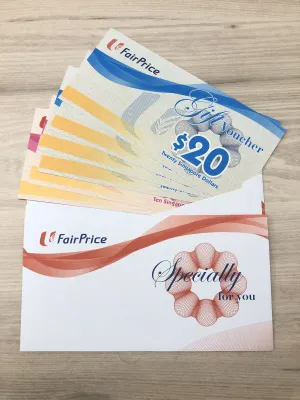
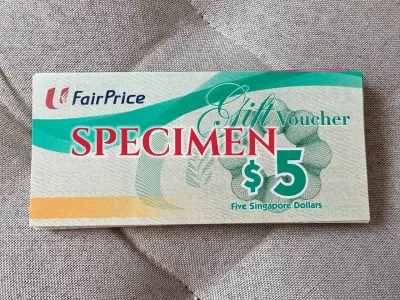


Prices are valid at publication and may change. Please refer to the product page for the latest price.
The expiry date is one of the most critical details to verify. This date is typically printed clearly on the front or back of the voucher. Once a voucher passes its expiration date, the point-of-sale (POS) system will automatically reject it, and store staff cannot override this system block. Checking this detail beforehand prevents the disappointment of presenting an invalid voucher at checkout.
Additionally, pay close attention to the specific outlet types where the voucher is accepted. FairPrice operates several retail formats, including standard supermarkets, premium Finest stores, large-scale hypermarkets, and convenience stores. Some promotional vouchers or corporate gift vouchers may be restricted to specific store formats or may exclude franchise locations. Reading the fine print on the back of the voucher will clarify exactly where you can spend it.
Finally, understand the denomination and stacking rules of your vouchers. Physical vouchers often come in fixed denominations, such as S$5, S$10, or S$50. Most physical stores allow you to combine multiple paper vouchers to pay for a single transaction, provided they are all valid. However, digital vouchers or online promo codes may have stricter limitations, often restricting usage to one code per transaction or requiring a minimum spend threshold before the discount applies.
How to Use Physical Vouchers In-Store
Using physical paper vouchers at a traditional checkout counter requires a specific sequence to ensure the transaction is processed correctly. As you queue up, organize your vouchers so they are ready to hand over. If you have multiple vouchers, stack them neatly with the barcodes facing the same direction. This small preparation helps the cashier scan them quickly and minimizes handling time.

When it is your turn, inform the cashier immediately that you intend to pay using FairPrice vouchers. It is crucial to do this before the cashier finalizes the bill or prompts you for other payment methods like credit cards or mobile apps. The POS system must be configured to accept voucher payments as a specific tender type, and notifying the cashier early allows them to select the correct input mode on their register.
Hand the physical vouchers to the cashier, who will scan the barcode on each voucher using the hand-held or counter-mounted scanner. If the scanner struggles to read the barcode, the cashier will manually type the serial number printed on the voucher into the register. Once scanned, the system will deduct the voucher value from your total bill. You can monitor the customer-facing display screen to verify that each voucher has been successfully applied.
Because physical vouchers do not provide cash change for any unused balance, you should plan your purchase total carefully. It is best to ensure your final bill is slightly higher than the total value of your vouchers. Prepare an accepted secondary payment method, such as cash, a debit card, a credit card, or a local mobile payment app, to cover the remaining balance. For example, if your bill is S$52 and you use S$50 worth of vouchers, you will need to pay the remaining S$2 using another payment method.
If you prefer using self-checkout kiosks, the process may vary. Some modern self-checkout machines are equipped with document slots and scanners that allow you to scan and deposit physical vouchers directly. However, many self-checkout zones require you to alert an attending staff member, who will assist in scanning the vouchers and securing them in the machine’s drop box to complete your transaction.
How to Redeem Vouchers on the Official Online Store
Redeeming vouchers on the official online grocery platform offers a convenient alternative to in-store shopping, but it requires a digital approach. Instead of physical paper, online redemption relies on alphanumeric promo codes, digital gift cards, or vouchers linked directly to your online customer account.
To begin, log in to your account on the official website or mobile application. If you have a physical voucher that features a digital redemption code, or if you received a digital voucher via email, you may be able to pre-load it into your account’s digital wallet. Navigating to your profile or wallet section and entering the code beforehand saves time during the actual checkout process.
Once you have finished adding items to your virtual shopping cart, proceed to the checkout page. Before entering your payment details, look for the payment summary or order review section. Here, you will find a dedicated input field labeled for promo codes, discount codes, or voucher PINs. This field is typically located near the subtotal display.
Carefully type the alphanumeric code into the input field. Digital codes are highly sensitive to formatting, so ensure you enter the exact characters, paying close attention to uppercase and lowercase letters, numbers, and any hyphens. Avoid copying extra spaces before or after the code, as this can cause the system to register an error. If the voucher is already saved in your digital wallet, you can simply select it from a list of available promotions instead of typing it manually.
After entering or selecting the voucher, click the “Apply” or “Redeem” button. The system will process the code and update your order summary. Verify that the discount is accurately reflected in the final total before confirming the order. Keep in mind that some online systems do not allow you to stack multiple promo codes or combine a voucher with other active store-wide promotions. If a conflict occurs, the system will usually apply the promotion that offers the higher discount, or prompt you to choose which one to keep.
Important Restrictions and Exclusions to Note
To avoid unexpected issues at checkout, it is vital to understand the common limitations and exclusions associated with voucher usage. Retailers implement these restrictions to comply with local regulations, licensing agreements, and store policies.
The most common exclusions involve regulated or statutory items. In most cases, you cannot use vouchers to purchase tobacco products, alcoholic beverages, infant formula, pharmacy-only medicines, or statutory items such as lottery tickets. Additionally, vouchers are generally not valid for purchasing third-party gift cards, prepaid phone cards, or mobile top-up cards. If your shopping cart contains any of these restricted items, their value will be excluded from the voucher calculation, and you must pay for them using an alternative payment method.
The change policy is another critical restriction to keep in mind, particularly for physical paper vouchers. These vouchers are strictly non-refundable and cannot be exchanged for cash. If your purchase total is lower than the face value of the voucher, the remaining balance is forfeited. For instance, using a S$10 voucher on a S$9.50 purchase means you lose the remaining S$0.50. To maximize your voucher’s value, always ensure your transaction total meets or exceeds the voucher denomination.
Minimum spend requirements and promotional compatibility are also common. Some vouchers are only active once your transaction reaches a specific dollar threshold, excluding any restricted items. Furthermore, certain vouchers cannot be used in conjunction with member discounts, senior citizen discount days, or other promotional events. Always read the terms and conditions printed on the voucher or detailed in the online help section to clarify these rules before shopping.
Frequently Asked Questions (FAQ)
What happens if my voucher value is higher than my total bill?
For physical paper vouchers, any unused value is forfeited because the store does not provide cash change or partial credit. If you use a S$20 voucher for a S$18 purchase, you will not receive S$2 in change, and the voucher is fully consumed. For digital vouchers or account-linked gift cards, the policy depends on the specific terms; some digital platforms may allow you to retain the remaining balance in your digital wallet, while others treat the code as single-use only. Always check the terms printed on the voucher or the digital wallet interface to confirm.
Can I use my voucher to buy other gift cards or prepaid items?
No, you generally cannot use store vouchers to purchase other financial instruments or prepaid products. This restriction typically covers third-party gift cards, app store cards, mobile network top-up cards, and lottery tickets. These items are excluded from voucher payments to prevent cash-equivalent recycling and to comply with financial regulations. You must use cash, debit cards, or credit cards to purchase these specific items.
What should I do if the cashier or online system rejects my voucher?
If a physical voucher is rejected in-store, check for physical damage, smudged barcodes, or an expired date. If the voucher is in good condition and valid, ask the cashier to manually enter the serial number. For online rejections, double-check the alphanumeric code for typos, ensure your cart does not contain excluded items, and verify that you have met any minimum spend requirements. If the system continues to reject a valid, unexpired voucher, contact customer service with the voucher’s serial number and purchase receipt for assistance.
Community discussion
Share your experience or ask a question. Comments are reviewed before publication.