
Choosing the right paper weight is a fundamental step in ensuring smooth office operations and high-quality document presentation. The weight of paper, measured in grams per square meter (gsm), directly affects how a sheet feels, how much ink it can absorb, and how easily it moves through your printer’s internal rollers. Selecting the incorrect weight can lead to frustrating paper jams, wasted toner, or documents that look unprofessional to clients.
To choose the right Xuedele paper weight, you must balance your specific document requirements, your printer’s mechanical capabilities, and your overall budget. While lighter weights like 70gsm offer excellent cost efficiency for high-volume internal drafts, heavier options like 80gsm provide the opacity and professional feel required for external correspondence and double-sided printing. This guide will walk you through the diagnostic steps to select the perfect paper weight for your daily printing needs.
Quick Diagnostic: Matching Paper Grammage to Document Types
When you need to make a quick decision before purchasing paper reams, matching the document type to the standard paper weight is the most reliable method. For everyday office tasks, the choice usually comes down to 70gsm versus 80gsm paper. Understanding the subtle physical differences between these two common weights will help you avoid printing issues and optimize your stationery budget.
Products mentioned in this guide
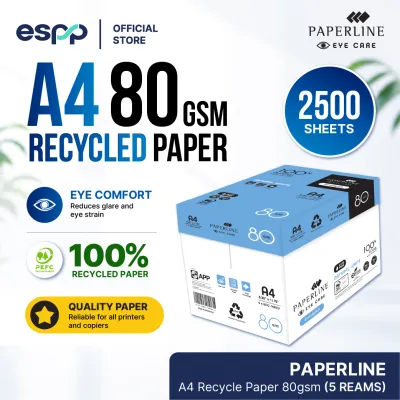

Prices are valid at publication and may change. Please refer to the product page for the latest price.
A 70gsm paper is thinner and more flexible, making it the ideal choice for high-volume, single-sided printing tasks. If you are printing daily emails, temporary reference guides, or internal spreadsheets that will eventually be recycled, this weight offers the best balance of utility and economy. It takes up less physical space in filing cabinets and binders, allowing you to store more documents efficiently.
On the other hand, 80gsm paper is the standard benchmark for professional business documents. It offers a noticeable increase in thickness and stiffness, which translates to a more substantial feel when held. This weight is highly recommended for external reports, client-facing letters, and any documents that require double-sided printing, as the extra density helps prevent text from showing through to the other side.
Before committing to a bulk purchase of any paper weight, always verify your printer’s compatibility. Most modern office copiers and laser printers are designed to handle both 70gsm and 80gsm paper without any adjustments. However, compact home printers or older devices may have specific tray settings or feed mechanisms that perform better with one weight over the other, so checking your device’s specifications is a crucial first step.
Assess Your Document Requirements and Usage Volume
To determine the ideal paper weight for your workspace, you must evaluate the nature of your documents and your overall printing volume. High-volume environments, such as schools, logistics offices, and administrative departments, often prioritize cost-per-sheet efficiency. In these scenarios, printing hundreds of pages of internal drafts, shipping labels, or packing slips on 70gsm paper can lead to significant long-term savings.

However, saving money on paper weight should not come at the expense of professional presentation. When preparing external client proposals, legal contracts, or official corporate letters, the tactile quality of the paper speaks volumes about your attention to detail. Using a flimsy sheet for an important contract can leave a poor impression, whereas an 80gsm or heavier sheet conveys stability and professionalism.
Double-sided printing, or duplexing, is another major factor that dictates your paper choice. When you print on both sides of a sheet, the opacity of the paper determines whether the text on the reverse side interferes with readability. Lighter papers like 70gsm have lower opacity, meaning dark ink or toner can easily shadow through, making the document look messy and difficult to read.
The type of content you print also influences the required paper thickness. Simple text documents with minimal formatting require very little ink or toner, making them suitable for lighter paper. In contrast, documents containing high-density graphics, charts, or solid color blocks deposit a large amount of moisture or toner onto the page, which can cause thin paper to warp, buckle, or wrinkle during the printing process.
Verify Printer Compatibility and Feed Mechanisms
Your printer’s physical design and mechanical condition are critical factors in determining which paper weights you can use successfully. Every printer model has a specified range of supported paper weights, which you can find in the user manual or on the manufacturer’s specification sheet. Attempting to feed paper that is too light or too heavy can result in persistent feeding errors.
The path that paper travels inside the machine varies significantly between printer types. Straight-path feeders, which typically load paper from a rear tray and exit through the front, place very little physical stress on the paper. These systems can easily handle a wider range of paper weights, including heavier cardstock, because the sheet does not need to bend or flex as it passes the imaging drum.
In contrast, curved-path feeders, common in front-loading desktop printers, pull the paper from a bottom drawer and loop it around a series of rollers to exit at the top. This design requires the paper to bend almost 180 degrees during the printing cycle. Thicker, stiffer papers may resist this bending motion, causing them to slip on the rollers or become wedged inside the paper path, leading to a jam.
The condition of your printer’s feed rollers also plays a vital role in paper handling. Over time, the rubber rollers that grab and pull individual sheets from the tray can wear down, become smooth, or accumulate paper dust. Worn rollers may struggle to grip a single sheet of 70gsm paper, leading to double-feeding, or they may lack the traction required to pull a heavier 80gsm sheet up into the feed path.
To maintain optimal feeding performance, regularly inspect and clean your printer’s feed rollers. Gently wiping the rubber surfaces with a damp, lint-free cloth can remove accumulated dust and restore the necessary grip. If you notice consistent feeding issues despite using high-quality paper within the recommended weight range, it may be time to replace the worn rollers or service the printer.
Inspect Xuedele Packaging Labels and Physical Attributes
When selecting Xuedele paper, understanding how to read the packaging labels ensures you get the exact product required for your tasks. The most prominent specification on the wrapper is the grammage, typically displayed as 70g or 80g. This number indicates the weight of one square meter of the paper, which serves as a direct proxy for its thickness and density.
In addition to weight, look for indicators of paper brightness and opacity on the packaging. Higher brightness levels reflect more light, providing a sharp contrast that makes printed text and images pop. Opacity ratings are equally important, especially if you plan to perform double-sided printing, as higher opacity prevents distracting show-through.
The quality of the packaging wrapper itself is a critical factor in maintaining paper performance. Xuedele reams are wrapped in moisture-resistant materials designed to protect the paper from environmental humidity. In humid climates like Singapore, paper can quickly absorb moisture from the air, causing the edges to curl, wave, or stick together due to static electricity.
To prevent humidity-related printing issues, keep your paper reams sealed in their protective wrappers until you are ready to load them into the printer tray. If you have leftover paper, store it in a dry, cool cabinet rather than leaving it exposed on an open shelf. This simple storage practice ensures the sheets remain flat and feed smoothly through your printer.
Finally, verify the standard size formats and sheet counts printed on the label to calculate your actual operating costs. Standard reams contain 500 sheets, allowing you to easily determine the cost per sheet by dividing the retail price in S$ by the total count. This helps you make an informed financial decision while ensuring your office remains stocked with the appropriate paper grade.
Action Plan: When to Switch Weights or Seek Alternatives
If your current paper choice is causing operational issues or failing to meet your aesthetic standards, you need a clear action plan to resolve the problem. If you notice that your printed documents look flimsy, suffer from excessive ink show-through, or tear easily during handling, the solution is to step up to a heavier paper weight, such as moving from 70gsm to 80gsm.
Conversely, if your printer frequently experiences paper jams, double-feeding, or struggles to pull sheets from the paper tray, you may need to step down to a lighter weight. Lighter paper is more flexible and places less strain on older or low-powered feed rollers, making it a practical troubleshooting step for persistent feeding errors.
There are times when standard copy paper, regardless of weight, is not the right tool for the job. For specialized projects like high-resolution photo printing, heavy-duty brochures, or durable signs, you should stop using standard multi-purpose paper and seek specialized media. Standard paper cannot absorb the heavy ink loads of photo printing without warping, nor does it have the stiffness required for cardstock applications.
Before loading any specialized media into your printer, always consult the manufacturer’s guidelines to verify compatibility. Many printers require you to select a specific media type in the print settings menu (such as “Heavy Paper” or “Glossy”) to adjust the fuser temperature and roller speed, ensuring a successful print without damaging the hardware.
Frequently Asked Questions (FAQ)
Can I use 80gsm Xuedele paper for double-sided printing without ink show-through?
Yes, 80gsm paper is generally thick and opaque enough to handle double-sided printing of standard text documents without distracting show-through. To verify this for your specific setup, perform a simple visual test by printing a sample page on both sides and holding it up to a natural light source to check the readability. The type of ink you use also plays a significant role; pigment-based inks and laser toners sit on the surface of the paper and show through less than dye-based inks, which penetrate deeper into the paper fibers.
Why does my printer jam when I use heavier paper reams?
Printer jams with heavier paper are usually caused by exceeding the printer’s maximum supported paper weight or by environmental factors. First, cross-reference the paper weight with your printer’s user manual to ensure it falls within the supported specifications. Additionally, inspect the paper ream for humidity-induced curling or static cling, which can cause multiple sheets to stick together; fanning the edges of the paper stack before loading it into the tray can help separate the sheets and ensure a smooth feed.

Community discussion
Share your experience or ask a question. Comments are reviewed before publication.