
Choosing the best small paper shredder for a home office in Singapore depends on matching your document security needs with the physical and thermal limits of compact machines. In Singapore’s high-density residential layouts, such as HDB flats or condominiums, space is at a premium, making a small footprint essential. However, a smaller size often means a shorter motor run time and a smaller bin capacity. Furthermore, Singapore’s high relative humidity can soften paper fibers, making sheets limp and more prone to tearing or jamming in low-powered shredders. To find the right balance, you must evaluate cut types, sheet capacities, and safety features rather than relying on generic marketing labels.
By understanding how these technical specifications translate to real-world performance in a local home environment, you can make an informed purchase. This guide provides a clear framework to evaluate options on online marketplaces and local stationery stores, ensuring you select a machine that reliably handles your daily document destruction needs without overheating or jamming.
Key Specifications to Check Before Buying
When selecting a small paper shredder for a home office, the physical footprint and bin capacity are your first major constraints. A compact shredder typically features a bin capacity ranging from 10 to 15 litres. This size is ideal for sliding under a standard study desk or tucking into a utility closet. However, keep in mind that bin volume directly correlates with how often you must empty the machine. If you choose a model with a tiny 10-litre bin, a single batch of shredding can fill it to capacity within minutes, especially if the paper is cut into larger strips that do not compress well.
Products mentioned in this guide
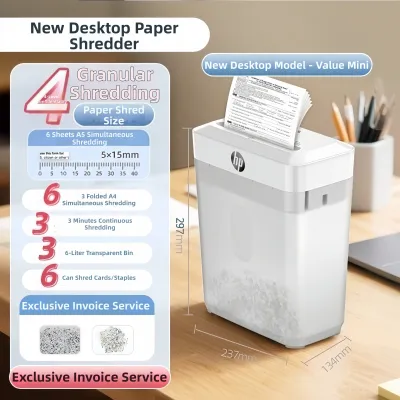
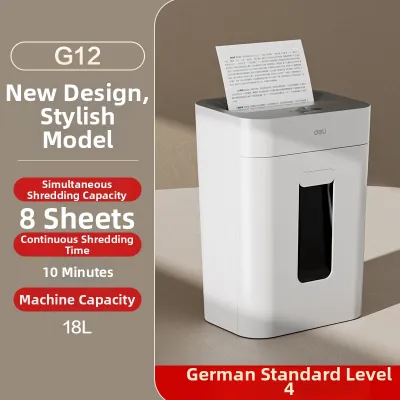
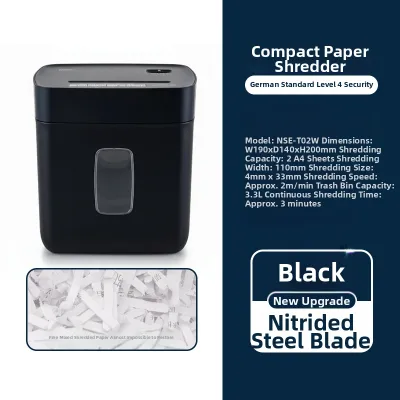
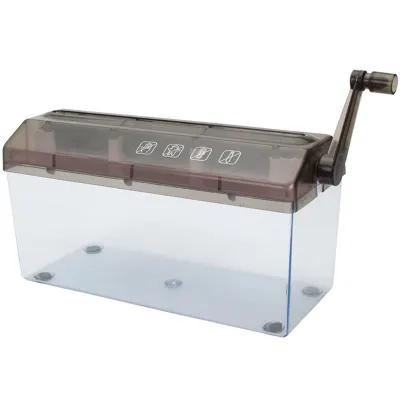
![[SG] [FREE SHIP] Manual Paper Shredder Mini Cutter Hand Crank Shred Office Destroy Private Confidential Documents](https://img.lazcdn.com/g/ff/kf/Scdcc162753a64816bee690cea4994db2h.jpg_400x400q80.jpg_.webp)
Prices are valid at publication and may change. Please refer to the product page for the latest price.
Sheet capacity per pass is another critical specification that dictates operational efficiency. Most entry-level home shredders are rated for 5 to 10 sheets of standard paper per pass. It is important to note that these ratings are based on dry, standard 80gsm paper under controlled laboratory conditions. In Singapore’s humid climate, paper stored in open trays absorbs moisture from the air, increasing its thickness and flexibility. This added moisture increases friction between the cutting blades, meaning a shredder rated for 8 sheets might only comfortably handle 5 or 6 humidified sheets without straining. Choosing a model with a slightly higher rated sheet capacity than your average daily stack provides a necessary performance buffer.
Electrical compatibility and power management are equally vital for residential safety. In Singapore, household appliances must operate safely on a 230V, 50Hz power supply and should ideally carry the Safety Mark regulated by Enterprise Singapore. Look for models fitted with a fused 3-pin Type G plug to ensure compliance with local electrical standards. Additionally, prioritize shredders with auto-sleep or auto-power-off features. These functions cut standby power consumption when the machine is idle, preventing unnecessary energy draw and reducing the risk of electrical faults in a home environment.
Cross-Cut vs. Micro-Cut vs. Strip-Cut: Which Security Level Do You Need?
Paper shredders are categorized by the way they cut paper, which directly determines their security level under the international DIN 66399 standard. Strip-cut shredders (typically rated P-1 or P-2) slice paper into long, continuous vertical strips, usually about 6mm wide. While strip-cut machines are fast and can handle a higher volume of sheets per pass, they offer minimal security. A single A4 sheet is cut into roughly 30 strips, which can be reassembled with relative ease. Furthermore, strip-cut paper does not compress well, causing the shredder bin to fill up rapidly with loose, springy nests of paper.

Cross-cut shredders (typically rated P-3 or P-4) offer a much higher level of security for home offices. These machines use two counter-rotating shafts to cut paper both vertically and horizontally, producing small, confetti-like particles (typically 4mm x 40mm). A single A4 sheet is reduced to approximately 400 pieces, making it highly secure for disposing of bank statements, utility bills, and personal correspondence containing names and addresses. Cross-cut particles also compress much better than strips, allowing you to fit significantly more shredded material into a 12-litre bin before needing to empty it.
Micro-cut shredders (rated P-5 and above) provide the highest level of security commercially available for home use. These machines reduce a single A4 sheet into more than 2,000 tiny, unreadable particles measuring roughly 2mm x 15mm. This level of destruction is essential if your home office handles highly sensitive financial documents, legal files, or proprietary business data. However, micro-cut machines require more powerful motors to drive the complex cutting blades, which often results in a lower sheet capacity per pass and a slower shredding speed. The tiny particles also generate more paper dust, which requires regular cleaning to prevent blade clogging.
Matching Shredder Capacity and Run Time to Your Workflow
Every small paper shredder has a maximum continuous run time, also known as its duty cycle, before the motor heats up and requires a cool-down period. Compact desktop shredders designed for home use typically feature a continuous run time of 2 to 5 minutes, followed by a mandatory cool-down period of 20 to 40 minutes. This limitation exists because small motors lack the heavy-duty cooling fans and large metal heat sinks found in commercial office shredders. Operating a shredder beyond its rated duty cycle will trigger the thermal overload protection, shutting the machine down completely until it cools.
To choose the right machine, you must align these operational limits with your actual shredding habits. If your workflow involves shredding documents immediately as they arrive—such as opening daily mail and destroying one or two envelopes—a light-duty model with a 2-minute run time is perfectly adequate. However, if you tend to accumulate a stack of documents over several weeks and perform a monthly filing purge, a short duty cycle will lead to a frustrating experience. For batch shredding, look for a mid-tier home office model that offers at least 5 to 10 minutes of continuous run time.
Recognizing the observable indicators of motor strain can help you prevent premature machine failure. If you hear the motor pitch drop significantly—producing a deep, straining groan—or if the speed of the paper feed slows to a crawl, the motor is drawing maximum current and generating rapid heat. This is a clear sign that the paper stack is too thick or that the blades are experiencing high resistance. Rather than pushing the machine to its limit and waiting for the thermal switch to trip, you should stop feeding paper immediately, reverse the machine to clear any excess fibers, and allow the motor to rest.
Essential Safety and Maintenance Features for Home Environments
Operating a paper shredder in a residential setting requires specific safety features, especially if you share your living space with children or pets. Look for models equipped with physical safety locks or touch-sensitive sensors around the paper entry slot. Touch-sensitive technology instantly stops the cutting blades if a hand, finger, or pet’s paw comes into contact with the bezel surrounding the feed opening. Additionally, ensure the shredder has an automatic cut-off switch that activates when the shredder head is lifted off the bin or when the bin is pulled out, preventing the blades from spinning while exposed.
Paper jams are the most common operational issue faced by home shredder users, making robust anti-jam features highly desirable. A basic manual reverse switch is a mandatory requirement, allowing you to manually back out overfed paper by reversing the direction of the cutting shafts. More advanced mid-tier models feature electronic auto-reverse systems. These systems monitor motor resistance; if a jam is detected, the machine automatically stops the blades and runs them in reverse to eject the paper, preventing damage to the gears and motor.
Regular maintenance is essential to keep a small shredder operating smoothly and to extend its lifespan. The cutting blades require regular lubrication to reduce friction, minimize heat buildup, and maintain cutting efficiency. You can lubricate the blades using specialized shredder oil sheets or by applying liquid shredder oil directly onto a sheet of paper in a zig-zag pattern before shredding it. Avoid using household aerosol lubricants, such as WD-40 or cooking oils, as they can gum up the blades, attract paper dust, and create a serious fire hazard. Finally, always empty the bin before it is completely full; allowing shredded paper to accumulate to the level of the blades can cause paper to back-feed into the cutting mechanism, leading to severe jams.
How to Build Your Shortlist: A Decision Matrix
To help you filter options on e-commerce platforms and local retail sites, use the decision matrix below to match your specific home office profile with the necessary technical specifications.
| User Profile | Recommended Cut Type | Sheet Capacity (80gsm) | Continuous Run Time | Target Bin Capacity |
|---|---|---|---|---|
| Light / Occasional<br>(Daily mail, occasional bills) | Cross-Cut (P-3) | 5–6 sheets | 2–3 minutes | 10–12 Litres |
| Confidential / Financial<br>(Tax files, bank statements) | Micro-Cut (P-4 or P-5) | 6–8 sheets | 5 minutes | 12–15 Litres |
| High-Volume / Batch<br>(Monthly filing purges) | Cross-Cut (P-4) | 10+ sheets | 10+ minutes | 15–20 Litres |
When browsing online marketplaces, verify seller claims carefully to avoid low-quality products. Check the product specifications for noise levels, which are measured in decibels (dB). A quiet shredder operates at or below 60 dB, which is comparable to the volume of a normal conversation and will not disrupt online meetings or family members. Cheaper, unbranded models often exceed 70 dB, producing a harsh, high-pitched whine that can be highly disruptive in a quiet home environment.
Always confirm the warranty terms and the availability of local after-sales support in Singapore. Many ultra-cheap models sold online are parallel imports that lack a local warranty, meaning you will have no recourse if the motor fails within a few months. Budgeting between S$30 and S$60 will generally secure a basic, entry-level cross-cut shredder suitable for light use. If you require a durable motor, micro-cut security, and advanced safety sensors, expect to budget between S$80 and S$150 for a reliable mid-tier home office model.
Be vigilant for red flags when evaluating budget-friendly options. Avoid unbranded models that do not explicitly state they have thermal overload protection. Without this safety feature, a jammed motor can continue to draw electrical current until the internal components melt, posing a significant fire hazard. Additionally, look for the Enterprise Singapore Safety Mark on the product listing or packaging to ensure the electrical components have been certified safe for use in Singapore homes.
Frequently Asked Questions (FAQ)
Can I shred credit cards or staples in a small home shredder?
You must check the manufacturer’s specifications before attempting to shred non-paper items. Some small shredders feature hardened steel blades designed to easily slice through standard staples and small paperclips, while others will chip or dull quickly if they encounter metal. For credit cards, look for models that explicitly state they support plastic cards. Many shredders feature a dedicated media slot that bypasses the main paper blades, ensuring the plastic is cut safely without damaging the primary paper-cutting teeth or voiding your warranty.
How do I clear a paper jam without breaking the machine?
If your shredder jams, start by turning off the power and unplugging the unit from the wall outlet to ensure safety. Switch the machine to manual reverse mode, plug it back in, and gently pull the paper upward as the blades spin backward. If the paper remains stuck, do not use scissors, screwdrivers, or metal tools to pry it out, as this can permanently damage the cutting blades. Instead, apply a few drops of specialized shredder oil directly onto the jammed area, let it sit for 10 minutes to soften the paper fibers, and then attempt to run the machine in reverse again.
Is it safe to leave a small shredder plugged in all day?
While modern home shredders feature auto-sleep modes that draw minimal standby power, it is best practice to unplug the device when it is not in use for extended periods. In a residential setting, paper dust can accumulate inside the paper entry slot over time. If the machine is left plugged in, accidental activation by curious pets, children, or shifting objects nearby remains a minor safety risk. Unplugging the shredder at the end of your workday ensures absolute electrical safety and prevents any potential standby power drain.
Community discussion
Share your experience or ask a question. Comments are reviewed before publication.