
Selecting the right paper shredder requires looking past surface-level marketing numbers. If you choose a model that is too small, you will find yourself waiting for the motor to cool down after only a few minutes of use. Conversely, overspending on a heavy-duty commercial unit for occasional household mail wastes valuable space and budget. To find the ideal balance, you must evaluate three core performance metrics: sheet capacity, continuous run time, and waste bin volume. Aligning these specifications with your daily document habits ensures smooth, jam-free operation without paying for excess power you do not need.
Assess Your Daily and Weekly Shredder Volume
To diagnose your actual shredding needs, begin by evaluating how much paper accumulates in your home or office on a regular basis. Many buyers make the mistake of purchasing a shredder based on a rough guess, which often leads to either an underpowered machine that jams frequently or an overpriced model that takes up unnecessary space. A practical way to estimate your volume is to observe your document habits over a two-week period, noting how many sheets of paper you actually need to destroy.
For light home use, your shredding needs are typically sporadic. You might destroy occasional bills, personal letters, bank statements, and junk mail as they arrive. This volume usually averages fewer than 10 to 20 sheets per day. In these scenarios, a compact, entry-level machine is more than sufficient to handle the daily trickle of personal information without cluttering your living space.
Products mentioned in this guide
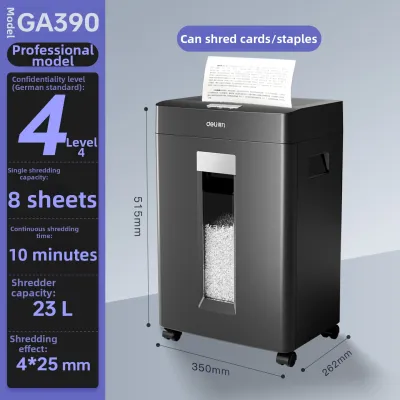
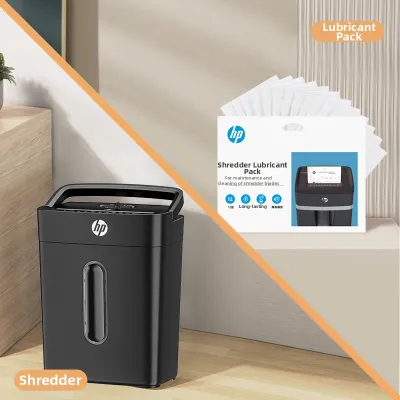
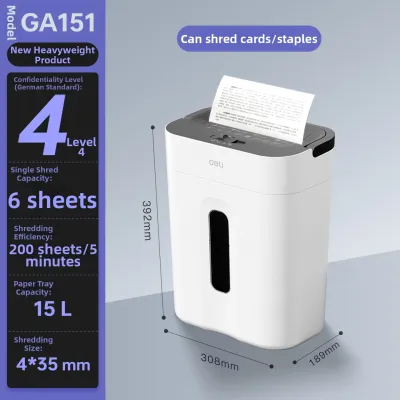
![[SG] Original Aurora AS800CD Plastic Paper Shredder Machine 8 sheet Cross cut (Able to Shred CDs) [Evergreen Stationery]](https://img.lazcdn.com/g/p/0cd07fe2a1ba74eeb42f61baa8c305df.jpg_400x400q80.jpg_.webp)
![[SG] [FREE SHIP] Manual Paper Shredder Mini Cutter Hand Crank Shred Office Destroy Private Confidential Documents](https://img.lazcdn.com/g/ff/kf/Scdcc162753a64816bee690cea4994db2h.jpg_400x400q80.jpg_.webp)
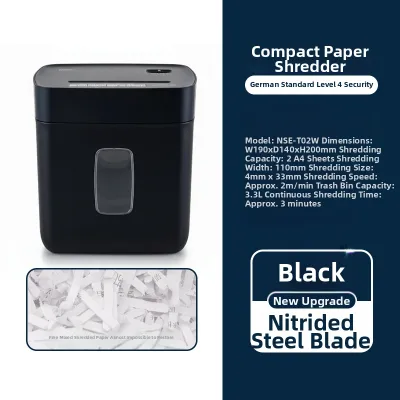
Prices are valid at publication and may change. Please refer to the product page for the latest price.
Small office environments present a different challenge. In a typical small-to-medium enterprise (SME) or a busy home office, administrative paperwork, client records, and printed drafts accumulate daily. This volume can easily range from 50 to 100 sheets per day. To keep up with this steady flow of documents, you need a machine that can handle larger batches without slowing down your daily workflow.
Heavy commercial environments require robust, high-capacity machines. Offices handling sensitive legal contracts, human resources records, or financial files often process hundreds of sheets of paper daily. In these settings, multiple employees rely on the same machine, making speed, durability, and high throughput paramount.
When estimating your needs, always factor in peak periods rather than just focusing on a single quiet day. In Singapore, businesses face high-volume administrative cycles during end-of-month financial closings, quarterly GST filing seasons, or annual tax periods. If you accumulate boxes of documents throughout the year for a single annual purge, a light-duty home machine will quickly become a bottleneck. Calculate a realistic weekly average that accounts for these peak periods to ensure your chosen model has the capacity to handle your heaviest shredding days without failing.
Match Shredder Sheet Capacity to Your Document Types and Thickness
Advertised sheet capacity is the maximum number of sheets the shredder can cut in a single pass. However, it is crucial to understand that these ratings are calculated using standard paper weights, typically 70gsm or 80gsm paper. In Singapore, standard A4 copier paper is usually 80gsm, which is slightly thicker and heavier than the standard paper used in some international testing environments.

Because actual performance varies with material thickness, a machine rated for 10 sheets of 70gsm paper may only handle 7 or 8 sheets of standard 80gsm paper. If you are shredding thicker materials, such as 100gsm letterheads, heavy cardstock, textured envelopes, or glossy brochures, the effective sheet capacity of the machine drops even further. Additionally, folding a single sheet of paper in half instantly doubles the thickness that the cutting cylinders must process, meaning a single folded A4 sheet counts as two sheets against your machine’s capacity.
Foreign objects also place immense strain on the cutting cylinders and motor. While many modern shredders are built to cut through standard staples and small paper clips, feeding them repeatedly can dull the blades over time. If you frequently shred documents bound with heavy-duty staples, large paper clips, or plastic credit cards, you must check the manufacturer’s product label to verify what materials the machine is rated to destroy. Attempting to force unsupported materials through the cutters can cause immediate mechanical damage and void your warranty.
Furthermore, Singapore’s high relative humidity can affect paper rigidity. Humid air can soften paper fibers, making the sheets more prone to tearing, folding, or clumping inside the feed entry. This softened paper is more likely to cause unexpected jams in low-power machines, making it wise to choose a model with a slightly higher sheet capacity than your absolute minimum requirement.
Choosing a higher sheet capacity offers faster processing but comes with distinct physical trade-offs. High-capacity machines require larger motors and more robust cutting assemblies, which increases the physical size, weight, and noise level of the unit. In a quiet home office or a compact Singapore apartment where sound echoes easily, a loud, bulky machine can be highly disruptive. Balancing your need for speed with your physical space and noise tolerance is essential when selecting your capacity.
Determine the Required Shredder Run Time to Prevent Overheating
Every paper shredder is driven by an electric motor that generates heat during operation. To prevent the motor from reaching dangerous temperatures, manufacturers design these machines with specific duty cycles. The duty cycle consists of two parts: continuous run time (how long the machine can shred without stopping) and the mandatory cool-down period.
Basic home models are typically designed for short, intermittent bursts of use. These machines usually offer a continuous run time of 2 to 5 minutes, followed by a mandatory cool-down period of 20 to 40 minutes. If you exceed this limit, the machine’s automatic thermal shutdown will trigger, disabling the shredder until the motor cools down to a safe operating temperature.
Mid-range office models are engineered for sustained use, offering continuous run times of 15 to 30 minutes. High-end commercial units often feature continuous-duty motors equipped with active cooling fans, allowing them to run indefinitely without stopping. Understanding these differences is crucial to avoiding frustrating delays during large shredding tasks.
Exceeding the recommended duty cycle poses significant risks to the machine. Repeatedly forcing a shredder to its thermal limit causes the internal lubricants to degrade faster, strains the electrical components, and can lead to permanent motor burnout. It also increases the risk of paper jams, as the motor loses torque as it heats up, making it harder for the blades to cut through thick stacks of paper.
To choose the right model, calculate the total time needed for your typical shredding session. For example, if you have a stack of 100 sheets and a shredder that processes 5 sheets per pass, you will need to feed the machine 20 times. At an average of 5 seconds per feed, this session will take less than two minutes of active run time, making a standard home model perfectly adequate. However, if you regularly shred entire archive boxes or file folders, you will require a machine with a much longer duty cycle to avoid waiting hours for the machine to cool down.
Select a Shredder Waste Bin Capacity That Fits Your Space
The size of the waste bin directly influences how often you must empty the machine. Bin capacity is usually measured in litres, and selecting the right size requires balancing your daily shredding volume with your physical space constraints.
However, the physical size of the bin is only half the equation; the cut type of the shredder plays a massive role in how quickly the bin fills up. Strip-cut machines slice paper into long, continuous ribbons. These ribbons do not compress well, leaving large air gaps in the bin and causing it to fill up rapidly. Cross-cut and micro-cut shredders reduce paper to tiny, confetti-like particles. Micro-cut models compress the waste far more efficiently, allowing the bin to hold up to six times more shredded paper than a strip-cut model of the same physical volume. This means a smaller micro-cut bin can hold the same amount of waste as a much larger strip-cut bin, saving you valuable floor space.
Bin design also impacts usability and mess prevention. There are two primary styles: lift-off heads and pull-out drawers. Lift-off heads require you to lift the heavy motor assembly off the bin to empty it, which can be physically awkward and often results in paper scraps spilling onto the floor. Pull-out drawers are much easier to manage, allowing you to slide the bin out cleanly to dispose of the waste.
For compact homes and shared office spaces in Singapore, physical footprint is a major consideration. A massive 40-litre bin may block walkways or clutter a small room. Conversely, a tiny 10-litre bin will require constant emptying if used in a busy office environment. Aim for a bin capacity that matches your weekly volume, ideally requiring emptying no more than once or twice a week to maintain a clean and efficient workspace.
Shredder Capacity Quick Reference Guide
To help you match your daily habits with the right machine specifications, use the quick reference guide below. These general ranges represent stable industry standards for various user profiles.
| User Profile | Estimated Daily Volume | Recommended Sheet Capacity | Recommended Run Time | Recommended Bin Capacity |
|---|---|---|---|---|
| Home / Personal | Under 50 sheets | 5 to 10 sheets | 2 to 5 minutes | 10 to 15 litres |
| Small Office / SME | 50 to 250 sheets | 10 to 20 sheets | 10 to 20 minutes | 20 to 35 litres |
| Large Office / Commercial | 250+ sheets | 20+ sheets | 30+ minutes to continuous | 40+ litres |
Please note that these are general diagnostic guidelines to help narrow down your options. Before making a purchase, you must verify the exact specifications, safety certifications, and material limits on the product label or the manufacturer’s user manual. Different brands may use unique motor technologies or blade designs that alter these general recommendations.
If your daily volume consistently exceeds these ranges, or if you regularly handle highly confidential documents containing sensitive personal data under local regulations like the Personal Data Protection Act (PDPA), it may be time to upgrade to a commercial-grade machine. Alternatively, for massive annual purges or bulk archiving projects, outsourcing to a professional document destruction service can save significant time and ensure compliant, secure disposal.
Frequently Asked Questions (FAQ)
Does a higher sheet capacity mean the shredder is faster?
No, a higher sheet capacity does not automatically mean the machine processes paper at a faster speed. Sheet capacity refers to the number of pages you can feed into the entry slot at a single time, while feed speed (usually measured in meters per minute) dictates how quickly the paper moves through the cutting cylinders. High-capacity machines are often geared to provide high torque rather than high speed, meaning they pull thick stacks through steadily but not necessarily rapidly. When comparing models, look at both the sheet capacity and the rated feed speed to understand the overall throughput of the machine.
Can I shred more sheets than the advertised capacity if the paper is thin?
While it may be physically possible to feed more sheets of very thin paper (such as 50gsm tracing paper or carbon copies) into the machine, doing so is highly discouraged. Exceeding the manufacturer’s advertised sheet capacity runs a severe risk of causing paper jams, misaligning the cutting cylinders, and putting excessive strain on the motor. Furthermore, overloading the machine can prevent the blades from making clean cuts, resulting in larger, incomplete paper strips that compromise your document security. To protect your investment and maintain your warranty, always stick to the rated sheet capacity.
How do I clear a paper jam caused by exceeding the capacity?
If you experience a paper jam, follow these safe, reversible steps to clear the obstruction. First, switch the machine to the reverse function to back the paper out of the cutting entry. If the paper remains stuck, unplug the machine from the wall outlet to ensure absolute safety before touching the entry slot. Once the power is disconnected, gently pull the visible paper upward to remove the excess sheets. Check the user manual for model-specific clearing instructions, and never use sharp metal tools, knives, or scissors near the cutting cylinders, as these can permanently damage the blades and void your warranty.
Community discussion
Share your experience or ask a question. Comments are reviewed before publication.