
Selecting the right handheld paper shredder requires balancing security, capacity, and portability to fit your specific workspace. Unlike bulky office appliances, these compact devices are designed for quick, low-volume document destruction, making them ideal for small study desks or compact home offices in Singapore. To find the best match, you must evaluate how the machine cuts paper, how many sheets it can handle at once, and how it is powered. Understanding these technical specifications ensures you protect your personal data without dealing with constant paper jams or motor strain.
Understanding Cut Types and Security Levels
The cutting mechanism determines both the security level of your shredded documents and how the machine performs under load. Strip-cut handheld shredders slice paper into long, continuous vertical strips. While this method is fast and requires less motor power, it offers relatively low security because determined individuals can reconstruct the pages. If you are disposing of highly sensitive information like bank statements or medical records, a strip-cut model may not provide sufficient peace of mind.
For higher security, look for a cross-cut mechanism. These models cut paper both horizontally and vertically, turning a single sheet into hundreds of tiny, confetti-like particles. Because of the smaller particle size, reconstructing a cross-cut document is exceptionally difficult. However, you should always check the manufacturer’s security rating on the product packaging or user manual rather than assuming all compact models offer identical protection.
Products mentioned in this guide
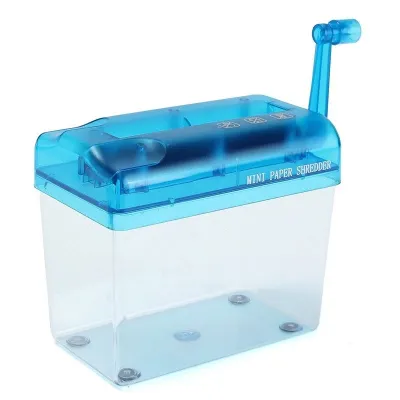
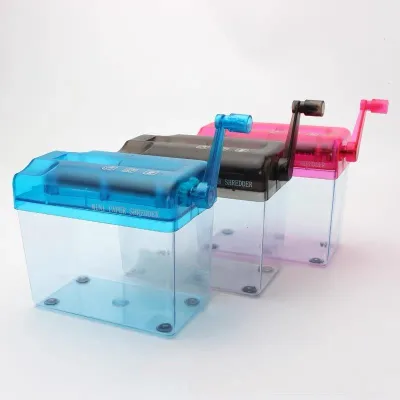
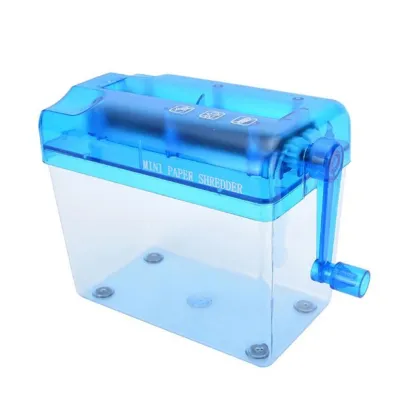
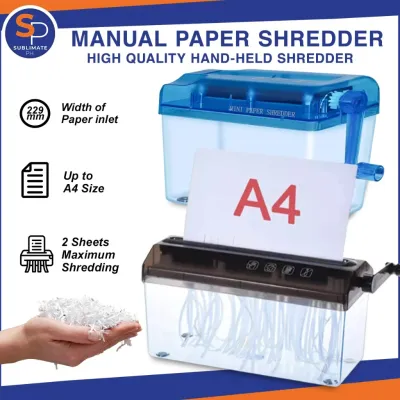
Prices are valid at publication and may change. Please refer to the product page for the latest price.
Keep in mind that finer cuts require more motor torque. The blades must work harder to slice the paper in two directions simultaneously, which often reduces the maximum sheet capacity per pass. If you choose a high-security cross-cut handheld model, you will likely need to feed fewer sheets at a time compared to a basic strip-cut alternative.
Evaluating Sheet Capacity and Motor Limits
Sheet capacity is a critical specification that dictates how quickly you can work through a stack of documents. Most handheld paper shredders are designed for light duties, typically handling between one and five sheets of paper per pass. It is important to note that this rating is based on standard-weight copier paper, usually around 75 to 80 gsm. If you frequently shred thicker materials, such as heavy envelopes, cardstock, or textured paper, the actual sheet capacity will decrease significantly.

Exceeding the recommended sheet capacity can easily stall the motor or cause a stubborn paper jam. To prevent motor burnout, you must also pay attention to the duty cycle or continuous run time listed in the user manual. Handheld shredders feature small, compact motors that generate heat rapidly. Many models are rated for a continuous run time of just two to five minutes before they require a cool-down period of fifteen to thirty minutes to prevent overheating.
Additionally, you must verify whether the blade design can safely handle common office fasteners. Standard handheld shredders are rarely built to cut through staples, paper clips, or plastic cards. Unless the manufacturer explicitly states that the blades are reinforced for these materials, always remove staples and clips beforehand to avoid chipping the cutting shafts and permanently damaging the device.
Assessing Portability, Power Sources, and Ergonomics
Portability and power configurations determine where and how easily you can use your shredder. Handheld models generally fall into three power categories: battery-operated, USB-rechargeable, and manual hand-crank. Battery-operated units offer excellent cordless convenience but require regular battery replacements. USB-rechargeable models are highly practical for modern workspaces, allowing you to charge the device directly from your laptop or a wall adapter. Manual hand-crank models require no electricity at all, making them completely silent and highly reliable, though they do require physical effort to operate.
The physical footprint and waste bin integration also play a major role in daily usability. Some handheld shredders are designed as “bridge” units with extendable arms that rest directly over your existing household trash can. This design eliminates the need for a dedicated waste bin, saving valuable floor space in compact Singapore apartments. Other models come with a tiny, integrated waste compartment that is easy to empty but requires frequent trips to the main bin.
Ergonomic features can make a significant difference during operation. Look for models with comfortable, non-slip grips that allow you to hold the unit securely over a bin without hand fatigue. Essential controls should be easily accessible, including a clear power switch, a safety lock, and a dedicated reverse function to help back out paper if a jam occurs.
Matching Specifications to Your Document Destruction Needs
To finalize your choice, map these specifications directly to your typical document destruction habits. If you only need to shred occasional utility bills, delivery labels, or cash register receipts, a manual hand-crank or a basic battery-powered strip-cut model is often the most practical choice. These options prioritize easy storage, require minimal maintenance, and can be tucked away in a desk drawer when not in use.
For those managing a home office or handling sensitive client documents, a cross-cut model with a reliable USB-rechargeable or plug-in power source is highly recommended. This setup ensures you have the necessary torque to handle multi-page documents while maintaining a high level of data security.
Before making your purchase, always review the manufacturer’s warranty terms and maintenance guidelines. Regular upkeep is essential for preserving blade longevity. Check if the manufacturer recommends specific dry lubricant sheets or routine cleaning procedures to keep the cutting shafts free of paper dust and operating smoothly over time.
Frequently Asked Questions (FAQ)
Can a handheld paper shredder destroy credit cards and CDs?
No, you should not attempt to shred credit cards or CDs unless the manufacturer’s manual explicitly states the device is rated for rigid plastic media. Standard handheld shredders are designed solely for paper. Forcing thick plastic or metal components through standard blades will dull the cutting edges, strain the compact motor, and likely void your warranty.
How do I clear a paper jam in a handheld shredder?
If a jam occurs, immediately turn off the device and disconnect it from its power source or remove the batteries to ensure safety. If your model features a manual reverse switch, plug it back in and use the reverse function to back the paper out of the feed slot. If the paper remains stuck, refer to the user manual for specific clearance instructions, and avoid using scissors, knives, or other sharp metal tools that could damage the delicate blades.
Do I need to oil the blades of a handheld paper shredder?
While larger office shredders require regular oiling, you should avoid pouring liquid oils into a handheld shredder unless the manufacturer explicitly instructs you to do so. Liquid oils can attract fine paper dust, leading to clumping and motor strain. Instead, check the user manual to see if the manufacturer recommends dry lubricant sheets or specific maintenance intervals to keep the blades running smoothly.
Community discussion
Share your experience or ask a question. Comments are reviewed before publication.