
Selecting the right label tape for an office environment involves balancing immediate organization needs with long-term operational costs. While both Casio and Brother are dominant forces in the desktop labeling market, their tape ecosystems are fundamentally different. Choosing between Casio label tapes and Brother TZe tapes is rarely a matter of which tape is universally superior; instead, the decision is heavily dictated by the specific label printer hardware you already own or plan to purchase. Both brands offer distinct advantages in terms of material variety, adhesive options, and overall availability, making it essential to evaluate your office’s specific labeling tasks before committing to an ecosystem.
Whether you are archiving financial documents, organizing IT cables, or tracking office assets, understanding the structural and financial differences between these two tape systems will help you optimize your stationery budget. This comparison explores the compatibility limits, material durability, print performance, and cost-efficiency of Casio and Brother label tapes to guide your next purchasing decision.
Checking Printer Compatibility and Ecosystem Lock-in
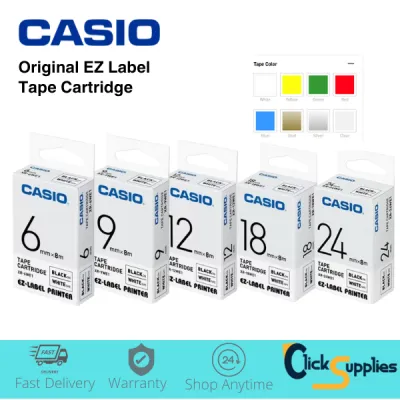
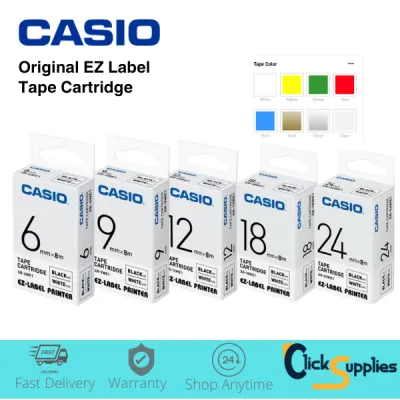
Before purchasing any label tape, you must understand that tape selection is strictly limited by the brand and model of your label printer. Casio label tapes and Brother TZe tapes are physically incompatible due to proprietary cassette designs. A Casio tape cassette will not fit into a Brother P-touch machine, and a Brother TZe cassette cannot be loaded into a Casio EZ-Label printer. The physical housing, spindle alignment, gear mechanisms, and tape exit paths are engineered specifically to match each manufacturer’s proprietary hardware.
Products mentioned in this guide
![XR-6WE XR-9WE XR-12WE Compatible Casio Sticker Label Tape (Black on White) for Casio Label Printer [theinksupply]](https://img.lazcdn.com/g/p/23494a64441e0575eaa4e1caf54f2905.jpg_400x400q80.jpg_.webp)
![XR-9ABK XR-12ABK Compatible Casio Label Tape (9mm 12mm White on Black) [theinksupply]](https://img.lazcdn.com/g/p/8ea02a862b6c3af7ae525feb2eaed55c.png_400x400q80.png_.webp)
Prices are valid at publication and may change. Please refer to the product page for the latest price.
To avoid purchasing incompatible consumables, always check your label maker’s model number, which is typically printed on the top or underside of the device. Opening the cartridge compartment will reveal a label indicating the supported tape series (such as Casio XR tapes or Brother TZe tapes) along with the supported tape widths. Standard office label makers typically support widths ranging from 6mm to 24mm, but individual hardware models have specific limits. Attempting to force an unsupported tape width or an incompatible brand into your machine can damage the delicate thermal printhead or jam the internal cutter mechanism.
This physical incompatibility creates a strong ecosystem lock-in effect. Once an office invests in a fleet of label printers from one brand, the ongoing cost of consumables is tied directly to that brand’s tape ecosystem. If you are setting up a new office or replacing outdated equipment, consider the long-term availability and pricing of the compatible tapes rather than just the upfront cost of the label maker itself. Standardizing on a single brand across all departments simplifies inventory management, reduces purchasing errors, and ensures that spare tape cassettes can be shared easily among staff.
Comparing Material Durability for Office Environments
Office labels must withstand a variety of environmental factors, from the constant friction of handling file folders to the temperature fluctuations of server rooms. To evaluate the durability of standard and specialty tapes, start by verifying the lamination structure indicated on the product packaging. Brother TZe tapes are widely known for their laminated design, which places a protective layer of polyethylene terephthalate (PET) film over the thermal print ink. This lamination protects the printed text from water, chemical spills, abrasion, and fading. Casio also offers highly durable laminated options within its XR tape lineup, which utilize a similar protective topcoat to ensure long-lasting legibility.

When selecting tapes for specialized office tasks, compare the availability of specialty materials offered by each brand. For instance, standard adhesive tapes may peel over time when applied to textured surfaces, curved cables, or powder-coated metal shelving. Both Casio and Brother manufacture extra-strength adhesive tapes designed for challenging surfaces, as well as flexible ID tapes engineered specifically for wrapping tightly around network cables and electrical wires. Additionally, security or tamper-evident tapes—which leave a distinct pattern behind if peeled off—are available in both ecosystems and are highly useful for asset tracking and sealing sensitive document boxes.
To ensure you select the correct material for your workspace, use this simple checklist to match tape properties to common office surfaces:
- Paper folders and document spines: Standard non-laminated or standard laminated tapes provide sufficient adhesion and clarity without the added cost of specialty adhesives.
- Plastic storage bins and organizer trays: Standard laminated tapes offer excellent resistance to frequent handling and moisture from cleaning.
- Metal shelving and equipment racks: Extra-strength adhesive tapes are recommended to prevent peeling on cold or slightly textured metal surfaces.
- Cables, wires, and power cords: Flexible ID tapes or heat-shrink tubes should be used to ensure the label conforms to the curved surface without flagging or lifting at the edges.
Evaluating Print Clarity and Adhesion Performance
Print clarity is a critical factor for office organization, especially when printing small text, detailed asset numbers, or high-density barcodes. Both Casio and Brother utilize thermal transfer printing technology, where heat from the printhead transfers ink from an internal ribbon onto the tape surface. Because this process does not use liquid ink, the resulting labels are instantly dry and resistant to smudging. However, the sharpness of the printed text is largely determined by the printhead resolution of your specific label maker model, typically measured in dots per inch (dpi). When comparing tapes, ensure that the tape surface is smooth and free of dust, as any surface debris can prevent proper heat transfer and result in faded or incomplete characters.
Adhesive reliability is equally important to prevent labels from curling or falling off over time. To assess adhesive performance in your specific office environment, conduct an observable trial before deploying labels on a large scale. Apply a test label to a clean, dry surface, pressing firmly across the entire length to activate the pressure-sensitive adhesive. Allow the label to cure for 24 hours under normal office temperature and humidity conditions, then inspect the edges for any signs of lifting. For optimal adhesion, always follow the manufacturer’s guidelines for surface preparation, which generally involve wiping the surface with isopropyl alcohol to remove dust, oil, and fingerprints.
Another critical consideration for leased office equipment or temporary signage is clean removal. Applying a permanent adhesive label to a leased copier, a glass partition, or a shared whiteboard can result in unsightly residue or surface damage when the label is eventually removed. Check the tape specifications for “removable” or “low-residue” options if you anticipate needing to reposition or peel off the labels in the future. Testing a small strip of tape on an inconspicuous area of the equipment will help you verify that the adhesive can be removed cleanly without requiring harsh chemical solvents that could damage plastic housings.
Analyzing Cost per Meter and Long-Term Value
To determine which brand offers better value for your office, look beyond the initial purchase price of a single tape cassette and calculate the true cost per meter. Because different tape cartridges contain varying lengths of tape, comparing upfront prices can be misleading. To find the actual unit cost, use the following formula:
Cost per Meter = Cassette Price (S$) / Tape Length (meters)
By dividing the retail price of the cartridge by the total length specified on the packaging, you can accurately compare the value of different tape widths and styles. Standard genuine cassettes from both brands typically range from 5 to 8 meters in length, but specialty tapes like extra-strength adhesive or tamper-evident options may contain less tape per cartridge, increasing the cost per meter.
Another major factor influencing long-term value is the availability of third-party compatible tapes. Because Casio and Brother tape designs are well-established, numerous third-party manufacturers produce compatible cassettes that fit into these machines. These compatible options are widely available on local ecommerce platforms and are often cheaper than genuine brand-name tapes. However, using third-party consumables involves distinct trade-offs. While they offer immediate cost savings, compatible tapes can vary widely in quality, with some exhibiting poor adhesive strength, difficult-to-peel backing paper, or inconsistent lamination.
Furthermore, using non-genuine tapes carries potential risks for your hardware. Poorly manufactured third-party cassettes may have uneven tension on the ink ribbon, leading to jams, or they may leave adhesive residue on the printer’s internal cutter blade and printhead. Over time, this can degrade print quality or cause premature hardware failure. Before purchasing third-party tapes in bulk, review your label maker’s manufacturer warranty conditions. Many brands state that damage caused by the use of non-genuine consumables is not covered under the standard warranty, meaning any savings on tape could be offset by the cost of replacing a damaged printer.
Making the Final Purchasing Decision
When deciding between Casio and Brother label tapes for your office, your choice should align with your existing hardware inventory, the specific labeling applications you perform, and your long-term budget strategy.
Choose Casio if…
- You already have a fleet of Casio EZ-Label printers deployed across your office departments.
- Your local stationery distributors offer favorable bulk pricing or contract discounts on genuine Casio XR tapes.
- Your labeling needs are primarily focused on standard office organization, such as filing folders, storage boxes, and basic shelving, where Casio's standard laminated tapes provide excellent, reliable performance.
Choose Brother TZe if…
- You require a highly versatile labeling ecosystem with immediate access to a vast range of specialty tapes, including fabric iron-on labels, extra-strength adhesives, and heat-shrink tubing.
- You value widespread retail availability, as Brother TZe tapes are commonly stocked in almost all local office supply stores and major online marketplaces.
- You are purchasing new labeling hardware and want to ensure maximum compatibility with modern, app-enabled desktop and mobile label printers.
Verify first if…
- You are managing a mixed office environment with both Casio and Brother machines. In this case, consider standardizing on a single brand to streamline your stationery inventory and prevent employees from accidentally loading incompatible cassettes.
- You are considering third-party compatible tapes. Always run a small trial with a single cartridge to verify print quality, adhesive strength, and clean removal before purchasing bulk quantities for the entire office.
Frequently Asked Questions (FAQ)
Can I use Brother TZe tapes in a Casio label maker?
No, you cannot use Brother TZe tapes in a Casio label maker. The physical cassette designs, spindle configurations, and tape feeding mechanisms of Casio and Brother systems are entirely different and incompatible. Attempting to force a Brother cassette into a Casio machine, or vice versa, can cause permanent damage to the printer’s thermal printhead, drive gears, or automatic cutter. Always consult your label maker’s official user manual to identify the exact tape series codes and widths supported by your specific device.
Which brand offers more specialty label options for IT and asset tagging?
While both brands manufacture high-quality specialty tapes, Brother’s TZe ecosystem is widely recognized for offering a broader and more readily available selection of specialized tapes for IT and facility management. This includes self-laminating cable wraps, flexible ID tapes for curved wires, and tamper-evident security tapes for asset tracking. Before committing to a hardware system, check the current stock and lead times of your local office supply distributors to ensure the specific specialty tapes you require are consistently available in your area.
Do third-party compatible tapes void the printer warranty?
Using third-party compatible tapes does not automatically void your label printer’s entire warranty. However, most manufacturers, including Casio and Brother, explicitly state in their warranty terms that any damage or operational issues caused directly by the use of non-genuine consumables—such as adhesive buildup on the cutter, ribbon jams, or printhead damage—will not be covered under the warranty. If your label maker requires repair due to a fault caused by a third-party tape, you will likely have to pay for the repair or replacement yourself.

Community discussion
Share your experience or ask a question. Comments are reviewed before publication.