
Whether the Casio fx-570EX is the right calculator for your child in Singapore depends on their current educational stage, their school’s specific classroom requirements, and the official guidelines set by the Singapore Examinations and Assessment Board (SEAB). While this advanced scientific calculator offers powerful features suitable for secondary school mathematics and science, parents must verify its current approval status for national examinations before purchasing.
As students transition from primary school to secondary school and eventually to junior college (JC) or polytechnics, their mathematical tools must evolve. Choosing the right device ensures they can complete coursework efficiently without violating exam regulations. Understanding how these requirements change at each grade level is the first step in making an informed decision.
Understanding Calculator Requirements in Singapore Schools
During the lower secondary years, students are introduced to algebraic equations, basic statistics, and geometry. At this stage, a standard scientific calculator is typically introduced to help students transition away from basic primary school models. The focus is on learning how to input fractions, handle negative numbers, and perform basic trigonometric functions.
Products mentioned in this guide
Prices are valid at publication and may change. Please refer to the product page for the latest price.
In upper secondary, the curriculum splits into Elementary Mathematics (E-Math) and Additional Mathematics (A-Math). The mathematical complexity increases significantly, requiring calculators that can handle quadratic equations, simultaneous equations, and more complex statistical distributions. A capable scientific calculator becomes an essential tool for daily homework and timed school assessments.
For students pursuing Junior College (JC) pathways, particularly those taking H1 or H2 Mathematics, the syllabus shifts dramatically. Here, standard scientific calculators are often insufficient for the entire curriculum, as graphing calculators are required for plotting curves, finding intersections, and performing advanced matrix operations. However, a reliable scientific calculator is still frequently kept as a secondary backup device.
Beyond national guidelines, individual schools in Singapore often recommend specific brands or models for classroom uniformity. This uniformity allows teachers to give step-by-step instructions to the entire class simultaneously, preventing students from getting lost in different menu layouts. Checking with your child’s subject teacher before purchasing can save time and prevent compatibility issues during lessons.
How to Verify SEAB Approval for National Examinations
The Singapore Examinations and Assessment Board (SEAB) maintains a strict list of approved calculator models for national exams like the GCE O-Level and A-Level. This list is updated periodically, and only models explicitly listed are permitted in the exam hall. Using an unapproved model can lead to confiscation and disciplinary action during high-stakes assessments.

To confirm if a specific model is permitted, parents should visit the official SEAB website directly to locate the current Approved List of Calculators. Do not rely on third-party forum posts, outdated school blogs, or retail listings, as approval statuses can change from year to year. Downloading the official document directly from the source is the only way to ensure accurate information.
When checking the list, pay close attention to the exact model number and any alphabetical suffixes, such as “EX”, “ES Plus”, or “SG Plus”. A minor variation in the suffix can mean the difference between an approved model and one that is prohibited due to unapproved programming capabilities. Ensure the physical label on the calculator matches the approved list exactly.
Because technology advances rapidly, SEAB reviews the capabilities of calculators to ensure no student has an unfair advantage. Always verify the list at the start of the academic year in which your child is sitting for their national examinations. This proactive check ensures that the device they use for daily practice is the exact same one they can carry into the exam hall.
Evaluating the Casio fx-570EX for Daily Coursework
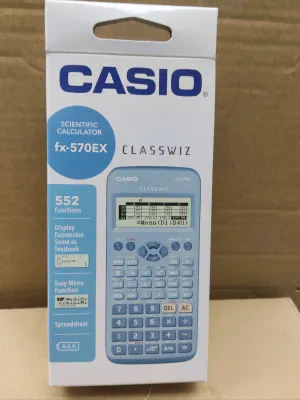
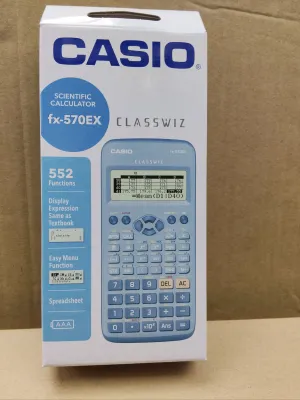
The Casio fx-570EX is known for its high-resolution display, which presents fractions, derivatives, integrals, and sum operations in natural textbook format. This visual layout helps students verify their inputs easily, reducing simple entry errors during stressful exam conditions. It also handles matrix calculations, vector calculations, and spreadsheet functions, which are highly relevant to upper secondary and introductory JC syllabi.
Transitioning from a basic primary school calculator to an advanced model requires practice. The menu-driven interface of this model is intuitive, but students must learn how to navigate the icon-based home screen and adjust settings like angle units between degrees and radians. Familiarity with these menus is crucial for maintaining speed during timed tests.
When evaluating this calculator physically, parents and students should perform a few simple checks. Test the responsiveness of the plastic keys to ensure they do not stick or require excessive force to register. Observe the screen contrast under different lighting conditions to ensure numbers remain legible from various viewing angles in a typical classroom setting.
This model typically relies on a single AAA battery rather than solar power. Parents should check the battery compartment regularly for any signs of corrosion and ensure their child carries a spare battery to school. Teaching your child how to read the low-battery indicator on the screen can prevent sudden power loss during daily coursework or school tests.
When to Consider Alternative Calculator Models
If your child is entering Junior College and taking H2 Mathematics, they will almost certainly need to transition to an approved graphing calculator. A scientific calculator like the fx-570EX may still be useful as a backup device for basic arithmetic, but it cannot perform the complex graphical analysis and plotting required by the JC syllabus.
It is also time to consider an alternative or replacement if your child’s current calculator shows signs of physical wear. A fading liquid crystal display (LCD), sticky or unresponsive keys, or a cracked casing can severely hinder performance. In mathematical exams, a single missed keystroke due to a faulty button can lead to incorrect calculations and lost marks.
Before purchasing an alternative model, consult the school’s official bookshop or the subject department. Ask whether they recommend a specific brand to match the teacher’s classroom emulator software, and verify if the alternative model is on the current SEAB approved list. This ensures the new device is fully compatible with both classroom instruction and national examination rules.
Frequently Asked Questions (FAQ)
Can my child use the Casio fx-570EX for both O-Level and A-Level exams?
Whether the Casio fx-570EX can be used for both exams depends entirely on its presence on the SEAB approved list for those specific exam years. While scientific calculators are generally permitted for both levels, A-Level mathematics papers often require a graphing calculator for specific sections, meaning a scientific model may only serve as a secondary, non-graphing backup device.
What should I do if the school recommends a different model?
If your child’s school recommends a different model, it is usually best to follow their recommendation to ensure classroom uniformity. If you have already purchased the fx-570EX, consult the subject teacher to see if they allow its use in daily classes, keeping in mind that the teacher’s step-by-step instructions will be tailored to the school’s preferred model.
Community discussion
Share your experience or ask a question. Comments are reviewed before publication.