
Choosing the right label maker depends entirely on your specific workflow, as there is no single universal winner among Brother, Niimbot, and Phomemo. Brother generally excels in office environments requiring durable, long-lasting labels and desktop software integration. Niimbot and Phomemo dominate the portable, home-organization, and crafting spaces with user-friendly mobile apps and aesthetic templates. However, the final decision must be based on a careful evaluation of printing technology, software ecosystems, and long-term consumable costs rather than just the initial hardware price.
To make an informed purchase, you must look beyond the initial price of the device. Evaluating the long-term cost of consumables, the durability of the printed labels under local environmental conditions, and the usability of the companion software will ensure you select a tool that fits your daily routine.
Understanding the Core Differences in Printing Technology
Direct thermal and thermal transfer are the two primary printing methods used by these brands, and they offer vastly different levels of durability. Direct thermal printing, which is common in portable models from Niimbot, Phomemo, and some entry-level Brother devices, uses heat-sensitive paper. The print head applies heat directly to the paper to activate chemical pigments, creating text or images without any ink or ribbon.
Products mentioned in this guide
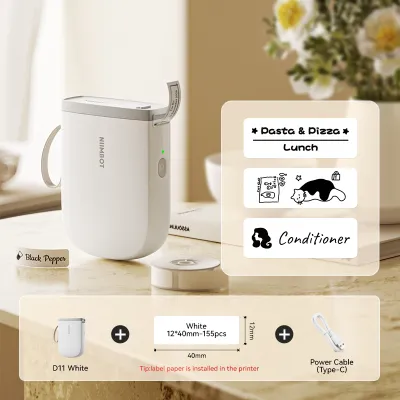
Prices are valid at publication and may change. Please refer to the product page for the latest price.
While direct thermal devices are highly compact and affordable, the resulting labels remain sensitive to environmental factors. In warm and humid climates, such as Singapore, exposure to direct sunlight, high ambient temperatures, or friction can cause direct thermal labels to darken or fade over time. This makes them less suitable for long-term archiving or labeling items exposed to heat and moisture.
Thermal transfer printing, typical of desktop Brother models, uses a heated ribbon to fuse ink onto the label material. This method is highly durable, especially when paired with laminated tape structures like Brother’s TZe series. The protective laminate layer shields the print from water, chemical spills, abrasion, and UV exposure, making it the preferred choice for outdoor equipment, industrial settings, and permanent office files.
Next, consider the physical format of the labels: die-cut versus continuous. Die-cut rolls contain pre-cut labels of fixed dimensions, such as circular jar labels or small rectangular price tags. These are highly convenient for repetitive tasks but offer zero flexibility if your text is too long. Continuous tape rolls allow you to print labels of any length, with the machine cutting the tape exactly where the text ends. Many advanced models feature automatic cutters, while entry-level models rely on manual tear bars.
Finally, check the print resolution, measured in dots per inch (DPI). Most standard portable label makers print at 203 DPI. While this is perfectly adequate for large, clear text, it may struggle with tiny fonts, intricate logos, or high-density barcodes. If you need to print detailed asset tags or small jewelry labels, look for models that specify a 300 DPI print head to ensure crisp edges and reliable barcode scanning.
Evaluating Software, Connectivity, and Template Ecosystems
The hardware is only half the equation; the software ecosystem determines your daily workflow efficiency. Niimbot and Phomemo are built from the ground up as mobile-first devices. They connect via Bluetooth to smartphones and tablets, utilizing highly visual, touch-friendly apps. Before purchasing, download the companion apps from the app store to test their interface. Verify if the app allows you to design labels offline, as some platforms require a constant internet connection or account login to access basic editing features.

For office environments, desktop software compatibility is a critical requirement. Designing complex labels on a small smartphone screen can be tedious and inefficient. Desktop programs, such as Brother’s P-touch Editor, allow you to utilize your computer’s full keyboard, mouse, and large display. More importantly, desktop software typically supports database integration. This allows you to import an Excel spreadsheet or CSV file containing hundreds of asset numbers or employee names and print them in a single, automated batch.
Template libraries and custom asset imports also vary widely between brands. Mobile-first apps often excel at providing creative templates, decorative borders, and a wide array of fonts suitable for crafting and home organization. However, if you need to print official company logos or custom vector graphics, verify how the app handles image imports. Some apps compress images heavily, resulting in pixelated prints, while others support high-resolution PNG or SVG files for clean branding.
Comparing Consumables: Proprietary Locks vs Open Systems
The true cost of owning a label maker is rarely the hardware itself; it is the ongoing cost of the label rolls. Many modern portable label makers utilize proprietary locking mechanisms, such as embedded RFID chips or unique cartridge shapes. These chips communicate with the device to automatically identify the label size, color, and material, which simplifies the setup process in the app. However, this proprietary lock prevents you from using third-party or generic label rolls, locking you into the manufacturer’s pricing structure.
Open systems, which do not use RFID chips or restrictive cartridge designs, allow you to purchase generic or third-party label tapes. These generic alternatives are often significantly cheaper, making them highly attractive for high-volume printing. However, using third-party consumables comes with trade-offs. You must manually configure the label dimensions in the software, and some generic tapes may have inconsistent adhesive quality or cause sensor calibration issues. Additionally, check if using non-original consumables voids the manufacturer’s hardware warranty.
Specialty media availability is another crucial factor to research before committing to a brand. If your projects require more than standard white paper labels, review the official consumable catalog. Look for specialized options such as waterproof plastic labels, tamper-evident security tape, flexible cable wraps, fabric iron-on labels for clothing, or strong-adhesive tapes designed for textured surfaces. Brother has a long-standing reputation for a vast catalog of specialized TZe tapes, whereas portable brands may have more limited, lifestyle-focused options.
Matching the Brand to Your Specific Use Case
To choose the right brand, you must align their engineering priorities with your specific daily tasks. For home organization, pantry labeling, and creative crafting, portability and aesthetic variety are the primary drivers. Niimbot and Phomemo are designed precisely for these scenarios. Their compact, rechargeable devices fit easily in a drawer or bag, and their apps offer a playful, intuitive design experience. The availability of pre-cut labels in various pastel colors, patterns, and shapes makes them ideal for organizing home spaces without a steep learning curve.
For small offices, retail inventory, and administrative management, reliability, durability, and data integration are the top priorities. Brother’s desktop and professional portable models are engineered for these demanding environments. Their thermal transfer printing ensures that labels remain legible for years, even when exposed to cleaning chemicals, sunlight, or heavy handling. The ability to connect to a PC or Mac and print directly from databases makes them indispensable for managing large inventories or complex filing systems.
Use this conditional decision framework to guide your purchase:
- Select Brother if you require maximum label durability, long-term resistance to environmental factors, desktop software integration, or specialized industrial media like heat-shrink tubes and cable wraps.
- Select Niimbot or Phomemo if you prefer a highly portable, mobile-first device for quick, creative labeling tasks, and you value a wide selection of pre-designed, aesthetic, pre-cut labels.
Before finalizing your choice, always verify the local availability and pricing of the specific label rolls you plan to use, and check the companion app’s compatibility with your mobile device or computer operating system.
Frequently Asked Questions (FAQ)
Do these label maker apps require a paid subscription?
While the basic companion apps for Brother, Niimbot, and Phomemo are free to download and offer essential text editing features, some brands lock premium design elements behind a paywall. This can include specialized fonts, advanced icon libraries, cloud storage for custom designs, or automated batch-printing features. Always review the app store details and user feedback to understand if the features you require are free or if they demand an ongoing monthly or annual subscription fee.
How long do direct thermal labels last before fading?
Direct thermal labels are highly sensitive to environmental conditions and typically begin to fade or discolor within six to twelve months under normal indoor conditions. In warm, humid climates, exposure to direct sunlight, high ambient temperatures, or friction can accelerate this degradation significantly. If you are labeling items for long-term storage, outdoor use, or areas exposed to heat and moisture, opt for laminated thermal transfer labels to ensure permanent legibility.

Community discussion
Share your experience or ask a question. Comments are reviewed before publication.