
Choosing the right led drawing board kids love depends primarily on matching the device’s physical specifications, safety features, and functional complexity to their developmental age. An illuminated drawing board—often called a light pad or light box—is an exceptional tool for developing fine motor skills, spatial awareness, and artistic confidence. However, a model designed for a school-age artist can frustrate a toddler, while a simplified toy-grade board will quickly limit an older child’s creative projects. By understanding the specific needs of each developmental stage, parents can select a device that remains safe, engaging, and highly functional.
To make an informed purchase, parents must look beyond marketing labels and evaluate concrete specifications such as dimensions, light uniformity, power sources, and surface materials. In Singapore’s unique urban context, where multi-use study areas and compact storage are standard, choosing a board with the right footprint and portability is equally vital. This guide breaks down the essential selection criteria and age-specific recommendations to help you choose the ideal light pad for your home.
Why Age Dictates the Right LED Drawing Board
Child development is a continuous progression of physical, cognitive, and sensory milestones. These milestones directly influence how a child interacts with an illuminated surface. For very young children, an LED drawing board is primarily a sensory exploration tool. For older children, it is a precision instrument for tracing, drafting, and animation. A mismatch between the board’s design and the child’s developmental stage can lead to safety hazards or creative frustration.
Products mentioned in this guide
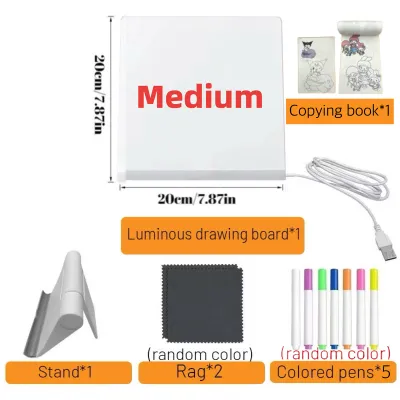
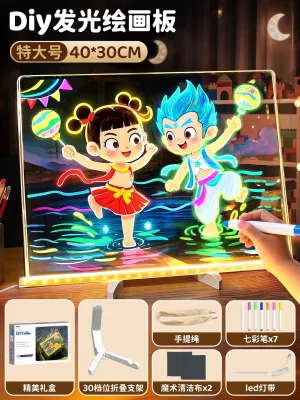
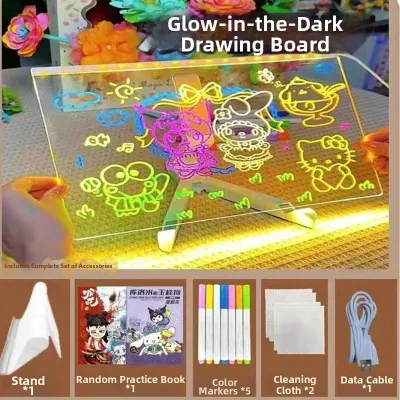
![[SG STOCK] Reusable LED Drawing Board DIY Luminous Acrylic Message Memo Note Pad Night Light Kids Writing Gift发光画板](https://img.lazcdn.com/g/p/4f49319070b36c6e7ba9cbce60944690.jpg_400x400q80.jpg_.webp)
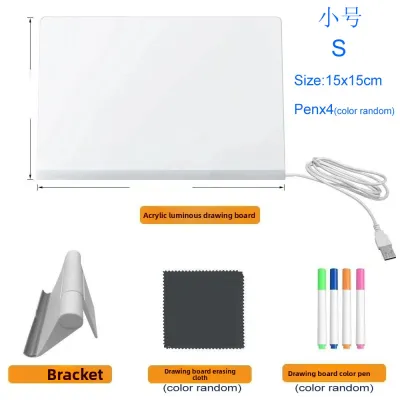
Prices are valid at publication and may change. Please refer to the product page for the latest price.
Fine motor skills and hand-to-eye coordination evolve dramatically between the ages of one and ten. Toddlers rely on gross motor movements, using their entire arm to swipe and play. They require large, highly durable surfaces that can withstand heavy impacts and accidental spills. As children enter preschool, they begin to develop the tripod grasp, learning to control pencils and markers with greater precision. At this stage, they need stable, medium-sized surfaces that accommodate standard worksheets and tracing templates.
Safety considerations also shift significantly across age brackets. For toddlers and young preschoolers, physical safety is the paramount concern. Cords, small detachable parts, and exposed battery compartments present choking and tripping hazards. Devices for this age group must feature fully sealed casings, rounded edges, and secured battery doors. Older children can safely manage USB cables and smaller accessories, allowing them to use sleeker, more advanced boards that draw power directly from wall adapters or laptops.
Finally, the complexity of the user interface must align with the child’s cognitive capacity. A toddler will become frustrated by touch-sensitive buttons that constantly change brightness at the slightest palm contact. They benefit from simple, mechanical on-off switches. Conversely, a school-age child requires precise control over brightness levels to trace through varying weights of paper, making step-less dimming and memory functions highly desirable.
Core Features to Check Before Buying a Light Pad
Before evaluating age-specific options, parents should understand the core technical features that determine a light pad’s performance, safety, and longevity. These criteria provide a baseline for comparing different models on the market.

Brightness and Eye Safety
Not all LED lights are created equal. When selecting an led drawing board kids will use for extended periods, eye safety is the most critical factor. Look for boards that explicitly feature flicker-free LED technology. Low-quality LEDs often utilize low-frequency pulse-width modulation (PWM) to control brightness, which causes a rapid flickering that is invisible to the naked eye but can lead to headaches, eye strain, and fatigue.
Additionally, prioritize boards with adjustable brightness. While basic models offer three fixed brightness steps, advanced boards feature continuous, step-less dimming. This allows the user to adjust the light output to match both the ambient room lighting and the thickness of the paper being used. A light pad that is too bright in a dimly lit room will cause glare and visual discomfort, while one that is too dim will make tracing difficult.
Power Options
Power delivery determines where and how safely the board can be used. The two primary options are USB-powered and battery-operated models:
- USB-Powered Boards: These boards typically run on a 5V input, drawing power from a USB wall adapter, a computer, or a portable power bank. They are incredibly lightweight and slim because they lack internal battery packs. However, they require a constant cable connection, which can restrict movement and present a tripping hazard for younger children.
- Battery-Operated Boards: These models feature either integrated rechargeable lithium-ion batteries or compartments for standard AA/AAA batteries. They offer total portability, allowing children to draw in the car, on public transport, or in outdoor settings. The trade-off is increased weight and thickness, along with the need for regular recharging or battery replacements.
Surface and Build
The drawing surface must be durable enough to withstand pressure from pens, pencils, and styluses. Most high-quality light pads use a solid acrylic (PMMA) panel. Acrylic is highly impact-resistant, lightweight, and offers excellent light transmission. However, it is susceptible to scratching if abrasive tools are used. Look for surfaces treated with a scratch-resistant coating.
Furthermore, check the build quality of the frame. The edges should be completely sealed to prevent light from leaking out the sides, which can be highly distracting. Anti-slip silicone pads or borders on the underside of the board are essential to keep the device from sliding across smooth study desks or dining tables during use.
Portability and Storage
In Singaporean households, where space optimization is key, a light pad’s physical footprint is an important practical consideration. Ultra-slim designs (often between 5mm and 8mm thick) are easy to store vertically in bookshelves, slots beside desks, or shallow drawers. If your child plans to take the board to art classes or school, look for models that include a protective felt or neoprene sleeve to prevent surface scratches during transit.
Best Light Pad Traits for Toddlers (Ages 1–3)
For toddlers, an illuminated board is not a tool for precise duplication; it is an interactive sensory platform. At this stage, children are fascinated by light, shadow, and color mixing. The ideal board must prioritize rugged durability, absolute physical safety, and extreme simplicity.
Simplicity and Durability
Toddlers lack the fine motor control to navigate delicate interfaces. Touch-sensitive buttons are highly impractical for this age group, as a toddler resting their hand or forearm on the board will constantly trigger brightness changes or turn the device off. Instead, look for boards with robust, physical toggle switches or mechanical dials that require deliberate force to operate.
Because toddlers are prone to dropping, stepping on, or throwing toys, professional-grade ultra-thin light pads are highly unsuitable. These slim acrylic sheets can flex or crack under concentrated weight. Choose toy-grade illuminated boards that feature thick, impact-resistant plastic borders and a reinforced backplate. These models are designed to absorb shocks and protect the internal LED light guide plate from damage.
Safety First
Safety is the non-negotiable priority for children under three. Ensure the board has completely rounded corners and no sharp edges. The battery compartment must be secured with a recessed screw to prevent access to small batteries, which pose a severe chemical and choking hazard.
If the board utilizes a power cable, it must be securely routed. However, for this age group, cordless, battery-operated models are highly recommended to eliminate the risks of cable wrapping or the child pulling a connected power bank off a table. Avoid any models that feature loose, small accessories like tiny plastic pegs, stylus caps, or detachable clips.
Use Case and Limitations
Instead of paper tracing, toddlers should use the light board for sensory play. Excellent activities include placing translucent colored geometric blocks, silicone shapes, or magnetic tiles on the illuminated surface to explore color blending. You can also use thick, high-contrast silhouette sheets (such as bold black outlines of animals or vehicles) to help with early shape and object recognition.
Parents must accept that these toy-grade boards have clear functional limitations. They typically do not offer high light output or precise color rendering, and their thick profiles make them unsuitable for detailed drafting. However, their safety and resilience make them the only appropriate choice for this developmental window.
Ideal Drawing Board Specs for Preschoolers (Ages 4–6)
Preschoolers are developing foundational pre-writing skills, learning to control their hand movements to form letters, numbers, and basic shapes. An LED drawing board at this stage serves as an engaging bridge between freehand drawing and structured tracing.
Size and Format
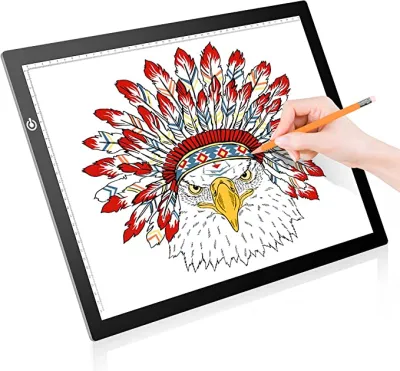
For children aged four to six, the standard A4 format (approximately 210mm x 297mm) is the absolute sweet spot. This size perfectly matches standard printer paper and common coloring book pages, eliminating the need to cut paper to fit the board. An A4 board provides a generous drawing area for broad arm movements while remaining small enough to fit comfortably on child-sized activity tables or typical Singaporean multi-use dining tables without cluttering the space.
Adjustable Lighting
As preschoolers begin to use different types of paper—ranging from thin, specialized tracing sheets to standard 80gsm copy paper—the ability to adjust the light intensity becomes important. Look for boards that offer at least three distinct brightness levels. This ensures the light is powerful enough to project clear lines through standard printer paper, while allowing you to dim the LEDs when using highly translucent tracing paper to prevent eye strain.
Accessories and Usability
To keep preschoolers engaged, look for light pad bundles that include age-appropriate accessories. Stencils with rounded, smooth edges featuring letters, numbers, and simple geometric shapes are excellent for developing spatial awareness and fine motor control.
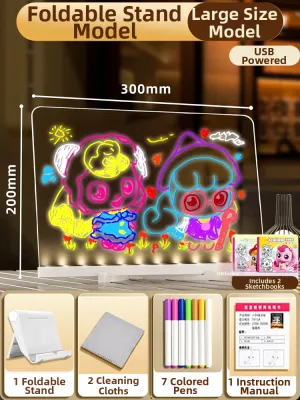
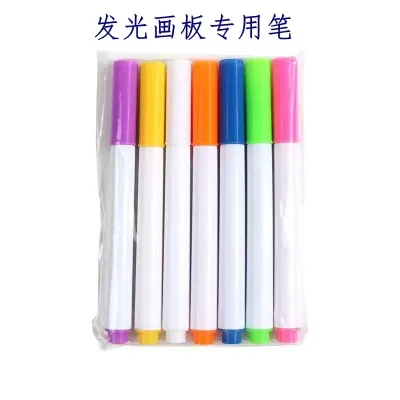
If the board is designed for direct writing, it will often come with water-based, non-toxic wet-erase markers. Before allowing your child to draw directly on the acrylic surface, always perform an erasability check: write a small stroke in an inconspicuous corner of the board, wait five minutes, and verify that it wipes away completely with a damp microfiber cloth without leaving a permanent stain or “ghost” image. If using paper, look for boards that feature built-in paper clips or low-tack magnetic borders to keep the sheets from shifting while the child is tracing.
Ergonomics
Drawing on a completely flat surface for extended periods can cause preschoolers to hunch forward, leading to neck and shoulder strain. To encourage healthy posture, select a board with a slight built-in ergonomic tilt (around 5 to 10 degrees) or one that is compatible with an adjustable, non-slip book stand. This elevates the workspace to a more natural viewing angle.
Advanced Light Box Features for School-Age Kids (Ages 7+)
By the age of seven, children often develop specific artistic interests, such as sketching, creating multi-panel comic strips, designing clothes, or experimenting with hand-drawn animation. School-age kids require a high-precision tool that mimics the equipment used by professional artists.
Larger Formats
While A4 remains highly portable, school-age children frequently work on larger art projects that require an A3 format (approximately 297mm x 420mm). An A3 light pad provides the expansive surface area needed for detailed landscapes, architectural drafting, map tracing, or laying out comic book pages. Despite the larger surface, modern A3 boards maintain an incredibly slim profile, allowing them to slide easily into school bags or flat storage slots.
Precision and Control
Older kids benefit from advanced electronic features that enhance their creative workflow:
- Step-less Dimming: Allows the user to hold down the power button to smoothly adjust the brightness to the exact level required, matching the specific density of heavy sketch paper or watercolor paper.
- Brightness Memory: Automatically saves the last used brightness level, so the child does not have to recalibrate the light intensity every time they power on the device.
- High Color Rendering Index (CRI): Look for boards with a CRI of 90 or higher. A high CRI ensures that colors appear vibrant and true to life when the child is coloring or painting directly over the light source.
- Anti-Glare Surface: A matte or textured acrylic surface diffuses light evenly and minimizes distracting reflections from overhead fluorescent room lights.
Specialized Accessories
For school-age children, look for light pads that support specialized creative disciplines. If your child is interested in hand-drawn animation, prioritize boards that are compatible with animation peg bars and pre-punched flipbook paper, which keep successive frames perfectly aligned. Magnetic clamping systems are also highly useful at this stage, as they hold multiple sheets of heavy paper securely in place without the sticky residue left behind by adhesive tape.
Power and Heat Dissipation
Because older children will use their drawing boards for hours at a time, efficient heat management is critical. Cheaply manufactured LED arrays can develop localized “hot spots” on the drawing surface, which can cause physical discomfort to the child’s resting hand and potentially warp plastic casings or degrade paper. High-quality boards utilize advanced heat-dissipation designs that keep the drawing surface cool to the touch, even after hours of continuous operation.
Quick Comparison: Board Specs by Age Group
To help you quickly identify the right specifications for your child, the table below summarizes the ideal configurations for each developmental stage.
| Target Age Group | Recommended Size | Brightness Control | Power Source Preference | Key Safety Features | Ideal Accessories |
|---|---|---|---|---|---|
| Toddlers (Ages 1–3) | Small (under A4) or custom toy formats | Single mechanical on/off switch or dial | Battery-operated (secured compartment) | Fully sealed casing, rounded edges, no small parts | Translucent colored blocks, thick silhouette templates |
| Preschoolers (Ages 4–6) | Standard A4 (approx. 210 x 297 mm) | 3-step adjustable brightness | USB-powered or rechargeable battery | Rounded corners, low-voltage input, secure cords | Rounded stencils, non-toxic wet-erase markers, paper clips |
| School-Age (Ages 7+) | A4 to A3 (approx. 297 x 420 mm) | Step-less dimming with memory function | USB-powered (5V) via wall adapter or power bank | Cool-touch heat dissipation, flicker-free LEDs | Magnetic clips, animation peg bars, protective sleeve |
Safe Usage and Everyday Maintenance Tips
To maximize the lifespan of your child’s LED drawing board and ensure a safe, comfortable creative environment, establish healthy usage and maintenance habits from day one.
Eye Health and Screen Time
While high-quality LED light pads are generally safe, staring at a bright light source in a dark room can cause severe contrast-induced eye strain. Always ensure your child uses the drawing board in a well-lit room with balanced ambient overhead lighting.
Enforce regular visual breaks using the 20-20-20 rule: every 20 minutes, have your child look away from the board and focus on an object at least 20 feet (about 6 meters) away for at least 20 seconds. This simple habit allows the eye muscles to relax and prevents accommodation fatigue.
Cleaning and Surface Care
To maintain optimal light transmission, the acrylic drawing surface must be kept clean and free of dust, oils, and marker residue. Before cleaning, always switch off and unplug the device from its power source.
Use a dry or slightly damp microfiber cloth to gently wipe away dust and fingerprints. For stubborn smudges, use a mild, highly diluted dish soap solution. Never use glass cleaners, ammonia, alcohol, or solvent-based chemical cleaners on acrylic (PMMA) surfaces. These harsh chemicals can cause “crazing”—a network of microscopic cracks that permanently clouds the acrylic and ruins the light distribution. Always refer to the manufacturer’s care instructions before applying any liquid to the board.
Storage and Environmental Care
In Singapore’s highly humid tropical climate, electronic components are susceptible to internal moisture buildup. Store the light pad in a dry, well-ventilated area away from direct sunlight, which can warp the plastic casing over time. Keep the board in a dedicated protective sleeve when not in use. Avoid placing heavy books, toys, or other equipment on top of the stored board, as concentrated static pressure can crack the acrylic panel or damage the delicate internal LED grid.
Frequently Asked Questions (FAQ)
Are LED light pads safe for young children's eyes?
Yes, high-quality LED light pads are entirely safe for children’s eyes, provided they feature certified flicker-free technology and are used under proper lighting conditions. Parents should avoid extremely cheap, unbranded boards that exhibit visible or high-frequency invisible flickering, as this is the primary cause of rapid eye strain and headaches. Additionally, always adjust the board’s brightness to match the room’s ambient light, and ensure children take regular breaks to rest their eyes.
What type of paper works best for tracing on a light board?
For basic tracing on medium-to-high brightness settings, standard 80gsm printer paper works perfectly fine. However, for detailed artistic tracing, specialized tracing paper (typically 40gsm to 50gsm), vellum, or lightweight sketch paper provides the best transparency and sharpest line definition. If your child is using heavy mixed-media or watercolor paper (above 200gsm), you will need a high-intensity light pad with step-less dimming set to its maximum output to project clear guidelines through the thick fibers.
Community discussion
Share your experience or ask a question. Comments are reviewed before publication.