
Finding the ideal brand to print a custom sticker name label in Singapore depends entirely on your specific volume, durability requirements, and preferred workflow. Whether you are labeling a child’s primary school water bottle to withstand daily washing, organizing pantry jars in a humid kitchen, or managing office assets, no single brand serves as a universal solution. Instead, the right choice hinges on how a brand’s ecosystem aligns with your practical needs.
To make an informed decision, you must look beyond the physical hardware and evaluate the entire ecosystem. This includes analyzing label width compatibility, the software or connectivity interface, and the long-term cost of consumables. By understanding these core decision drivers, you can select a system that delivers legible, long-lasting name stickers without exceeding your budget.
Key Specifications to Compare When Choosing a Brand
When comparing label maker brands, print resolution is a critical technical specification that directly determines the clarity of your sticker name label. Resolution is measured in dots per inch (DPI). For standard text labels, a basic resolution of 180 DPI is generally sufficient. However, if you plan to print small name stickers with multi-line text, intricate Chinese characters, or small decorative icons, look for brands offering 203 DPI or 300 DPI. Higher resolution prevents fine lines from blurring, ensuring that names remain legible even on narrow tapes.
Products mentioned in this guide
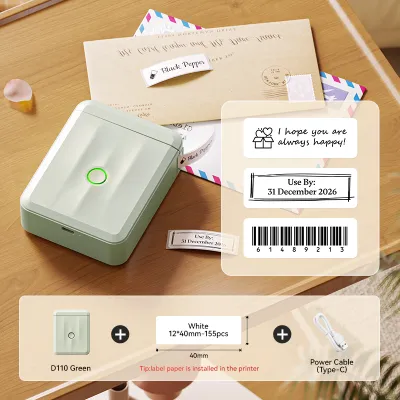
Prices are valid at publication and may change. Please refer to the product page for the latest price.
Maximum label width compatibility is another essential factor to verify before choosing a brand ecosystem. Most entry-level label makers support widths from 6mm up to 12mm, which is the standard size for labeling pens, notebooks, and small personal items. If you require larger name stickers for storage bins, office folders, or shipping boxes, you will need a brand that supports wider tapes, such as 18mm or 24mm. Ensure the brand you select offers a machine that accommodates the specific range of widths your projects demand, as most machines cannot accept tapes wider than their rated maximum.
The connectivity ecosystem defines how you will design and send print jobs to your device. Traditional standalone models feature a built-in physical keyboard and a small monochrome screen. These are highly portable and require no external devices. Conversely, modern smart label makers connect via Bluetooth or Wi-Fi to a smartphone app or computer software. This integration allows you to use system fonts, import custom graphics, and design complex layouts, though it relies heavily on the brand’s software stability and device compatibility.
Finally, evaluate the built-in template libraries, font variety, and icon sets provided within the brand’s native software or firmware. Some brands cater specifically to families and school children, offering hundreds of playful icons, borders, and pre-designed name sticker templates. Other brands focus on professional, industrial, or minimalist designs suitable for corporate environments. Reviewing the design assets available in the brand’s companion app or built-in menu ensures you can easily create stickers that match your desired aesthetic.
Matching Label Maker Form Factors to Your Name Sticker Needs
Selecting the right physical form factor is a pivotal step, as it dictates the brand ecosystem and daily workflow you will adopt. The physical design of the machine determines where and how easily you can print your sticker name label.

Smartphone-connected, app-based label makers have become highly popular for home and school organization. These compact, battery-powered devices lack physical keyboards, relying entirely on a mobile app for design and control. They are exceptionally well-suited for users who prioritize high customization, creative font choices, and the ability to import custom logos or hand-drawn doodles. Additionally, these apps often support batch-printing features, allowing you to import a contact list or a spreadsheet of names directly from your phone to print dozens of unique stickers in a single run.
Standalone handheld label makers represent the classic, self-contained approach to labeling. Equipped with a physical keyboard and a built-in cutter, these devices allow you to type, format, and print a sticker name label on the spot without needing a smartphone, computer, or internet connection. This makes them highly reliable for quick, spontaneous labeling tasks around the classroom, office, or home. However, typing out long lists of names on a small, rubberized keyboard can be slow and tedious, making standalone models less ideal for high-volume batch jobs.
Desktop or PC-connected label makers are designed for high-volume, stationary environments such as school administrative offices or corporate mailrooms. These units connect directly to a computer via USB or local Wi-Fi, utilizing robust desktop software that integrates with spreadsheet programs like Microsoft Excel or Google Sheets. This setup allows you to print hundreds of uniform name badges, asset tags, or address labels systematically. While they lack the portability of handheld or mobile units, their fast print speeds, heavy-duty automatic cutters, and reliable power connections make them indispensable for large-scale projects.
Evaluating Consumables and Long-Term Tape Costs
While the upfront cost of a label maker is a one-time expense, the ongoing cost of replacement tapes is a long-term consideration that varies significantly across brand ecosystems. Before committing to a specific brand, it is essential to analyze the availability and pricing of its consumables.
A primary distinction among brands is whether they utilize proprietary tape cartridges or support open-market compatible alternatives. Some established brands design their machines with microchipped cartridges, requiring you to purchase official, brand-name tapes to ensure compatibility and optimal print quality. Other brands use open-format cartridges, allowing you to choose from a wide variety of third-party compatible tapes. While official tapes generally offer the most reliable adhesive performance and color accuracy, compatible tapes can significantly reduce your running costs.
To accurately compare long-term expenses, calculate the estimated S$ cost per label based on standard tape roll lengths. A typical tape cartridge contains between 4 to 8 meters of tape. By dividing the retail price of the cartridge by the total length, you can determine the cost per meter. For example, if a standard 8-meter cartridge costs S$20, the cost is approximately S$2.50 per meter. If your average sticker name label is 50mm long, one roll will yield roughly 160 labels, resulting in a cost of about S$0.13 per label. Comparing these figures across brands helps prevent unexpected expenses down the road.
Additionally, verify the specific tape material options offered within each brand’s ecosystem. For name stickers exposed to daily wear, look for brands that offer laminated thermal transfer tapes, which protect the printed text beneath a clear protective layer, making them highly resistant to water, friction, and fading. If you need to label school uniforms or fabric items, check if the brand offers iron-on fabric tapes. For temporary labeling, standard paper or non-laminated plastic tapes are cost-effective options for dry, indoor environments.
Finally, ensure that replacement tapes are readily accessible in Singapore. Some specialized brands may require you to order consumables from overseas sellers, leading to shipping delays and potential stock shortages. Opting for brands with a strong local presence ensures you can easily purchase replacement cartridges from neighborhood stationery stores, major department stores, or local online marketplaces whenever you run out of tape.
Final Decision Framework: Which Brand Type Fits Your Needs?
To finalize your choice, align your primary labeling tasks with the brand ecosystem that best supports your workflow. If your main goal is to print highly customized, creative name stickers with unique fonts, icons, and borders for children’s school items or home organization, an app-based brand ecosystem is highly recommended. The flexibility of designing on a high-resolution smartphone screen makes the creative process intuitive and efficient, especially when managing diverse layouts.
If you prefer a durable, self-contained tool that is always ready to print without the distraction of a smartphone screen or the hassle of Bluetooth pairing, a standalone handheld brand is the ideal fit. These devices are excellent for quick, functional labeling in classrooms, workshops, or offices where speed and simplicity are prioritized over decorative design.
For administrative professionals, event organizers, or school coordinators who need to print large volumes of uniform name labels or asset tags from pre-existing databases, a desktop PC-connected brand is the most practical choice. This setup minimizes manual data entry and ensures consistent print quality across large batches.
Before making any purchase, always verify that the brand’s official companion app is fully compatible with your current smartphone operating system and regional app store. Download the app beforehand to explore its user interface, check for any hidden paywalls, and ensure it runs smoothly on your device. This simple step prevents compatibility issues and ensures a seamless labeling experience.
Frequently Asked Questions (FAQ)
Can I use third-party label tapes to save money?
Yes, many popular label maker brands allow the use of third-party compatible tapes, which can offer substantial cost savings compared to official cartridges. However, there are trade-offs to consider. Official tapes undergo rigorous testing to ensure optimal print head compatibility, clean cutting, and long-lasting adhesive performance. Third-party tapes may occasionally suffer from inconsistent adhesive quality, potential residue buildup on the print head, or inaccurate color matching. Additionally, using non-original consumables might affect your machine’s warranty if a third-party cartridge causes physical damage to the device.
What is the best label material for school supplies?
For school supplies like water bottles, lunch boxes, and food containers that undergo frequent washing and daily handling, laminated plastic tapes are the most durable choice. The lamination process seals the ink beneath a protective layer, preventing the text from smudging or fading when exposed to water, dishwashing soap, and friction. For school uniforms, bags, and hats, iron-on fabric tapes are highly recommended, as they bond directly with the textile fibers to withstand regular laundry cycles. Standard paper labels should be avoided for school items, as they quickly degrade when exposed to moisture.
Do I need a subscription to use a label maker app?
In most cases, the basic companion apps provided by label maker brands are free to download and use, offering a standard selection of fonts, borders, and common icons. However, some brands may lock premium design elements, exclusive licensed characters, advanced barcode generators, or cloud-storage features behind a subscription model or one-time in-app purchases. To avoid unexpected costs, download the brand’s app prior to purchasing the hardware to verify which features are freely accessible and whether the standard offering meets your design needs.
Community discussion
Share your experience or ask a question. Comments are reviewed before publication.